

Quick Summary
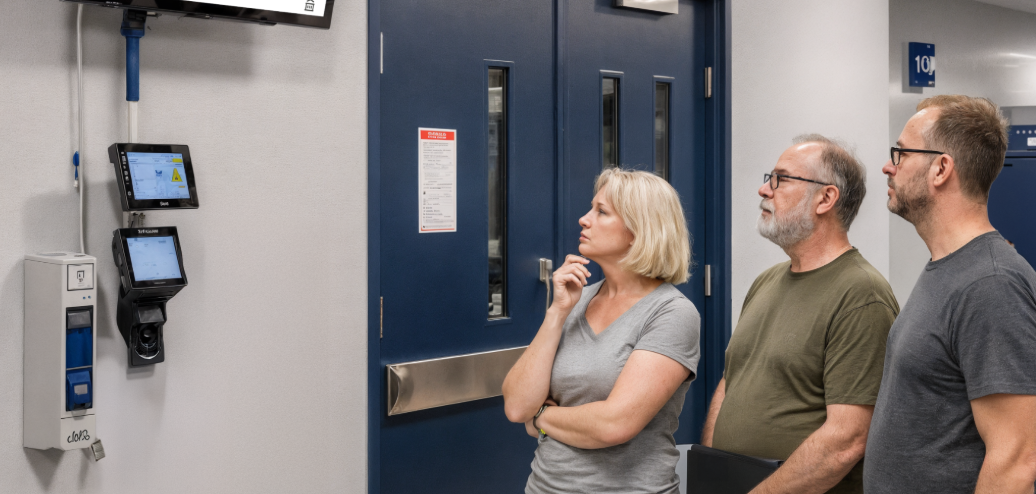
Plant floor communication tools help manufacturers reach workers who do not use email or desk-based collaboration tools during a shift. Rise Vision, Poka, and Beekeeper are among the strongest options for teams that need safety alerts, digital work instructions, and real-time updates across production lines, warehouses, and shared plant spaces.
Our top three picks:
|
# |
Tool |
Best For |
|
1 |
Rise Vision |
Visual signage and plant-wide alerts |
|
2 |
Poka |
Digital work instructions and operator support |
|
3 |
Beekeeper |
Frontline messaging and shift updates |
Looking for the Best Communication Tools for Your Plant Floor?
The plant floor is one of the noisiest environments in any business (not just in decibels, but in information too).
Important updates lose value when they do not reach the people on the floor. Production changes, safety alerts, shift updates, and performance targets often stay in emails, paper notices, or disconnected systems that frontline teams do not check during a shift. This can lead to delays, missed instructions, and weaker visibility across the operation.
This review compares 7 plant floor communication tools used in manufacturing and warehouse environments. It looks at Rise Vision, Poka, Beekeeper, and other platforms based on how they support visual communication, frontline updates, safety messaging, and real-time visibility across production lines, factories, warehouses, and distribution sites.
Why Listen to Us?
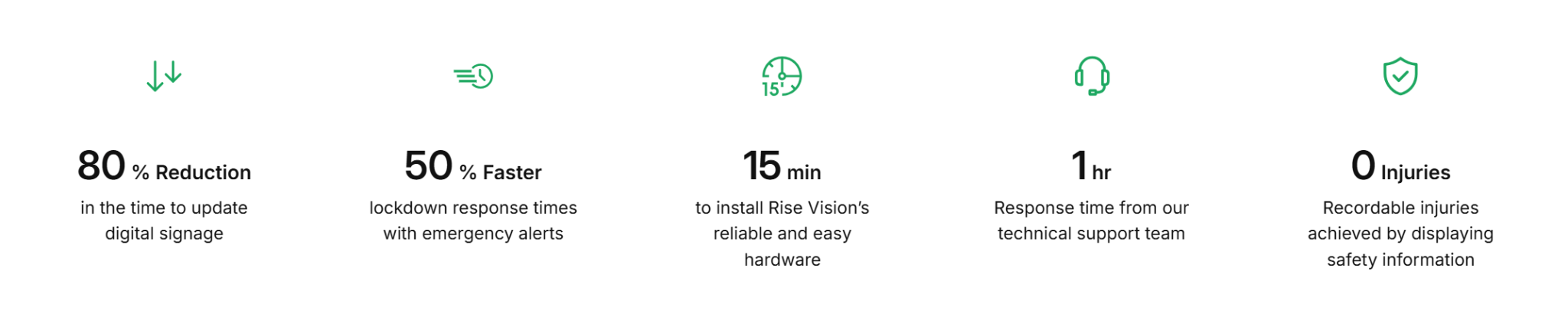
At Rise Vision, we work with organizations that use digital signage to communicate across plants, warehouses, and other shared environments. Backed by a 99% customer satisfaction rating, we understand what matters when plant floor communication tools are evaluated, including ease of use, support quality, visibility across shared spaces, and day-to-day reliability.
 7 Best Plant Floor Communication Tools
This summary compares our top 7 picks for 2026 based on frontline visibility, safety messaging, and day-to-day communication across plant floor environments.
|
# |
Tool |
Best For |
Key Strength |
Starting Price |
|
1 |
Rise Vision |
Visual communication across plant floors |
Digital signage, alerts, and KPI displays |
$12/display/month |
|
2 |
Poka |
Digital work instructions and skills tracking |
Connected worker platform for plant teams |
Custom pricing |
|
3 |
Beekeeper |
Mobile communication for frontline teams |
Messaging, tasks, and multilingual updates |
Custom pricing |
|
4 |
Vorne XL |
Real-time production visibility |
Live OEE scoreboards and downtime tracking |
$4,490 one-time |
|
5 |
Staffbase |
Multi-channel employee communication |
Branded app, email, and signage publishing |
Custom pricing |
|
6 |
MaintainX |
Maintenance and safety coordination |
Work orders, inspections, and technician workflows |
$20/user/month |
|
7 |
Tulip |
Configurable plant floor workflows |
No-code apps tied to machines and sensors |
$100/interface/month |
Here’s how each plant floor communication tool compares in more detail.
1. Rise Vision
Rise Vision is an all-in-one visual communication tool for manufacturers that need to share updates with workers who are not at desks. It works well across production lines, warehouses, break rooms, and distribution sites where teams need fast access to safety alerts, shift updates, and operational KPIs.
We combine digital signage, screen sharing, and CAP-based emergency alerts in one cloud-based platform, which helps manufacturers manage alerts, updates, and plant floor screens across multiple facilities from one system.
Key Features
- Digital signage, screen sharing, and alerts: Manage plant floor screens, wireless presentations, and emergency messages from one system.
- Cloud-based remote management: Update displays, schedules, and playlists across one site or multiple plants from a central dashboard.
- Manufacturing dashboards and KPI displays: Show live production targets, scrap rates, throughput, and ERP or Power BI data on floor screens.
- CAP-based emergency alerts: Push urgent visual alerts for safety incidents, evacuations, and protocol changes across connected displays.
- Days since the last accident displays: Use live safety counters and scoreboards to reinforce safety performance and awareness.
- Flexible hardware support: Works with existing displays, Rise Vision Media Players, and Avocor commercial screens.
- Onboarding and support: Includes guided onboarding, free training, and highly rated support for teams rolling out screens across one or more sites.
Pricing
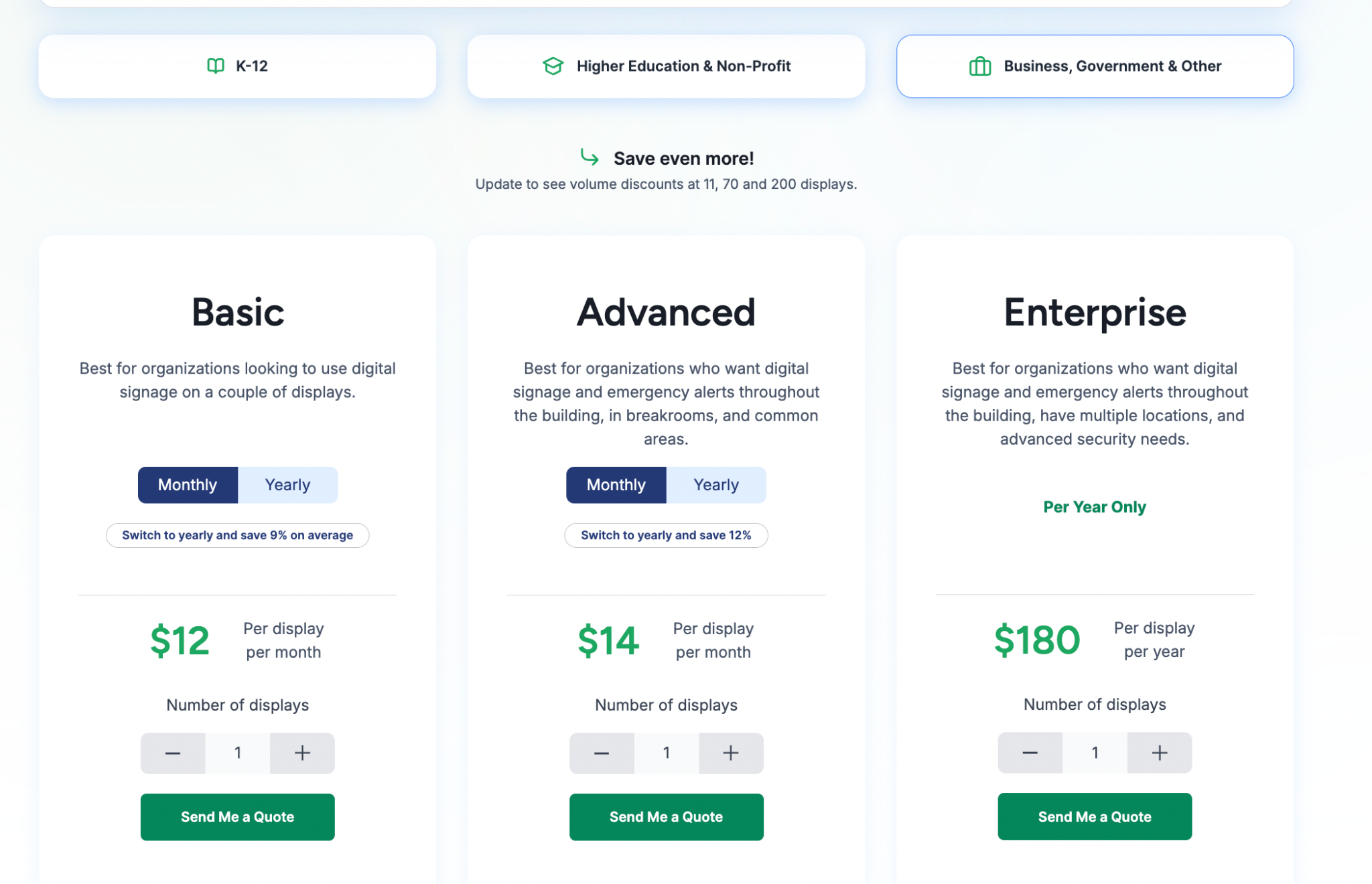
- Basic: $12 per display/month. Includes core signage management, 750+ templates, and unlimited storage.
- Advanced: $14 per display/month. Adds CAP-supported emergency alerts, social media integrations, and brand settings.
- Enterprise: $180 per display/year. Includes full data dashboard support (Power BI/Domo), authenticated web pages, and screen sharing.
Add-ons
- Interactive Display License: $1,200 per display/year (Requires Advanced plan).
- Additional AI Credits: $300 per 600 credits/year.
Pros
- Supports plant-wide communication through screens in production, warehouse, and shared areas.
- Combines digital signage, screen sharing, and emergency alerts in one platform.
- Displays live KPIs, safety scoreboards, and shift updates across facilities.
- Works with existing hardware to avoid costly rip-and-replace deployments.
- Includes guided onboarding and fast technical support.
Cons
- Interactive display features require a separate annual add-on.
2. Poka
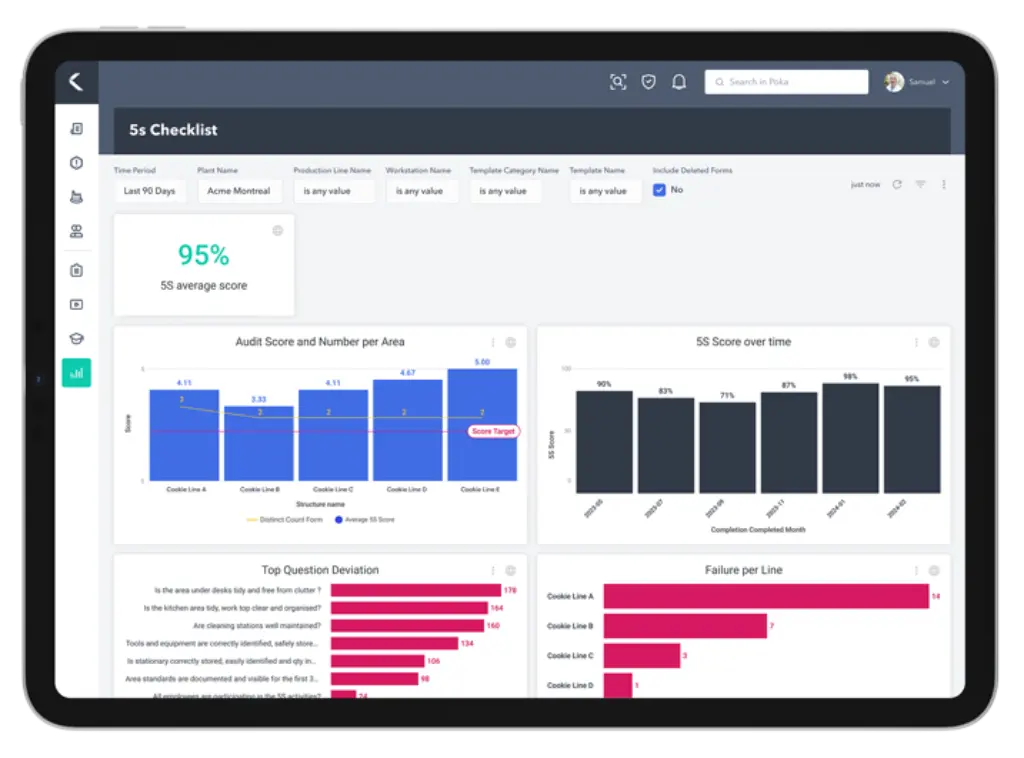
Poka is a connected worker platform built for manufacturers that need to digitize work instructions, training, and frontline knowledge on the plant floor. It is best for production environments where operators need fast access to troubleshooting steps, standard procedures, skills tracking, and shift-to-shift knowledge.
Key Features
- Digital work instructions: Create video-based guides and troubleshooting steps linked to specific machines, tasks, and stations.
- Factory Feed: Share shift updates, frontline posts, photos, and problem-solving knowledge in a feed built for plant teams.
- Skills matrix: Track worker training, qualifications, and station readiness across lines, teams, and facilities.
- Issues management: Log production, maintenance, and safety issues digitally so teams can assign and resolve them faster.
- Forms and checklists: Replace paper processes with digital forms for standard work, audits, and daily management tasks.
Pricing
Poka uses enterprise pricing and does not publish standard plan rates. Pricing depends on rollout size, implementation scope, and the modules a manufacturer needs.
Pros
- Built specifically for manufacturing knowledge and frontline execution.
- Factory Feed improves shift handovers and issue visibility.
- Strong fit for training, troubleshooting, and skills tracking.
Cons
- Content setup takes time before teams see full value.
- Less relevant outside manufacturing or similar industrial environments.
- Enterprise pricing may be high for smaller operations.
3. Beekeeper
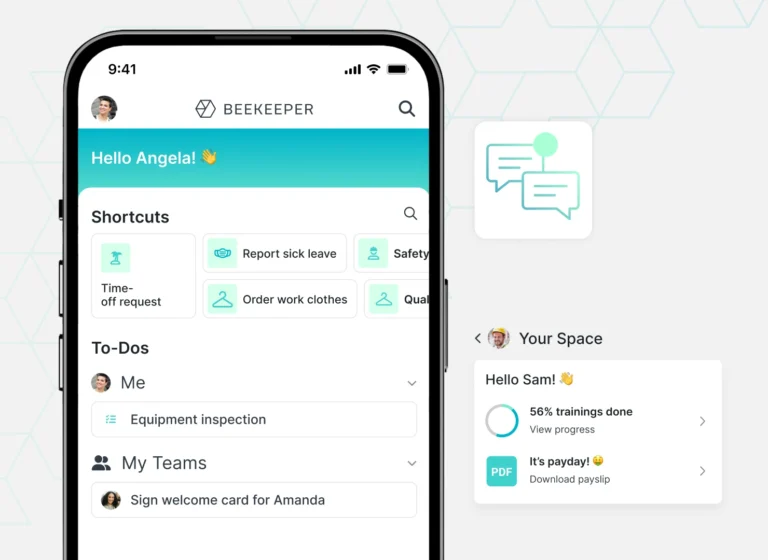
Beekeeper is a mobile-first frontline communication platform designed for workers who do not use desk-based tools during the day. It is best for manufacturers and warehouse teams that need secure messaging, shift communication, multilingual updates, task coordination, and mobile access to important information across distributed frontline operations.
Key Features
- Secure messaging: Give workers one-to-one and group chat without relying on personal messaging apps.
- Streams and updates: Share announcements, frontline news, and shift communication in a feed employees can access quickly.
- Inline translation: Translate messages and posts into workers’ preferred languages to support multilingual teams.
- Digital forms and tasks: Run safety checklists, requests, workflows, and recurring frontline tasks from the same app.
- Employee resources: Provide access to schedules, documents, onboarding materials, key HR resources, and FAQs.
Pricing
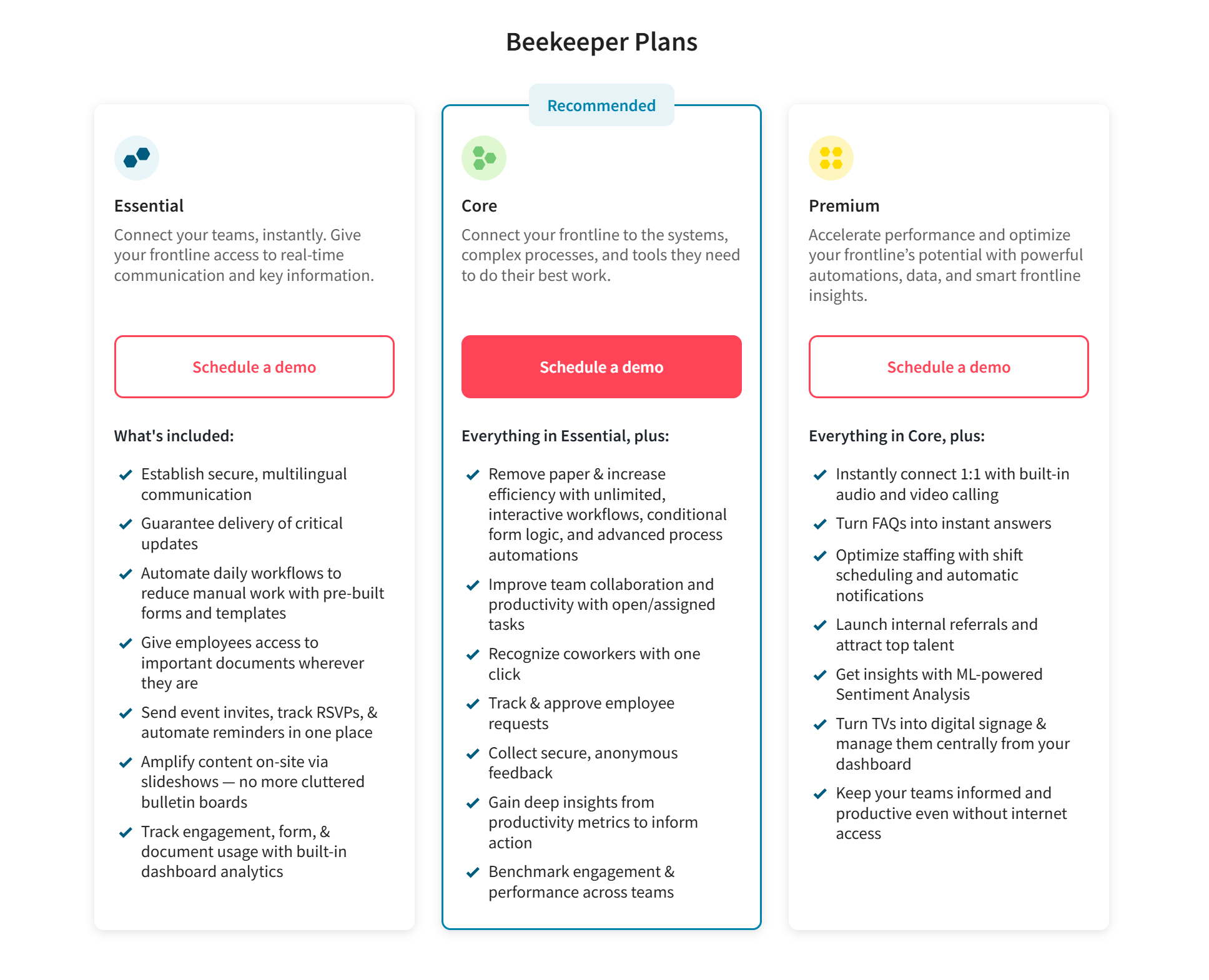
Beekeeper does not publish standard pricing. Its plans are organised as Essential, Core, and Premium, with each level adding more workflow, automation, scheduling, analytics, and frontline support features. Pricing is quote-based and depends on workforce size, modules, and integrations.
Pros
- Built for frontline teams without desk-based communication tools.
- Inline translation supports diverse multilingual manufacturing workforces.
- Combines messaging, tasks, documents, and updates in one app.
Cons
- Can be expensive for simple communication-only use cases.
- Shift tools are not full workforce management software.
- Less effective for plant-wide visual communication than signage tools.
4. Vorne XL
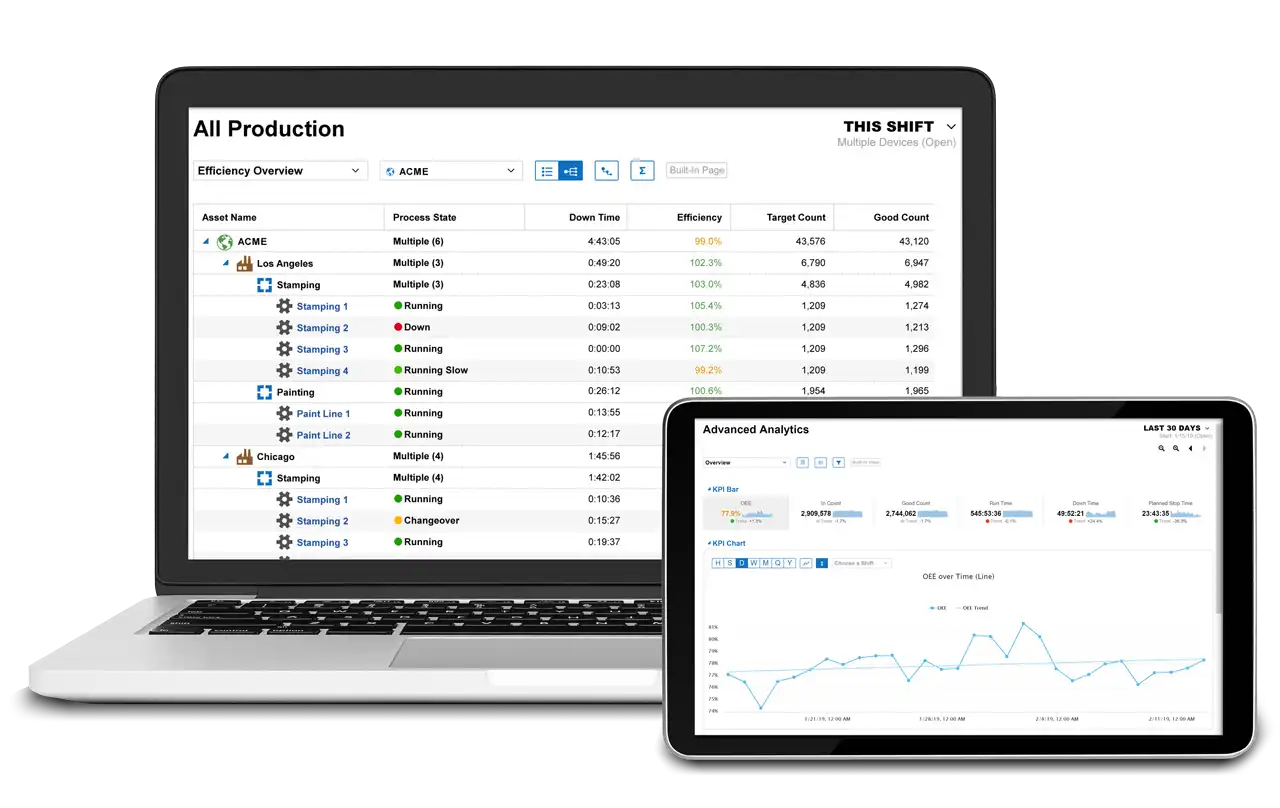
Vorne XL is a production monitoring and visual performance platform that combines hardware and reporting software to show live output, downtime, and OEE on the plant floor. It is best for manufacturers that need real-time production visibility, line scoreboards, and fast deployment without adding complex software infrastructure or recurring SaaS fees.
Key Features
- Real-time scoreboard: Show target, actual, efficiency, downtime, and shift performance directly on the line.
- Automated OEE tracking: Measure availability, performance, and quality automatically from connected machine signals.
- Downtime tracking: Capture stop reasons and production losses in real time to support faster corrective action.
- Browser-based reporting: Access built-in dashboards and reports through a web browser without separate software installation.
- Alerts and shift reports: Send automated email or text alerts and end-of-shift reports using XL Enterprise services.
Pricing
Vorne XL uses one-time hardware pricing rather than standard per-user subscriptions.
- XL810-1 Model: Approximately $4,490 per unit. Includes a single-zone alphanumeric scoreboard.
- XL HD+ Model: Approximately $4,690 per unit. Offers high-definition HDMI output for larger, more detailed visual displays.
- XL Touch Model: Approximately $4,990 per unit. Features a built-in touch interface for easier operator interaction.
Note: All models include free technical support, unlimited users, and free software updates for life.
Pros
- Real-time scoreboards make production performance visible to operators.
- One-time hardware pricing avoids recurring software subscription fees.
- Fast setup creates usable production data within hours.
Cons
- Requires physical hardware for each monitored production process.
- Does not handle chat, training, or broader workforce communication.
- Shows problems clearly but does not guide issue resolution.
5. Staffbase
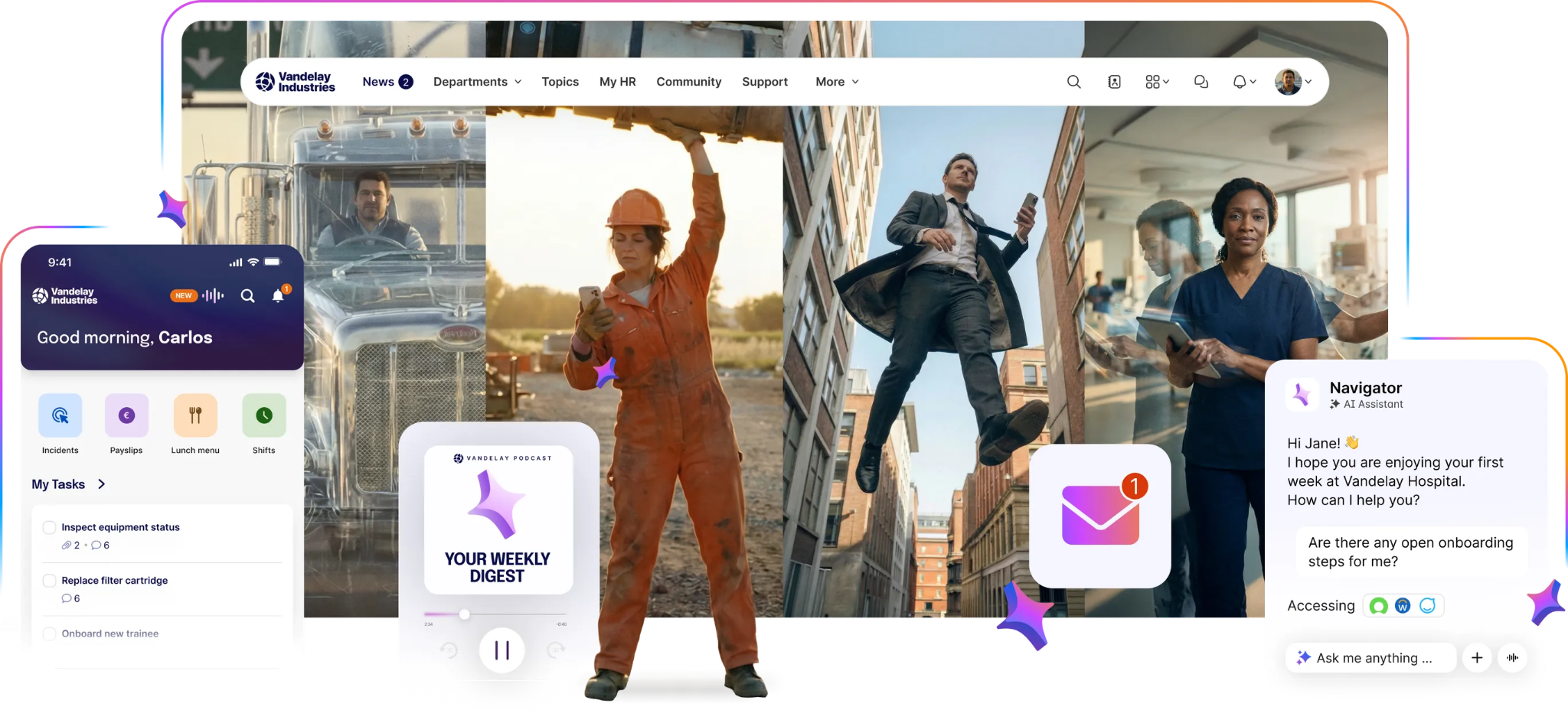
Staffbase is an employee communication platform built for large, distributed workforces that need updates across mobile, email, intranet, and digital signage. It is best for manufacturers and organizations that need one branded system for alerts, announcements, and employee communication across plant teams and office staff.
Key Features
- Branded employee app: Deliver company news, updates, and resources through a custom mobile app for frontline and office teams.
- Cross-channel publishing: Publish once across the employee app, email, Microsoft Teams, SMS, and digital signage.
- Employee surveys and feedback: Measure engagement, collect sentiment, and gather feedback from workers across multiple sites.
- AI Companion editor: Help internal teams draft, refine, and localize communication content more efficiently.
- Digital signage support: Extend key announcements to on-site screens for employees who are not checking email.
Pricing
- SMB: For companies with up to 100 employees. Includes the branded app, news feeds, and push notifications.
- Business: Adds the AI Companion, automated translation, advanced analytics, and an editorial calendar.
- Enterprise: Includes automated employee journeys and local content management for global sites.
Pros
- Reaches deskless and office workers through multiple communication channels.
- Strong cross-channel publishing reduces duplicate communication work across teams.
- Digital signage extends updates to workers without email access.
Cons
- Less focused on plant-specific workflows than manufacturing-first platforms.
- Does not manage payroll or other full HR operations.
- Can be more platform than smaller plants actually need.
6. MaintainX
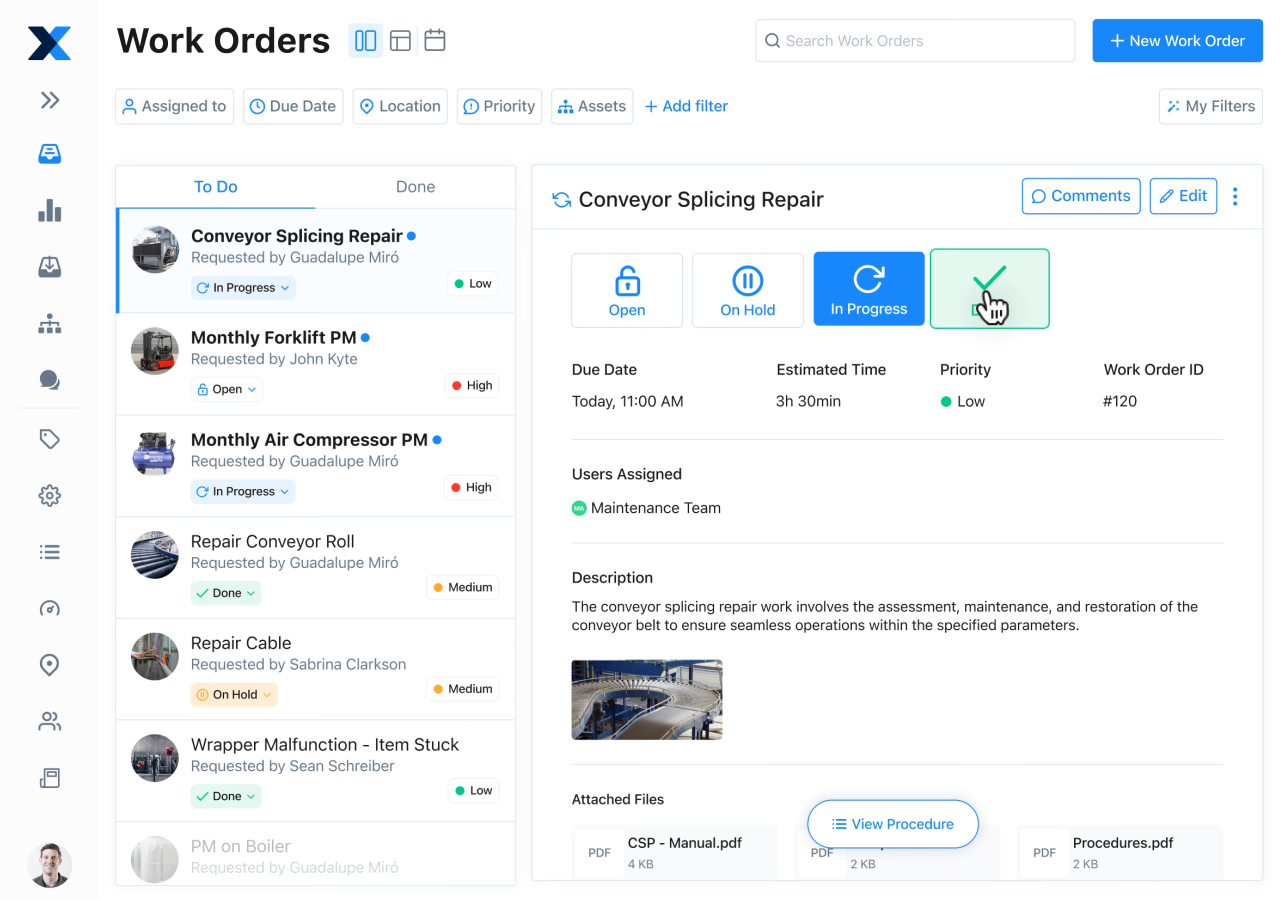
MaintainX is a mobile-first Computerized Maintenance Management System (CMMS) built to digitize the daily operations of industrial maintenance teams. It fits production plants that need maintenance coordination, safety workflows, and technician communication in the same system.
Key Features
- Work order management: Create, assign, track, and close maintenance tasks from mobile devices in real time.
- Preventive maintenance scheduling: Automate recurring inspections and service tasks based on time, usage, or equipment conditions.
- Checklists and inspections: Standardixe maintenance, safety, and compliance procedures with digital forms and guided steps.
- Parts inventory tracking: Monitor spare parts availability and reorder needs to reduce maintenance delays.
- MaintainX AI tools: Use AI-powered tools for procedure digitization, reporting, and troubleshooting support.
Pricing
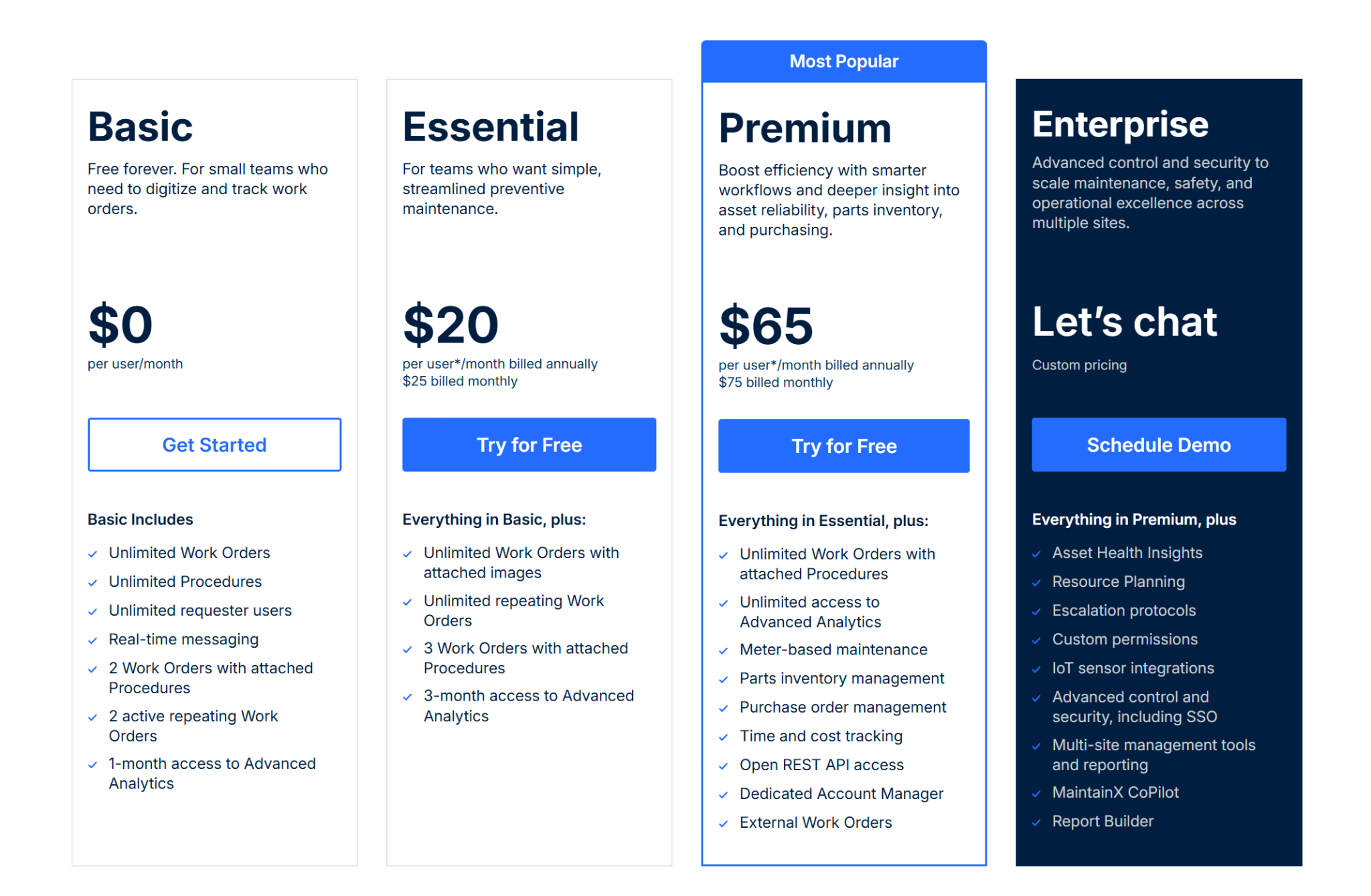
- Basic: $0 per user/month. Includes unlimited work orders, procedures, requester users, and real-time messaging.
- Essential: $20 per user/month billed annually. Adds unlimited repeating work orders and more analytics access.
- Premium: $65 per user/month billed annually. Adds parts inventory, purchase orders, API access, and tracking tools.
- Enterprise: Custom pricing. Adds SSO, IoT integrations, multi-site reporting, and advanced controls.
Pros
- Strong fit for maintenance, inspections, and equipment-related communication.
- Mobile-first design is easy for frontline teams to use.
- Improves accountability with clear task ownership and records.
Cons
- Built more for maintenance than broad plant-wide communication.
- Reporting may feel limited for highly complex enterprise environments.
- Per-user pricing can add up across large technician teams.
7. Tulip
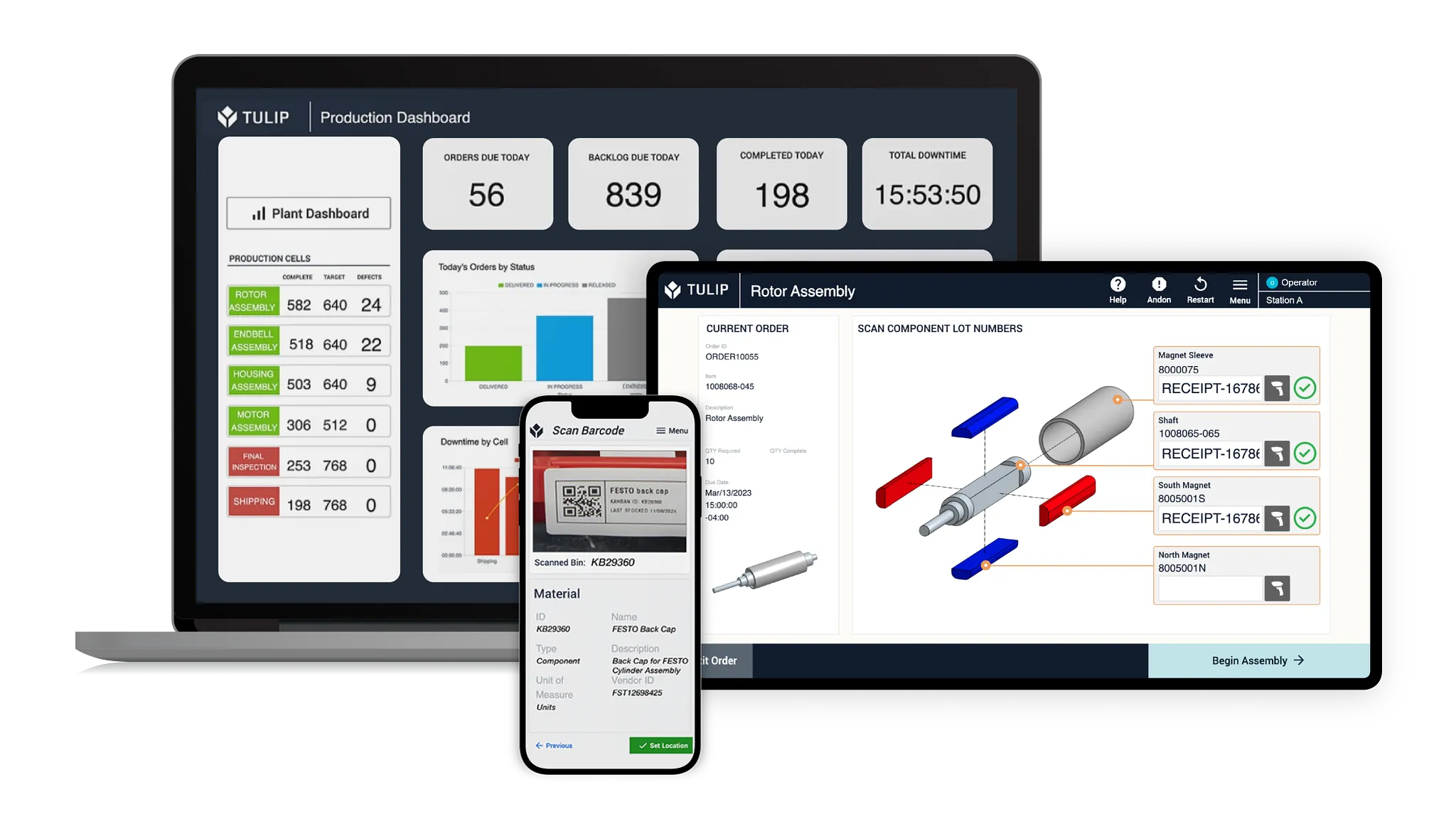
Tulip is a frontline operations platform that helps manufacturers build custom apps for work instructions, production visibility, quality checks, and operator workflows. It is best for plants that need configurable digital workflows connected to machines, sensors, and live production data.
Key Features
- No-code app builder: Create custom plant floor apps for instructions, workflows, and operator-facing tasks through a no-code builder designed for plant operations.
- Machine and sensor connectivity: Connect equipment, IoT devices, and edge hardware to capture floor-level data automatically.
- Digital work instructions: Replace paper SOPs with guided, visual workflows that reduce process errors and training gaps.
- Real-time analytics: Track production, quality, and operational data through dashboards and live reporting tools.
- Traceability and compliance tools: Capture records across processes to support audits, quality control, and regulated workflows.
Pricing
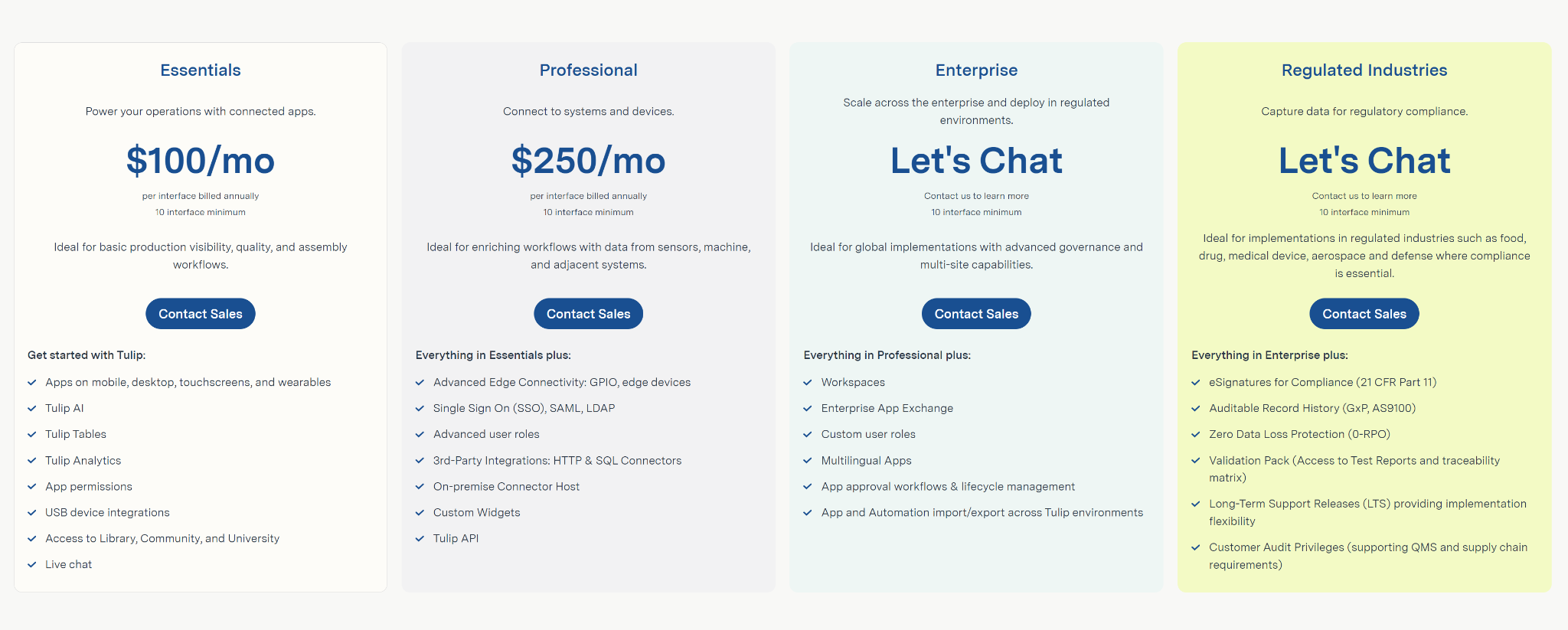
- Essentials: $100 per interface/month billed annually with a 10-interface minimum. Best for basic production visibility and workflows.
- Professional: $250 per interface/month billed annually with a 10-interface minimum. Adds advanced connectivity, SSO, APIs, and third-party integrations.
- Enterprise: Custom pricing. Adds governance, workspaces, multilingual apps, and lifecycle controls for large deployments.
- Regulated Industries: Custom pricing. Adds compliance features such as eSignatures, audit history, and validation support.
Pros
- Extremely flexible for custom workflows and operator guidance.
- Strong machine connectivity supports real-time production visibility.
- Works well for quality, training, and traceability use cases.
Cons
- Initial setup can be complex for smaller plant teams.
- Governance becomes important when many teams build apps.
- Pricing is high for simpler communication-only needs.
Selecting The Best Plant Floor Communication Tool
Choosing the right plant floor communication tool starts with how information moves across your operation. The right platform should fit the way your teams work on production lines, in warehouses, and across shared spaces where updates need to be visible, timely, and easy to act on.
- Frontline accessibility: Make sure the tool reaches workers who do not use email or desk-based systems during a shift.
- Environmental durability: Prioritize platforms that support industrial-grade hardware or stable operating systems for demanding environments.
- Data integration depth: Review how easily the tool connects with ERP, MES, or dashboard systems to keep information current.
- Emergency response capabilities: Check whether the platform can interrupt normal content with urgent safety alerts or evacuation messaging.
- Ease of content creation: Look for tools that let supervisors, safety teams, or plant managers update content without IT support.
- Total operational value: Weigh the setup cost against gains in visibility, response time, uptime, and day-to-day communication.
Connecting Plant Floor Updates To Daily Operations
Plant floor communication works best when updates are easy to see, easy to manage, and tied to what teams need during a shift. Rise Vision supports those needs through one platform for digital signage, emergency alerts, and real-time dashboards. We give manufacturers and warehouse teams a clearer way to manage updates across facilities, improve visibility into operational changes, and reduce gaps between frontline teams and site leadership.
Frequently Asked Questions
What Are the Best Plant Floor Communication Tools?
The best plant floor communication tools depend on how your team receives information during a shift. Rise Vision works well for visual communication, safety alerts, and KPI displays across shared spaces. Poka is a strong option for digital work instructions and operator knowledge. Beekeeper fits teams that need mobile messaging, shift updates, and frontline communication.
How Does Digital Signage Improve Plant Floor Safety?
Digital signage improves plant floor safety by putting alerts, protocols, and safety metrics where workers can see them during a shift. It is especially useful in loud environments where workers may miss email, paper notices, or audio-only updates. Rise Vision supports safety scoreboards, days-since-last-accident displays, and CAP-based emergency alerts across connected screens.
How Does Rise Vision Handle Emergency Alerts in Loud Factory Environments?
Rise Vision supports emergency alerts through CAP integrations that can override scheduled content on connected displays. In loud manufacturing spaces, this gives teams a visual alert layer for urgent messages, safety protocols, and evacuation instructions.
Can I Use Existing TVs and Hardware With Rise Vision?
Yes. Rise Vision supports existing displays and a wide range of hardware. Teams can use current screens, Rise Vision Media Players, or Avocor displays depending on the setup they need.
How Long Does It Take to Set Up Rise Vision for a Manufacturing Site?
Setup is designed to be straightforward. Rise Vision uses a simple three-step process: choose your hardware, set up the software, and push content to displays. We also provide guided onboarding, free training, and support for larger rollouts.
More From Our Blog
-

Digital Signage Remote Management: How to Run Every Screen From One Place
Digital signage remote management lets you control screens, schedules, and display health from an online platform. To get started, choose a hardware-agnostic platform, connect your media players or[…]
Read More -
ScreenBeam Review 2026: Features, Pricing, and Limitations
ScreenBeam sells wireless display receivers that let people cast to a screen from any device without an app. You need one receiver per display, and they run from $299.99 to $1,199.99. Cloud-based[…]
Read More -

Interactive Touch Screen Digital Signage: How It Works and What You Need
Interactive touch screen digital signage lets viewers tap a display to find what they need. It pairs a commercial touch display with content software. Common uses include wayfinding, visitor[…]
Read More
12,300+ Organizations Trust Rise Vision, You Can Too
































Schedule a Free Demo
You deserve the #1 all-in-one platform for digital signage, screen sharing, and emergency alerts.





