Best for individual schools looking to use digital signage on a couple of displays.
Best for individual schools who want digital signage and emergency alerts throughout the school, in the hallways, and common areas.
Best for schools or districts who want digital signage and emergency alerts in hallways, common areas, and classrooms, plus screen sharing.
Manage content and displays from our easy-to-use web dashboard on your desktop or mobile device.
Save all your photos, videos, and presentations with unlimited storage from Rise Vision.
Add an unlimited number of users to your Rise Vision account. Each user has their own password, and can have different User Role types.
Use folders to organize your presentations, schedules, displays, and storage files.
Use an unlimited number of displays without scaling issues.
Rise Vision runs on a wide range of digital signage media players, wireless presentation systems, and interactive flat panels to fit your needs and budget.
The Rise Vision application is WCAG A Compliant, meeting accessibility standards to ensure it’s usable by everyone, including those with disabilities. This means our platform supports key accessibility features like keyboard navigation, readable text, and alternative text for visuals, helping you meet accessibility requirements.
No design experience required! Customize any of our professionally designed templates using our easy-to-use editor.
Use one of our zoned templates or design your own to combine media and integrations on the same display. It’s easy to share as much information as you need.
Customize one of our templates or create your own presentations with our layout editor. Collaborate creatively on your content with any number of users in your account.
Personalize your content by adding your organization’s brand settings once. Automatically add your logo and colors to all of your templates, saving you time and helping you maintain a consistent look.
Save custom presentations as templates and share them throughout your organization or district.
Customize our templates to make them your own. You can add or change the media, fonts, text, and other components in the templates with our design editor.
Bring your brand to life with custom fonts in our text component. Upload and use your preferred fonts across presentations for consistent and compelling communication.
We have 50+ auto-updating templates to ensure your content is fresh daily. Easily add an automatically updating template to your schedule to keep content engaging.
Get a preview of your presentation’s content inside the browser to easily see what your content will look like on your display.
New templates are added based on recommendations and suggestions from our customers.
Rise Vision helps you create engaging content using powerful integrations. Automatically pull content from the services you already know and love like Power BI, Canva, Live Streaming, Meta Social, Google Workplace (Google Slides, Sheets), Google Calendar, YouTube including Live, Microsoft 365 (Excel, Word, PowerPoint), Outlook Calendar, Weather & more!
Showcase photos, graphics, or branded visuals to captivate your audience.
Access millions of royalty-free stock images for your presentations with our stock image library. Easily search and filter by landscape or portrait orientation, then add them directly to your design. Content provided by Pixabay.
Deliver impactful video content to engage employees, students, or visitors.
Upload closed caption files for MP4 videos and choose to turn captions on or off during playback. Make your video content more accessible, improve comprehension for all viewers, and support compliance with accessibility standards.
Stream YouTube videos to deliver engaging content in real time.
Stream YouTube live broadcasts to deliver engaging content in real time.
Display a live video stream using HLS (HTTP Live Streaming) on your Rise Vision displays. Perfect for broadcasting a message from the CEO, town hall meetings, public board meetings, and more.
Access millions of royalty-free stock videos for your presentations with our stock video library. Easily search and filter by landscape or portrait orientation, then add them directly to your design. Content provided by Pixabay.
Share templates with content you can trust from your favorite partners like Random Acts of Kindness, CASEL, I Love U Guys, and more to help promote a positive culture.
Access Canva directly via Rise Vision. Easily modify existing Canva designs directly within Rise Vision, streamlining your digital signage design and display process for seamless updates.
Showcase Facebook and Instagram posts, along with real-time follower counts for your pages.
Show upcoming events, meetings, or deadlines with real-time calendar integrations.
Display your Google Slides presentations directly on your screens for seamless updates and engaging content.
Link data from your Google Sheet to automatically update on your Display.
Show upcoming events, meetings, or deadlines with real-time calendar integrations.
Effortlessly share your PowerPoint presentations to your digital displays.
Present live data, tables, dashboards from Excel to track performance and share insights.
Display important documents, announcements, or memos directly from Microsoft Word.
Securely show any of your existing data dashboards on your display with our powerful integrations with Power BI, Domo, Google Workspace, and Microsoft Office.
Show web pages that require a login, ensuring personalized and confidential content while maintaining audience engagement and data integrity.
Display live web pages to keep your screens updated with current information.
Securely show any of your Power BI dashboards and reports on your displays.
Share PDF manuals, safety protocols, and important documents in a clear, visual format.
Easily integrate custom HTML content for personalized messaging and interactive displays.
Show dynamic headlines and updates from your preferred news or information sources.
Keep viewers informed with real-time weather forecasts and conditions.
Display the current time with customizable clock designs to suit your space.
Our count up/down templates let you display the number of days before or after any event, making engagement easy. Customize one of our templates for your special event or deadline.
Upload your data using a CSV to easily integrate with a list, calendar, or other template.
Share trusted digital literacy resources and educational content with your audience.
Reinforce safety with emergency protocols designed for crisis response.
Inspire learning with engaging STEM-focused content for students and educators.
Promote social-emotional learning with CASEL’s trusted resources and strategies.
Show live sports scores, team updates, and game schedules in real time.
Inspire positivity with uplifting quotes and motivational messages.
Share heartwarming, positive news stories to brighten your displays.
Promote mental health awareness with engaging content and helpful resources.
Educate and inspire with fascinating facts about animals and nature.
Encourage kindness and positivity with inspiring messages and stories.
Override content on all of your displays with an emergency message or an announcement.
Receive emergency alerts from any service that supports CAP, such as Singlewire, Punch Alert, E2Campus, Rave, Alertus, CrisisGo, and configure those alerts to immediately show on any or all of your active displays.
Show emergency alerts or announcements on any display in your network regardless of whether it is currently showing a Rise Vision presentation.
Show the content you want at the time you want with easy customizable schedules and playlists.
Schedule repeating events (daily, weekly, monthly, yearly).
Create an unlimited number of custom schedules to manage your content. You can also manage your display's working hours by controlling when they turn on and off.
Preview your schedule in your browser to ensure your content and timing is correct.
Customize the exact time period your presentations will be shown, which displays will show the content, and when content should reoccur.
Customize the exact time period your playlist items will be shown and when playlist items should reoccur.
No more black screens between content. Customize the transitions between images, videos, and presentations.
Organize your content into sub-playlists and add these smaller playlists to larger playlists. You can structure your playlists to manage hundreds of presentations, or allow certain people to make changes to only certain sub-playlists.
Use this setting to show image galleries, playlists, and other presentations until the content is complete before moving onto the next item in your playlist.
Show priority messages on all displays in your organization with our screen take over feature—either instantly or within your regularly scheduled content.
Show priority messages on all displays in all your sub-companies throughout your organization with our screen take over feature—either instantly or within your regularly scheduled content.
View a screenshot of what’s being shown on your displays right now. This makes it easy to confirm that the correct content is being shown, no matter where the display is located.
Stores content locally so your display is always running, regardless of connection status.
Automatically turn your displays on or off based on their assigned schedule, helping you conserve energy and extend the life of your hardware.
Save time when setting up multiple devices with Mass Device Provisioning. Activate the Rise Vision Media Player using a USB flash drive.
Do you have media players and displays in different time zones? Set the time zone for each device to customize when content is displayed.
The Rise Vision player software installed on your device is automatically updated over the internet.
All presentations and content are stored locally on your media players.
Continuously monitor the status of your display and receive an email notification if it goes offline.
Manage your licenses at the top level, allowing you to purchase and assign Enterprise or Unlimited licenses across all your locations.
Show content on every display in your school for one price. (K-12 only)
Rise Vision ensures robust user management and security with high uptime, seamless multi-location management, and enterprise-grade protection backed by our SOC 2 Type 2 Attestation. Manage displays across your organization with user roles, unlimited users, single sign-on (SSO), account hierarchy, and expert help.
Know your data is secure with our SOC 2 Type 2 Attestation, regular penetration testing, and support for the latest operating systems and hardware.
Authenticate users with Google, Microsoft, or ClassLink for added security.
A formal approval process in which Content Publishers are notified to review content created by Content Editors before it is approved and published.
Add an unlimited number of users to your account. Each user has their own password and permissions.
Customize who can access and make changes to your Rise Vision account with user roles.
Manage users with account hierarchy to keep your account secure. Sub-companies can be nested under your primary company and can control content on their own displays. The primary company can also push content to all sub-company displays.
Rise Vision runs on a wide range of digital signage media players, wireless presentation systems, and interactive flat panels to fit your needs and budget.
Integrate your Airtame devices with Rise Vision for seamless digital signage, emergency alerts, and screen sharing.
Rise Vision recommends the Amazon Signage Stick instead of the Amazon Fire Stick or Fire TVs due to its affordability, performance, reliability, and built-in Mobile Device Management (MDM) capabilities.
Integrate your Amazon Signage Stick with Rise Vision for seamless digital signage, emergency alerts, and screen sharing.
Integrate your Android media players with Rise Vision for seamless digital signage, emergency alerts, and screen sharing.
Integrate your Apple TV with Rise Vision for seamless digital signage and emergency alerts.
Integrate your BrightSign players with Rise Vision for seamless digital signage, emergency alerts, and screen sharing.
Integrate your Chrome OS media players with Rise Vision for seamless digital signage, emergency alerts, and screen sharing.
Manage your Interactive Flat Panel Displays with Rise Vision for seamless digital signage, emergency alerts, and screen sharing.
Integrate your LG devices with Rise Vision for seamless digital signage, emergency alerts, and screen sharing.
Manage your Mersive devices with Rise Vision for seamless digital signage, emergency alerts, and screen sharing.
Integrate your Raspberry Pi devices with Rise Vision for seamless digital signage, emergency alerts, and screen sharing.
Manage your ScreenBeam devices with Rise Vision for seamless digital signage, emergency alerts, and screen sharing.
Integrate your Linux Ubuntu media players with Rise Vision for seamless digital signage, emergency alerts, and screen sharing.
Manage your Vivi devices with Rise Vision for seamless digital signage, emergency alerts, and screen sharing.
Turn devices into digital signs by running Rise Player directly in your web browser, eliminating the need for software installation.
Integrate your Windows media players with Rise Vision for seamless digital signage, emergency alerts, and screen sharing.
Manage your Zoom Room devices with Rise Vision for seamless digital signage, emergency alerts, and screen sharing.
Turn any Windows device into a powerful communication tool by showing your Rise Vision content as a screen saver.
Screen sharing transforms any Rise Vision display into a wireless presentation hub. Easily share to your screens without needing an account, or opt for secure, moderated sessions with full control.
You can share from any device to any display running Rise Vision; it’s completely OS-agnostic.
Maintain control with PIN Access. Participants are prompted to enter a PIN code in order to screen share to the display.
Maintain control with Moderator Mode. You approve which participants are able to present, ensuring a smooth and orderly sharing process.
Enjoy 4K resolution when you wirelessly share your screen.
Wirelessly screen share from your browser without installing an application.
Seamlessly screen share a tab, window, or your entire screen from your browser.
Stream video and audio with Rise Vision’s screen sharing.
Use the Rise Vision iOS app to screen share from supported devices.
Use the Rise Vision Android app to screen share from supported devices.
You can screen share from any device to any display running Rise Vision (excluding Apple TV). Rise Vision runs on a wide range of media players, wireless presentation systems, and interactive flat panels to fit your needs and budget.
Rise Vision supports displays in horizontal and vertical screen orientations.
Rise Vision supports any screen resolution, including 1080p and 4K.
Rise Vision supports custom resolutions, including those used on LED panels and billboards.
You can set up a custom video wall made up of any number of displays. Video walls created with Rise Vision require a media player for each display.
Get help within one business hour by phone, email, or remote desktop support from a team backed by a 99% satisfaction rating.
Get a response to your questions within one business hour, Monday to Friday, through phone, email, or remote desktop support.
Access an extensive help center with detailed articles and videos.
Get help within one business hour by email from our support team between 9 a.m. and 6 p.m. EST.
Get help within one business hour by phone from our support team between 9 a.m. and 6 p.m. EST.
Get help within one business hour by Zoom from our support team between 9 a.m. and 6 p.m. EST.
per display / year - Advanced Plan required
Elo 4k Touch Displays
Available in 40", 50", 55", and 65" sizes
Pricing from $2,524 to $3,973, plus shipping
Purchased Separately
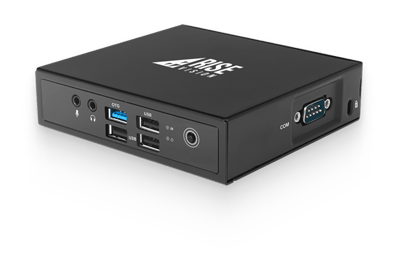
Rise Vision Media Players
Compact, powerful device with plug-and-play setup
Digital signage requires software and hardware. The hardware is typically a display and/or media player. Some displays have a media player built into them. We offer three options for hardware. Software is purchased separately.
Eliminate upfront CAPEX costs, and leave the management and support of your digital signage hardware to us. Pay a low annual fee and get your hardware, white glove service and full warranty for the length of the hardware subscription.
Prefer to own your hardware outright? This is the option for you. Get the best devices to run Rise Vision from Rise Vision.
Use existing devices or purchase new ones that run a supported operating system. See all of the operating systems we support here.
Requires a TV, commercial display, projector, or other device
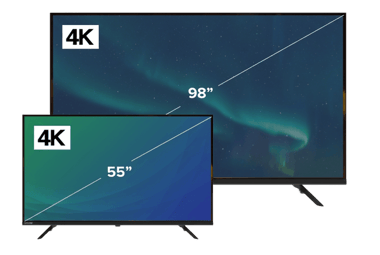
All-in-one solution includes display and built in media player
You Cover
You cover
Optionally upgrade your hardware on subscription renewal
Capable of running demanding schedules full of animated templates, live data, and video.
Mounting bracket included
Wall mount included (except with 98”), VESA compatible
Metal Box
Metal Box
55”, 65”, 75”, 85”, or 98” display
3840 x 2160 @ 60Hz
3840 x 2160 @ 60Hz
Android 11
Android 11
Android 11 with 55”. Android 14 with 65”, 75”, 85”, and 98”
16GB
16GB
32GB
32GB
4GB
4GB
4GB
4GB
No open reports, full disk encryption, regular firmware updates
No open reports, full disk encryption
No open reports, full disk encryption, regular firmware updates
No open reports, full disk encryption
Yes! If you are a K-12 school district it is possible to set up your account so that some schools have unlimited licenses and others have display licenses and everything can be on one invoice. Contact us.
No, you can’t share an unlimited license across multiple schools or your district. The unlimited license only applies to a single school, you need to purchase an unlimited license for every school that you want to use unlimited displays in. If you are interested in purchasing unlimited licenses for your entire district please contact us.
Every display requires its own license. You can purchase licenses individually, or if you’re a K-12 school you can purchase an unlimited license. You can adjust the number of licenses you have at any time in the Accounts & Billing section of your account.
Yes! Select if you’re a school/non-profit on our pricing page and you will see the discount you receive.
No problem. We accept purchase orders for annual subscriptions. Sorry, we don’t provide on account billing for monthly subscriptions.
From our pricing page select the number of displays you require and if you’re a school/non-profit and then request a quote. We will send it right over.
No problem. Provide your tax exempt information on checkout and we won’t charge any applicable sales taxes.
If you are a reseller looking to add Rise Vision to your offering, contact us here.
Absolutely. At any time. You don’t have to wait for a subscription to renew. Just let us know what accounts you want to combine and we will prorate your existing subscriptions into one new combined plan.
12,300+ Organizations Trust Rise Vision, You Can Too

You deserve the #1 all-in-one platform for digital signage, screen sharing, and emergency alerts.
Get a personalized tour of the Rise Vision all-in-one platform for digital signage, screen sharing, and emergency alerts and see how you can improve communication at your organization.
Choose the best hardware for your needs—use our recommended Avocor displays or media players, or bring your own hardware.
Create your Rise Vision account and customize your digital signage, screen sharing, and emergency alerts.
Push content to your displays, set up your employees to screen share, and manage communication, collaboration, and safety across multiple locations with ease.
Get help within one business hour by phone, email, or remote desktop support from a team backed by a 99% satisfaction rating.
Get your organization up to speed on Rise Vision with our free training sessions and have our customer success team guide you through implementation and onboarding.
Save hundreds with our simple, transparent pricing. We have options for every organization, volume discounts, and affordable recommended hardware.