

Quick Summary
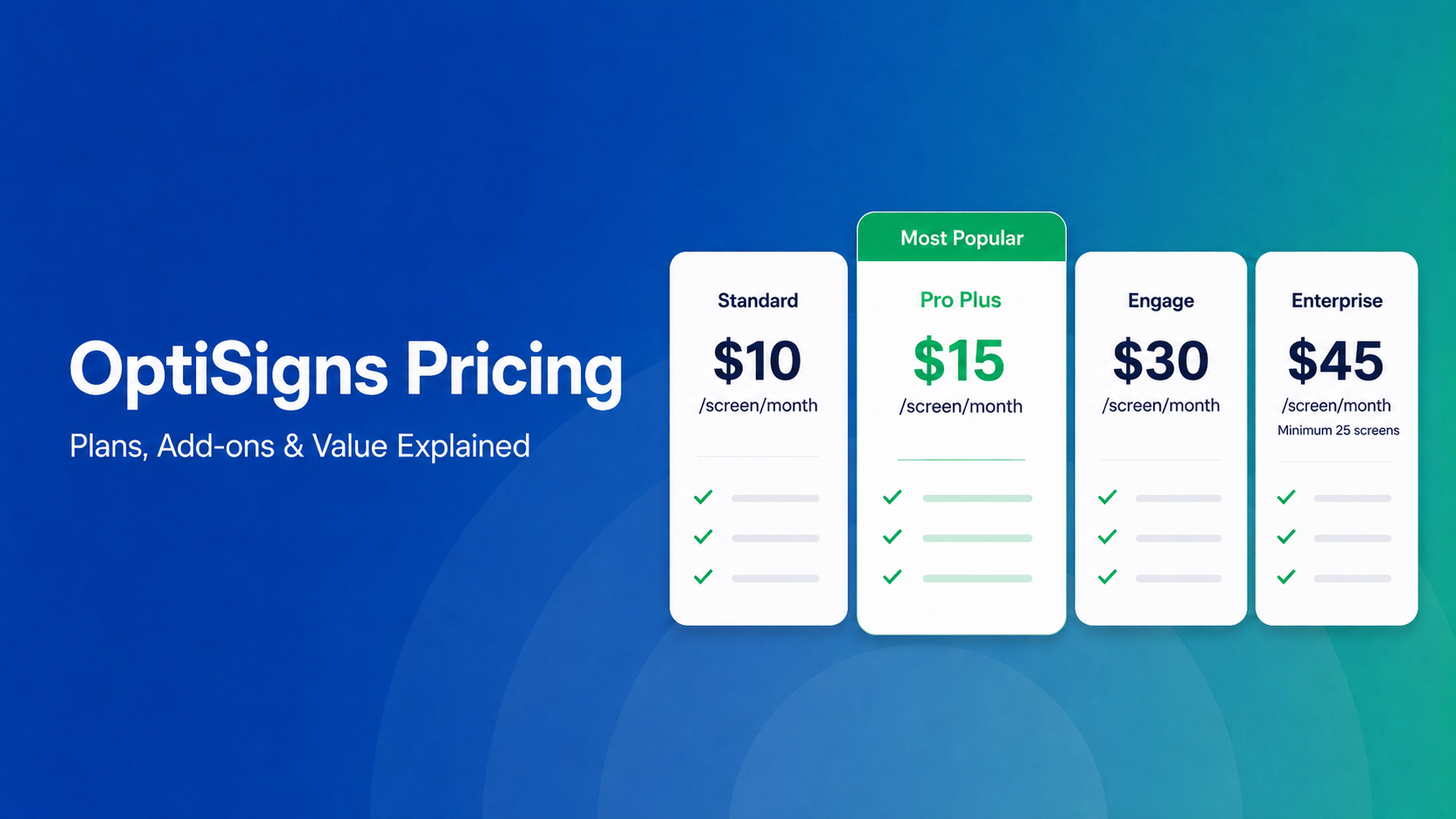
OptiSigns' paid plans run $10–$45/screen/month ($9–$40.50 on annual billing). Add-ons for wireless presentation and video walls aren't included in any base plan, and phone support requires an upgrade to Pro Plus. For K-12 schools on fixed budgets, Rise Vision's $1,399/school/year Unlimited plan covers digital signage, screen sharing, and emergency alerts.
What Buyers Typically Miss When Evaluating OptiSigns Pricing
On paper, OptiSigns looks like one of the most budget-friendly digital signage options on the market. With plans starting at just $10 per screen, it's easy to see why small businesses and large organizations alike go for the price tag.
But as any IT manager or operations director will tell you, a per-screen SaaS model can get complicated (and expensive) fast. Once you factor in hardware costs, data integration upgrades, and scaling across multiple locations, that $10 entry point can quickly multiply.
In this breakdown, we'll look past the basic tiers to map out the cost of OptiSigns in 2026, fees to watch out for, and how Rise Vision compares.
Why Trust Us?
We work with K-12 schools, districts, and multi-site organizations on their digital signage needs. We know where headline pricing and real-world cost tend to come apart.
We put OptiSigns through the same process your team would, plan by plan and add-on by add-on, so you don't have to piece together the full picture yourself.
OptiSigns Plans and Pricing: All Five Tiers Explained
Here's what OptiSigns' full lineup looks like as of 2026, from the free entry point through Enterprise.
|
Plan |
Monthly |
Annual |
User Limit |
Key Features |
|
Free |
$0 |
$0 |
Up to 3 |
Up to 3 screens, 1GB storage, OptiSigns logo on screen |
|
Standard |
$10/screen/mo |
$9/screen/mo (billed annually) |
Up to 25 |
100+ apps and integrations, unlimited storage, split-screen zones |
|
Pro Plus |
$15/screen/mo |
$13.50/screen/mo (billed annually) |
Unlimited |
Microsoft 365 and Google Workspace, campaign management, SSO, audit logs |
|
Engage |
$30/screen/mo |
$27/screen/mo (billed annually) |
Unlimited |
Interactive kiosk designer, live TV ads overlay, Zoom-based support |
|
Enterprise |
$45/screen/mo |
$40.50/screen/mo (billed annually) |
Unlimited |
25-screen minimum, dedicated account manager, priority support |
OptiSigns uses a traditional per-screen pricing model built around four main paid tiers, plus a basic free option. If you're ready to commit annually, they offer a 10% discount across the board.
The Free and Standard Plans
The free plan lets you test the waters on up to three screens, giving you 1GB of storage and 25 basic apps. However, because it includes OptiSigns branding on your displays, most professional setups will want to step up to the Standard plan.
Coming in at $10 a month (or $9 if paid annually), Standard gives you the foundational tools you need, like playlist scheduling, split-screen zones, and access to over 100 apps and templates, backed by unlimited cloud storage and email support.
Pro Plus and Engage
If your team handles more complex workplace content, the Pro Plus plan at $15 a month ($13.50 annually) is usually the sweet spot. It unlocks deep integrations with Microsoft 365, Google Workspace, Teams, and Slack, alongside data dashboards (like Power BI), advanced user permissions, and phone support.
From there, the Engage plan jumps to $30 a month ($27 annually) and is entirely dedicated to interactive experiences like adding kiosk design tools, QR code interactions, and touch-to-interact features.
Enterprise and Optional Add-ons
For large-scale deployments of 25 screens or more, the Enterprise plan sits at $45 a month ($40.50 annually). This tier is focused heavily on infrastructure and support, giving you mass device provisioning, advanced API access, and a dedicated customer success manager.
Finally, remember to budget for your specific use case, as OptiSigns breaks out several advanced features as premium monthly add-ons:
- Wireless Presentation: $20/screen
- Background Music: $15/screen
- Video Wall Syncing: $25/wall
- Ads Portal: Available via custom quote
This leads to our next point on…
What OptiSigns Really Costs at Scale
1. Add-Ons for Features You'd Expect to Be Included
While a quick look at the Standard or Pro Plus feature list might make it seem like you're getting a completely all-inclusive platform, the add-on menu tells a slightly different story. Several features that growing teams typically look for after their initial rollout are treated as separate monthly line items:
- Video Wall: $25/video wall/month. If you're running a multi-display wall setup in a lobby, cafeteria, or common area, this is a separate line item on top of your per-screen rate.
- Wireless Presentation: $20/screen/month. Enabling wireless presentation for a meeting room or classroom isn't built into any base plan—it's an add-on per screen.
- Background Music: $15/screen/month. Playing audio alongside your content costs extra for every screen it's running on.
To see how this plays out in the real world, look at a typical 10-screen setup on the annual Standard plan ($90/mo). If you need just one video wall ($25) and wireless casting for two meeting rooms ($40), your monthly bill steps up to $155.
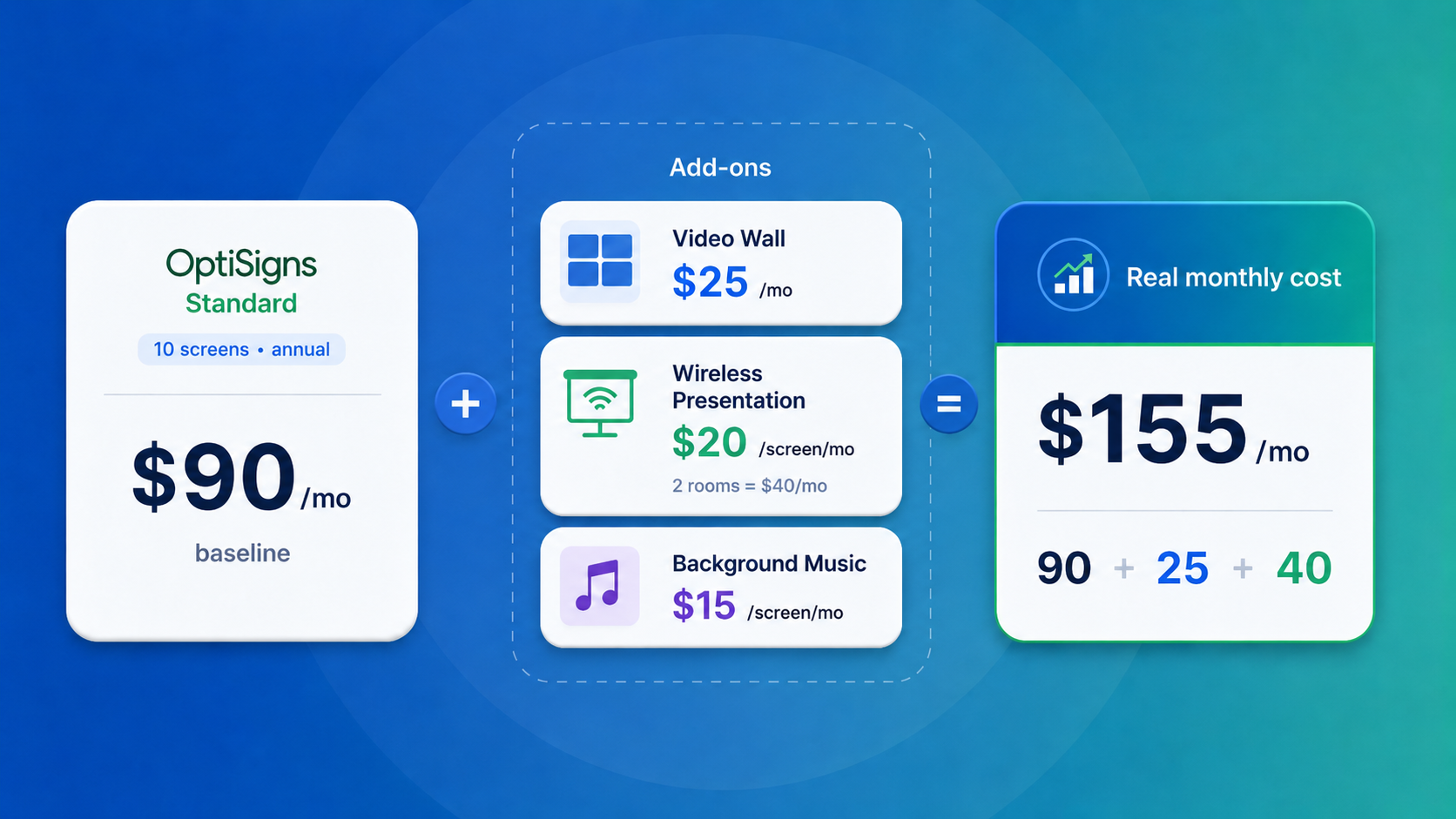 Suddenly, your actual layout costs significantly more than the baseline sticker price—making it essential to map out these feature requirements before you commit to a budget.
2. User Caps and the Tier Trap
The Standard plan offers a decent amount of user slots (25), but it's easy to underestimate how many people actually need to log in. Once you loop in IT, communications, department leads, and anyone responsible for updating local content, those seats go quickly.
But the actual kicker is what happens when you hit that 25-user limit. You can't just buy a few extra user seats. Your only option is upgrading the entire account to Pro Plus ($13.50/screen/month annually). On a 10-screen setup, that bumps your monthly total from $90 to $135. It's an extra $45 a month simply to clear a user bottleneck, regardless of whether you use the actual Pro Plus features.
3. The 25-Screen Enterprise Floor
The Enterprise plan comes with a hard minimum of 25 screens. It's a set billing floor, so if you happen to need Enterprise-specific features like a dedicated account manager or priority support but only have 15 screens set up, you'll still be billed for the full 25.
At $40.50 a screen on the annual plan, that sets the baseline at $1,012.50 a month, which comes out to about $12,150 a year before adding any extra features. Whether you're running 15 screens or 24, that baseline stays the same.
For schools that genuinely need those higher-tier features, this setup can make the approval process a bit tricky. It can be tough for a technology coordinator or IT director to walk into a school board meeting and map out a $12,000+ annual contract when the building only has 15 screens on the walls. Explaining that the budget includes 10 unused slots isn't an ideal position to be in, and OptiSigns doesn't really have a middle-ground tier if you fall below that screen threshold.
4. Phone Support Is a Pro Plus Feature
The Standard plan includes email support, which means you won't have access to phone support or live chat if you need to troubleshoot on the fly. If a screen goes down, your main option is to send an email and wait for a response.
To get phone support, you have to upgrade to the Pro Plus plan at $13.50/screen/month on the annual tier. If you're running 10 screens, that adds an extra $45 to your monthly bill—not necessarily because you need the advanced Pro Plus tools, but just to have a direct line to call when you need help.
By comparison, Rise Vision takes a different approach by including phone support with a one-hour response time on all of their plans, even the entry-level tiers.
How Rise Vision's Pricing Compares to OptiSigns'
While OptiSigns definitely looks like the lower-priced option at first glance, the total cost comes with a few different layers.
The pricing gets much more competitive as you move into Advanced or Enterprise territory. For example, Rise Vision's Advanced plan runs $13 a screen monthly for schools and nonprofits (or $14 for businesses). By comparison, OptiSigns Pro Plus sits right in that same neighborhood at $15 a month, or $13.50 if you pay annually.
The biggest contrast shows up at the Enterprise level. OptiSigns Enterprise requires a hard 25-screen minimum, which sets a fixed annual floor of $12,150 (at $40.50/screen). Rise Vision Enterprise takes a different approach with flat annual rates per display: $164 for schools and nonprofits, and $180 for businesses.
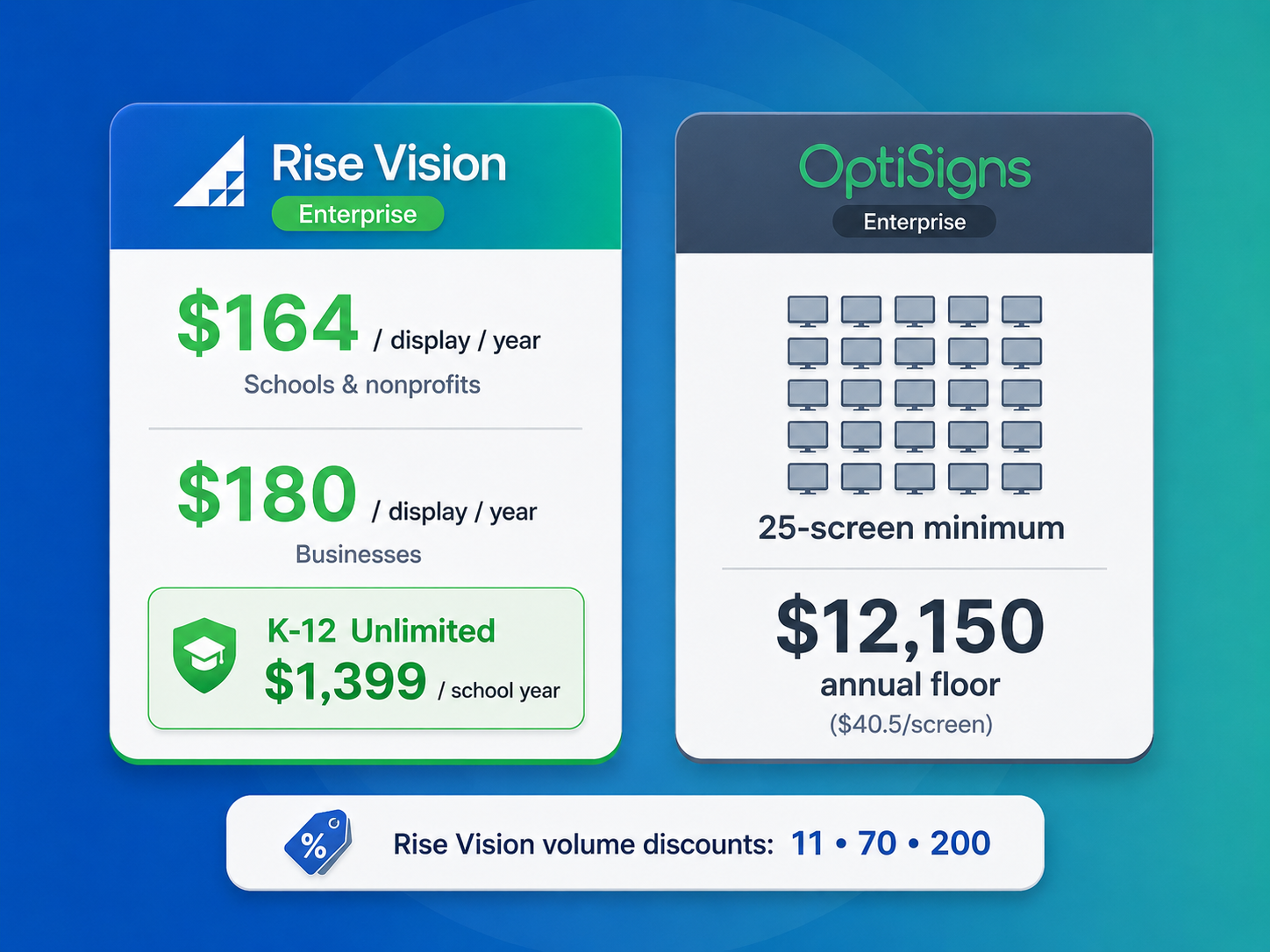
Even better for K-12 schools, you can opt for an Unlimited-display license for a flat $1,399 per school year. Once a school hits about nine screens, this option practically pays for itself, while giving you a completely predictable budget ceiling as you add more displays. Rise Vision also applies volume discounts at 11, 70, and 200 screens, keeping emergency alerts right in the Advanced tier, while upgrading you to tools like screen sharing, content approvals, and SSO on Enterprise.
Because of that structure, the math works out incredibly well for schools and larger deployments, rather than small setups that only need a handful of basic signage screens.
Beyond the numbers, the support model is a huge differentiator. Rise Vision brings some of the strongest customer support in the digital signage space, backed by a 99% satisfaction rating. Instead of waiting on long email threads, you get guaranteed answers and live troubleshooting within one business hour, Monday through Friday, across phone, email, or remote desktop. The team handles everything from basic signage and hardware issues to screen sharing and emergency alerts, while also covering onboarding, continuous training, and regular account check-ins to make sure your setup runs smoothly.
So, Is OptiSigns Worth It?
If your needs are straightforward—display content, schedule it, manage it remotely—OptiSigns does the job. But for schools and multi-site organizations trying to communicate, keep teachers connected in classrooms, and make sure every screen responds in an emergency, OptiSigns requires you to piece together what Rise Vision includes by default.
If you're running a small number of screens, know you'll stay within Standard, and have a team comfortably under 25 users, OptiSigns' per-screen pricing is competitive and the platform handles basic digital signage well.
But if you're managing a K-12 school or a multi-site operation on a fixed budget, Rise Vision is built for exactly that. We offer an all-in-one platform to communicate across every screen, help teachers share and collaborate in classrooms, and keep everyone safe when something urgent happens.
You can start a free trial and take the full platform for a spin. Rise Vision backs every plan with a 30-day money-back guarantee, so there's no risk in finding out.
More From Our Blog
-

Digital Signage Remote Management: How to Run Every Screen From One Place
Digital signage remote management lets you control screens, schedules, and display health from an online platform. To get started, choose a hardware-agnostic platform, connect your media players or[…]
Read More -
ScreenBeam Review 2026: Features, Pricing, and Limitations
ScreenBeam sells wireless display receivers that let people cast to a screen from any device without an app. You need one receiver per display, and they run from $299.99 to $1,199.99. Cloud-based[…]
Read More -

Interactive Touch Screen Digital Signage: How It Works and What You Need
Interactive touch screen digital signage lets viewers tap a display to find what they need. It pairs a commercial touch display with content software. Common uses include wayfinding, visitor[…]
Read More
12,300+ Organizations Trust Rise Vision, You Can Too
































Schedule a Free Demo
You deserve the #1 all-in-one platform for digital signage, screen sharing, and emergency alerts.





