

Quick Summary
- Yodeck bills per-screen with no ceiling (free up to $16/screen/mo) so costs rise with every display added.
- 2026 Price Increase: Yodeck raised Premium and Enterprise plans by $1/month per screen, expanding costs for large deployments.
- Annual plans include pre-configured Raspberry Pi players, reducing upfront hardware spend, though IT teams still manage setup and maintenance.
- For larger K-12 deployments, Rise Vision's unlimited license may provide predictable costs and broader functionality.
What You Need to Know About Cost Before Choosing Yodeck
At first glance, Yodeck's pricing seems pretty straightforward, which is good. But as with any tech rollout, the sticker price is just one part of the equation. Depending on how many displays you have, you'll also want to account for hardware costs, add-ons, and their recent pricing updates to get an accurate picture.
This Rise Vision guide breaks down Yodeck's pricing plan, shows you what a real-world setup actually costs, and points out the hidden gaps you need to watch out for if you're on a tight budget.
Why Trust Us?
We've spent years working with multi-site organizations, K-12 schools, and districts on their digital signage needs. We know what IT directors, operation leaders, and administrators actually need from a signage platform, and where tools that look good on a pricing page fall short in practice.
We evaluated Yodeck's plans, hardware setup, and real-world cost the same way your team would, so you don't have to dig through the fine print yourself.
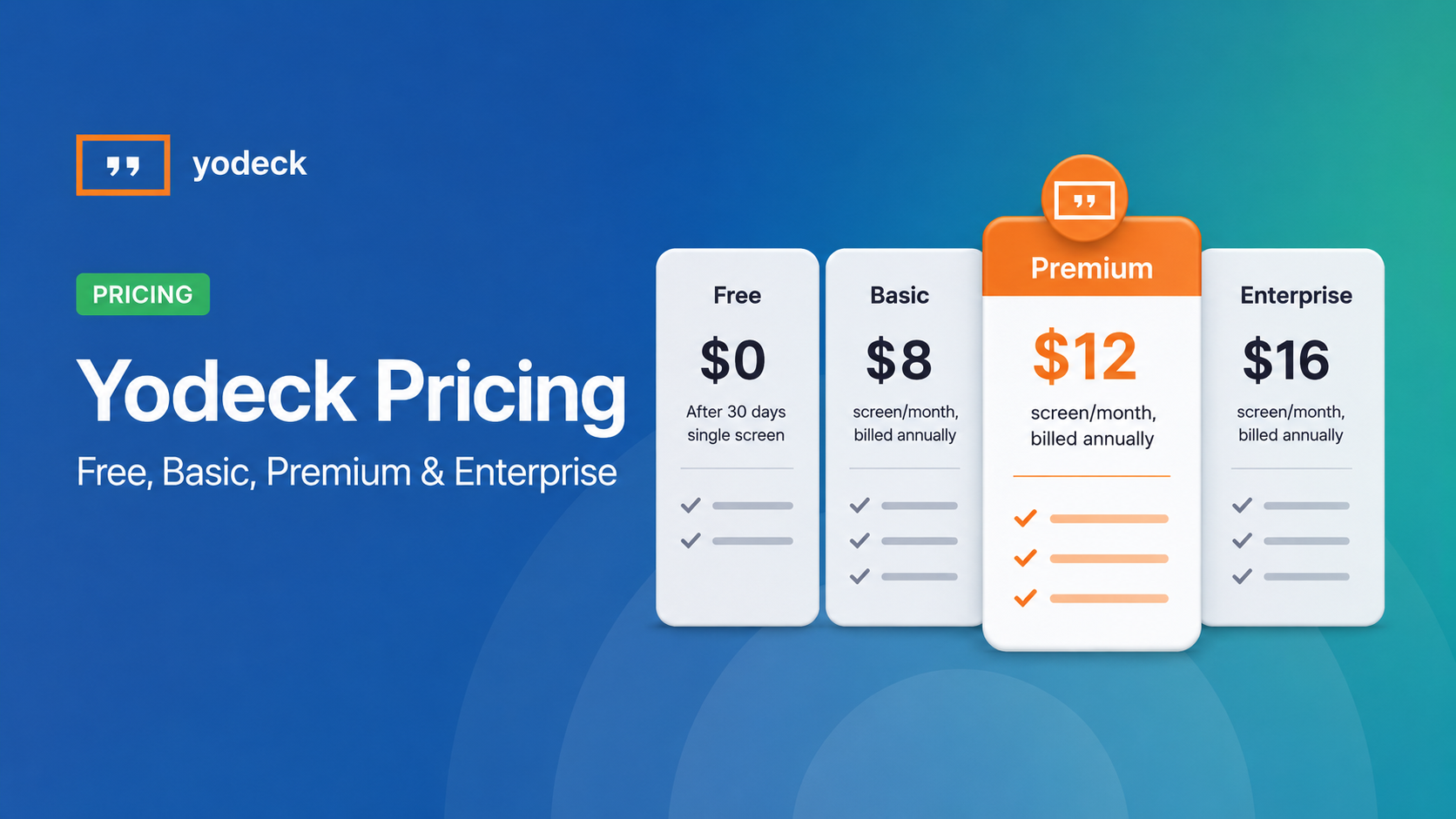
Yodeck Plans and Pricing: What Each Tier Costs
Here's what Yodeck's lineup looks like as of 2026, with Premium and Enterprise reflecting the updated pricing that took effect April 1.
|
Plan |
Monthly |
Annual |
Key Features |
|
Free |
$0 |
$0 |
1 screen license, basic features only |
|
Basic |
$8/screen/mo |
$8/screen/mo + free 1GB player (billed annually) |
All media types, 500+ templates, 80+ app integrations, scheduling |
|
Premium |
$12/screen/mo |
$12/screen/mo + free 4GB player (billed annually) |
Everything in Basic, plus Microsoft app integrations, Power BI/Grafana/Tableau, API access, and playback reports |
|
Enterprise |
$16/screen/mo |
$16/screen/mo + free 4GB player (billed annually) |
Everything in Premium, plus workspaces, SSO/SAML, custom user roles, storage encryption, audit logs |
|
Enterprise+ |
Custom |
Custom |
Dedicated account manager, 1-hour SLA, custom integrations, professional design services |
Yodeck's Full Cost Picture: The 2026 Price Increase, Add-Ons, and What Scales
What Changed with Yodeck's 2026 Price Increase
On April 1, 2026, Yodeck raised the price of its Premium and Enterprise plans by $1 per screen per month. Premium moved from $11 to $12, and Enterprise from $15 to $16. Basic stayed at $8.
If you're on a monthly plan, the new rate already applies. If you're on an annual plan, your current price holds until renewal. Multi-year contracts are protected at their agreed rate for the full term, though any new screens you add after April 1 may be billed at the updated price.
Yodeck's stated reason is rising infrastructure costs, investment in new features, security, and performance. While an extra dollar a screen sounds minor, it scales up quickly depending on your deployment size. For example, 20 screens on Premium adds $240 a year, and 50 screens on Enterprise means an extra $600 annually. For a school district or a multi-site operation working within strict, fixed budget cycles, even small shifts like this mean you have to reallocate funds or adjust planning for the coming year.
Yodeck's Add-Ons
Beyond the per-screen rate, Yodeck has two add-ons worth knowing about before you start building out a budget.
- Yodeck Assurance: This runs $1 per month. It covers hardware replacement and keeps your players running if something goes wrong. This is useful if you're managing physical Yodeck players across multiple locations and don't want a dead screen to become an IT ticket.
- Embeddable Feeds: This starts at $6 per month. It lets you display your Yodeck content on websites or intranets without duplicating work. Not something every organization will need, but worth knowing it's an extra line item if you do.
Neither is mandatory, but Assurance is one IT teams tend to want once they're responsible for hardware at scale. Here's what your annual cost actually looks like across a 10- and 25-screen deployment:
|
Plan |
10 screens |
10 screens + Assurance |
25 screens |
25 screens + Assurance |
|
Basic ($8/mo) |
$960/yr |
$1,080/yr |
$2,400/yr |
$2,700/yr |
|
Premium ($12/mo) |
$1,440/yr |
$1,560/yr |
$3,600/yr |
$3,900/yr |
|
Enterprise ($16/mo) |
$1,920/yr |
$2,040/yr |
$4,800/yr |
$5,100/yr |
Free Raspberry Pi Player
With qualifying annual plans, Yodeck provides a pre-configured Raspberry Pi 4 player for each subscribed screen. Basic subscriptions include the 1GB model, while Premium and Enterprise subscriptions include the 4GB Player Plus.
Yodeck estimates this saves you up to $129 per player. For a 20-screen rollout, that's potentially $2,580 in upfront hardware savings, depending on which model your plan includes.
Because the players arrive pre-configured, getting them up and running is pretty straightforward. However, the real consideration isn't just the budget—it's the time investment for your IT team. If you're running a lean department, handling day-to-day logistics like connecting devices to local Wi-Fi, troubleshooting offline screens, and managing hardware replacements can quickly drain your team's limited hours. For schools or multi-site organizations with small IT teams, that ongoing maintenance workload is an important piece of the puzzle to weigh against the initial savings.
On the plus side, you aren't completely locked into one ecosystem. Rise Vision also supports Raspberry Pi 4 hardware, meaning you could potentially repurpose the devices down the road if you ever decide to switch.
No Unlimited Plan For K-12
Yodeck's pricing is entirely per-screen, with no ceiling. Every screen you add increases your annual cost. For K-12 schools trying to cover hallways, classrooms, cafeterias, gymnasiums, and common areas across one or more buildings, the screen count adds up fast.
On Premium, a school running 40 screens is paying $5,760 per year. At 50 screens, that's $7,200! And those numbers grow every time you add a display, with no point at which the billing levels off.
That matters less in some industries than others. In K-12, it matters a lot. Every line item in a school technology budget gets scrutinized—by principals, by district leadership, by school boards. When the bill goes up, even by a few hundred dollars, conversations have to happen. Those conversations often go through a formal approval process that lands squarely on whoever signed off on the platform.
The 2026 price increase compounds this. A school that added screens over the past year, renewed at the new rate, and didn't budget for the increase is now managing a gap they didn't plan for. With Yodeck, those costs climb every single time you add a display.
If you want to avoid that budget creeping up entirely, Rise Vision offers an Unlimited license that lets you scale across classrooms and hallways without adding a dime to your bill.
How Rise Vision's Pricing Compares to Yodeck's
Rise Vision's pricing is based on the type of organization you run, splitting rates between K-12, Higher Ed/Non-Profits, and standard Business/Government. While you can opt for monthly billing on the Basic and Advanced tiers, the Enterprise tier is strictly an annual commitment.
If you're planning a larger rollout, keep in mind we offer price breaks at 11, 70, and 200 displays. Here is how the standard pricing shapes up:
|
Plan Type |
K-12 Education |
Higher Ed & Non-Profit |
Business & Gov |
|
Basic |
$11/mo (or $119/yr) |
$11/mo (or $119/yr) |
$12/mo (or $132/yr) |
|
Advanced |
$13/mo (or $138/yr) |
$13/mo (or $138/yr) |
$14/mo (or $156/yr) |
|
Enterprise |
$164/yr per screen OR $1,399/yr for unlimited screens |
$164/yr |
$180/yr |
Rise Vision's Unlimited plan gives schools a flat rate of $1,399 per year for unlimited displays. If a sitewide license isn't necessary for your setup, schools can also buy individual Enterprise-level subscriptions for $164 per year. For most buildings, though, the flat-rate math is much more favorable. Here is how the breakdown looks for a school with 25 screens:
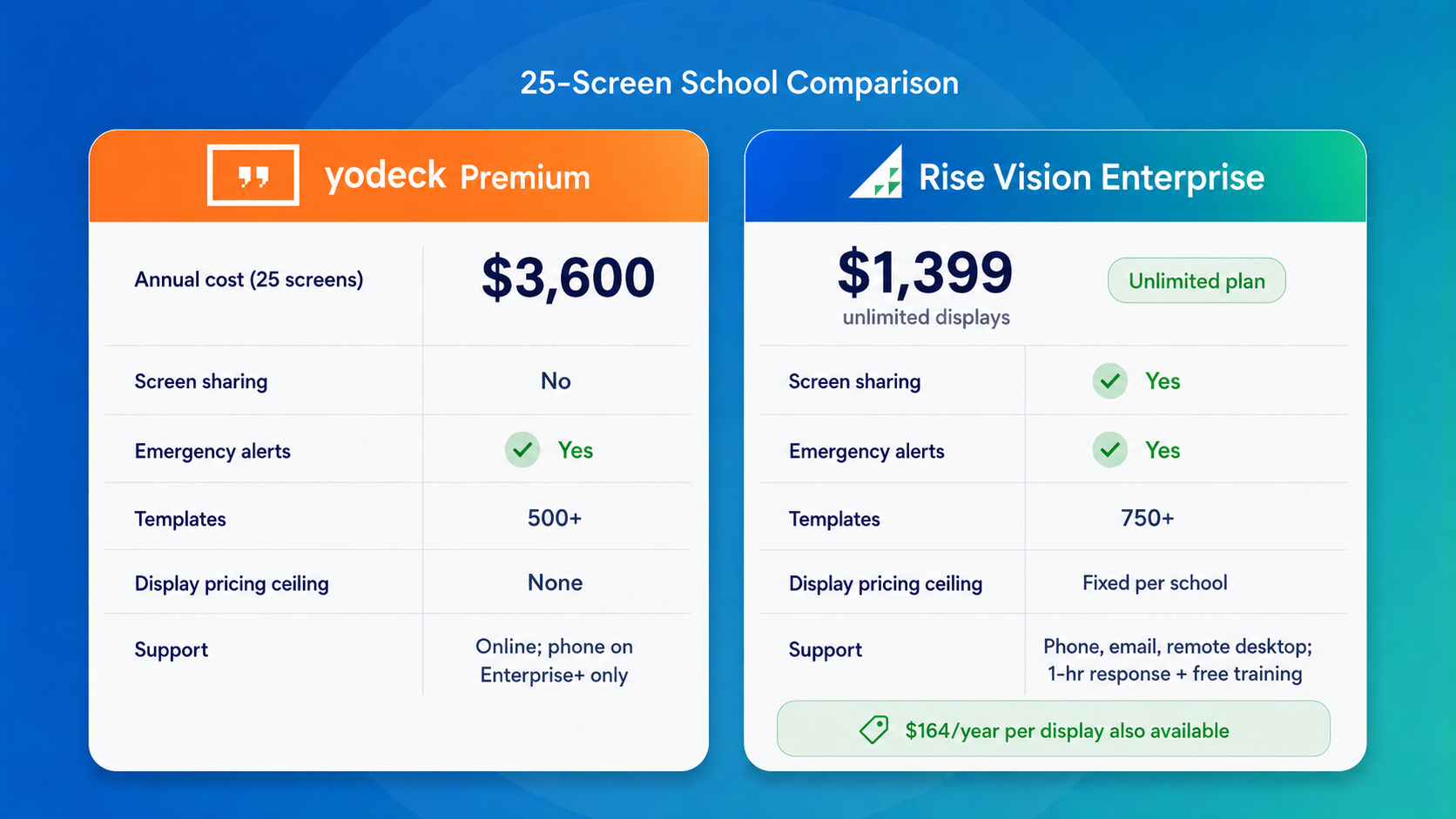
Beyond the pricing structure, Rise Vision gives you one platform to handle digital signage, screen sharing, and emergency alerts.
Yodeck is a dedicated digital signage tool rather than an all-in-one platform. If your classrooms, meeting rooms, or common areas need wireless screen sharing or interactive collaboration features, you'll need to pair Yodeck with a separate solution.
Because it doesn't natively support built-in mirroring protocols like AirPlay, Miracast, or Google Cast, it won't act as a replacement for devices like Chromecast during presentations. If your goal is a single platform that covers both broadcast signage and daily screen sharing, you'll likely want to look at alternative setups.
Rise Vision bridges that gap. Along with handling daily school-wide communication and classroom collaboration, it integrates with leading emergency management systems. When an alert is triggered, the platform can automatically override active displays across the building to broadcast critical safety information instantly—all without forcing your team to stitch together separate software tools.
So, Is Yodeck Worth It?
When you're working with school budgets, a $2,201 annual difference at 25 screens is a chunk of change you can absolutely use elsewhere. But the bigger thing to look at here is the actual pricing model. Yodeck works on a straight per-screen basis—meaning every new display adds to the monthly invoice. For smaller rollouts, this setup is usually fine, but the math changes a bit as you scale.
If you're managing more than a handful of screens, Rise Vision pricing allows you to add screens to your building without bumping what you pay. For districts covering multiple schools, the Unlimited license applies per school starting at $1,399 each, with volume discounts available on set display thresholds. A five-school district at full rate would be $6,995/year. That's still significantly less than per-screen Yodeck pricing at any comparable scale.
Want to see how the numbers line up for your specific district? Book a quick demo with Rise Vision today to see the platform in action.
More From Our Blog
-

Digital Signage Remote Management: How to Run Every Screen From One Place
Digital signage remote management lets you control screens, schedules, and display health from an online platform. To get started, choose a hardware-agnostic platform, connect your media players or[…]
Read More -
ScreenBeam Review 2026: Features, Pricing, and Limitations
ScreenBeam sells wireless display receivers that let people cast to a screen from any device without an app. You need one receiver per display, and they run from $299.99 to $1,199.99. Cloud-based[…]
Read More -

Interactive Touch Screen Digital Signage: How It Works and What You Need
Interactive touch screen digital signage lets viewers tap a display to find what they need. It pairs a commercial touch display with content software. Common uses include wayfinding, visitor[…]
Read More
12,300+ Organizations Trust Rise Vision, You Can Too
































Schedule a Free Demo
You deserve the #1 all-in-one platform for digital signage, screen sharing, and emergency alerts.





