Quick Summary
Visix digital signage is a long-established system built for large organizations with their own IT teams. Its biggest strengths are meeting room signs, touchscreen wayfinding and calendar integrations for colleges. But it leans heavily on Windows, you'll need a sales call to get a price, and there's no wireless screen sharing.
Why Buyers Are Taking a Fresh Look at Visix in 2026
Visix has been around for a long time. It's been developing digital signage software since 2000 and now serves more than 4,000 clients across over 1,000 campuses.
If you're considering Visix today, you might be planning a new campus-wide rollout, replacing an older system, or reviewing your options before renewing a contract.
You may also be dealing with aging hardware. Microsoft ended standard support for Windows 10 in October 2025, so organizations still running older Windows-based signage players have another reason to review their setups.
Whatever brings you here, the important questions are much the same. What can Visix do? How easy is it to manage? And what will it cost?
We’ll look at each. But before we do that…
Why Listen to Us?
Rise Vision has been helping organizations communicate, teach and collaborate better since 1992. We’re trusted in over 100 countries, and universities like Rutgers and Kent State run their campus screens with us. We’ve also been in conversation with people who’ve used Visix. So we know which questions to ask when you’re weighing your options.
What Is Visix Digital Signage?
Visix is a digital signage company based in Atlanta, Georgia. Its main software product, AxisTV Signage Suite, helps organizations create, schedule, and display content across screens in different buildings and locations.
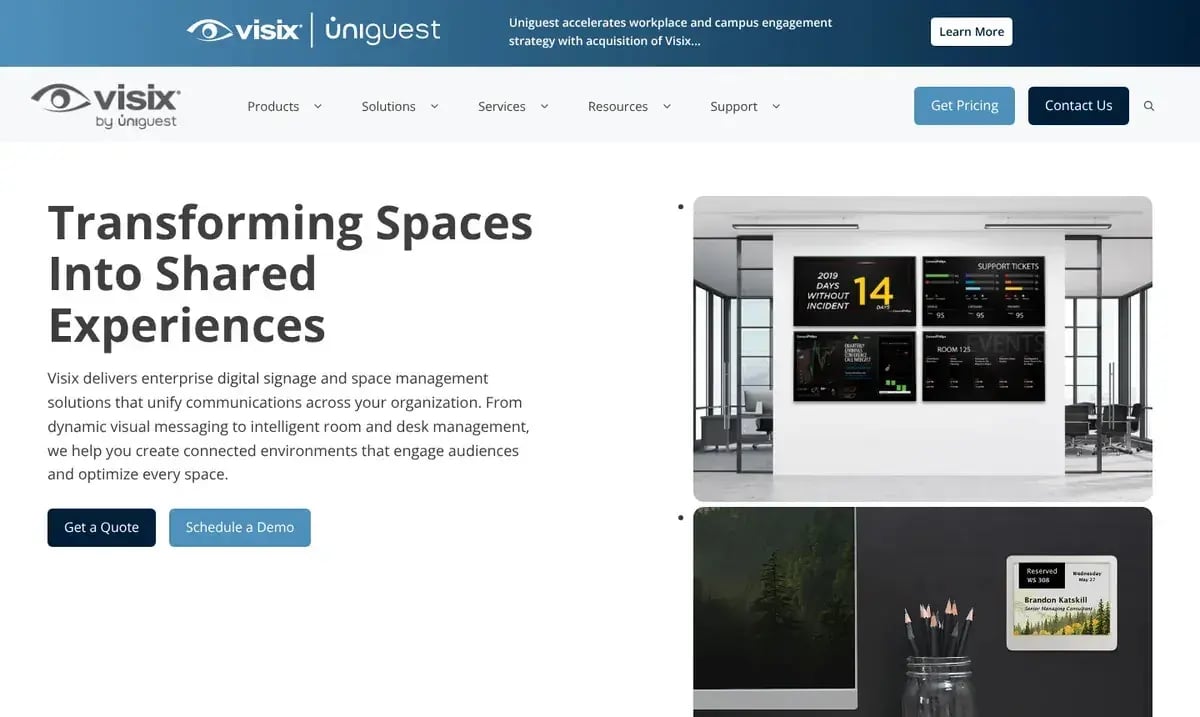
At the center of the system are three applications:
- AxisTV Design: A desktop application for creating more customized screen layouts and messages. It runs on Windows.
- AxisTV Manage: A browser-based content management system where you upload content, organize playlists, and schedule what appears on your screens.
- AxisTV Engage: The playback software used on Visix's Windows-based media players to display your content.
You can host the content management system on your own servers or let Visix host it in the cloud. There are also subscription and perpetual licensing options, depending on how you'd prefer to pay.
For smaller deployments, AxisTV One supports one user and up to 25 media players, with player licenses purchased separately. Larger editions allow more users and screens, while Campus and Enterprise support unlimited users and players.
Beyond digital signage, Visix also offers room signs, interactive directories, wayfinding systems, and QR-code room booking. So it's a fairly broad platform, particularly for organizations that want to manage several types of screens and spaces.
Key Features of Visix Digital Signage
Visix does more than run announcement screens. Its key features also cover meeting rooms, wayfinding and emergency alerts:
- Signage Software and Templates: Start from hundreds of fill-in templates or the AI Message tool, then add live widgets like campus event calendars and Power BI dashboards.
- Meeting Room Signs: Choose from four ways to show and book room schedules, from Touch and Connect screens to battery-powered EPS ePaper signs and Choros phone booking.
- Touchscreen Wayfinding: Help visitors find rooms, offices and services on their own with interactive maps and directories, all with ADA accessibility controls built in.
- Emergency Alerts and Video Walls: Take over every screen in an emergency with the optional AxisTV Alert module, and run up to 12 video wall screens from one player.
Pricing
Visix doesn't publish its prices. Instead, you'll answer a few questions about your project on its pricing page, and the sales team follows up with a custom quote. That quote bundles several parts together, so it's worth knowing what goes into it before you start comparing options:
- Software Licenses: Your price depends on how many users and players you need, and whether you go with a cloud subscription or a perpetual license. You'll also buy media player licenses separately.
- Optional Modules: AxisTV Alert is an optional add-on, and on some editions, so are the event and data widgets.
- Support: New systems come with 30 days of priority support and updates. After that, support becomes a paid subscription, which you'll also need if you want live weather data on your screens.
- Published Extras: A few prices are public, though. Content subscriptions start at 33 cents per day. Hosted wayfinding runs under $500 a year for an area map and under $3,000 for full wayfinding, plus hardware and licenses.
Rating
AxisTV Signage Suite has a 3.9 out of 5 rating on Capterra from 14 reviews, as of October 2026. It scores highest on customer service, at 4.4, and lowest on features, at 3.7.
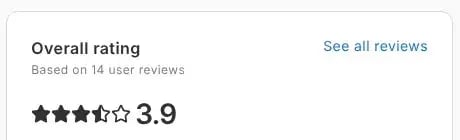
That said, 14 reviews isn't much to go on, especially since the most recent one dates from December 2024. So it's worth taking these ratings with a grain of salt, as they may not reflect improvements Visix has made since then.
What We Like
Visix is strongest when you need more than signage, especially on a busy campus. These are the three things we like most:
Several Room Booking Options
Visix makes it easier for people to find and book available meeting rooms. For example, someone walking past a conference room can check the sign outside to see whether it's occupied. They can also see when the next meeting starts and whether they can book it.
There are several ways to set this up, too. You can use touchscreen signs outside meeting rooms or battery-powered ePaper displays for rooms and desks. Or you can use QR codes that let people check availability and book from their phones.
That flexibility is particularly useful for universities and large offices managing lots of shared spaces.
Strong Integrations With Campus Scheduling Systems
Visix connects with event management systems (EMS) like 25Live, Ad Astra, and Mazévo. So if your university already manages classes, events, and room bookings in one of these systems, you can show that information on your screens. And nobody has to enter it all again.
Interactive Wayfinding
Visix also makes it easier for visitors to navigate large buildings. Its touchscreen directories let people search for offices, departments, or rooms and see where to go. That's particularly useful in hospitals, universities, and corporate campuses where visitors may be unfamiliar with the layout.
What We Don't Like About Visix
Visix won't suit every team, though. Before you sign a contract, these are the four drawbacks we'd think about:
Some Parts of the Software Still Depend on Windows
While AxisTV Manage works in a browser, AxisTV Design is a Windows desktop application.
So if your design team works entirely on Macs and the Apple ecosystem, they'll need access to a Windows machine or virtual machine to use the full desktop design tool.
AxisTV Engage also runs on Windows, although compatible BrightSign players provide another playback option.
This isn't necessarily a problem if your organization already uses Windows hardware. But it's something worth considering if you're trying to standardize on another operating system.
Older Installations Can Involve More IT Work
The day-to-day experience seems to depend quite a bit on how an organization sets up Visix.
For example, during our research, one university IT team described an older installation where publishing involved uploading content and remotely accessing players to complete updates. The process could take 10 to 30 minutes. Another university had an on-premise server that staff could only access while connected to the campus network.
These aren't limitations of every Visix installation. The software supports browser-based publishing, remote management, and cloud hosting. Still, the examples show why it's worth asking about the specific setup you're buying, particularly if you're replacing an older system.
Before committing, we'd recommend asking Visix to demonstrate the complete process of creating, approving, and publishing a message remotely.
There's a Learning Curve for Nontechnical Teams
Visix has a lot of features, but that also means there's more for people to learn.
We’ve seen communications teams struggle with the interface, so IT ended up handling routine screen updates.
Of course, that’s not everyone's experience. But if you want staff across different departments to manage their own content, ease of use is something to test carefully during the demo.
It's Difficult to Compare Costs Without a Quote
Finally, there's pricing.
With no standard AxisTV price list, it's hard to know what your deployment will cost until you've gone through the sales process. And because Visix can price software, hardware, support, and additional modules separately, you'll want to look at the full cost rather than just the license fee.
A Better Alternative: Rise Vision
Visix has plenty to offer, especially if you need specialized room signs or interactive wayfinding.
But what if your main priority is something simpler and better?
Maybe you want staff to update screens themselves without asking IT for help. Or you want the same classroom displays to handle announcements, wireless presentations, and emergency alerts.
That's where Rise Vision comes in.
Rise Vision is the all-in-one platform for digital signage, screen sharing, and emergency alerts. If you're coming from Visix, having everything on one platform is the biggest difference you'll notice. That's because Visix doesn't sell wireless screen sharing, and its emergency alerts are an add-on. With us, the same display shows your signage, takes a wireless presentation and switches over to an alert the moment there’s an emergency.

We've also spent years making digital signage easy for people outside IT. At Kent State University, for example, more than 40 departments have their own accounts, so different teams can manage their own content. Mark Meszar, a senior applications support analyst there, says looking after it all takes up only 1% of his time. As he puts it, "it has to be easy for the Non-IT person, which it is."
Want to see how that works across a whole campus? Our video on digital signage for universities covers five campus use cases, how each department updates its own screens, and how one emergency alert reaches all of them.
And if your team ever gets stuck, you'll get help within one business hour from a support team with a 99% satisfaction rating.
Key Features
If you're switching from Visix, these are the Rise Vision features that matter most:
- Digital Signage: Create engaging content with 750+ customizable templates, our AI presentation design tool, and integrations like Canva, PowerPoint, Google Slides and Power BI.
- Screen Sharing: Transform any display into a wireless presentation hub, then share from any device to up to 10 displays at once, with no adapters needed.
- Emergency Alerts: Deliver instant, high-contrast visual emergency alerts to displays, interactive flat panels and live screen sharing sessions.
- Room and Event Schedules: Show live room availability outside meeting spaces from Google Calendar, Outlook Calendar, 25Live, any iCal URL or Ad Astra.
- Interactive Directories: Simplify wayfinding with searchable digital directories and quick-access buttons for departments, services or amenities.
- Campus Management: Manage every display with user roles, unlimited users, single sign-on (SSO) and account hierarchy, so central IT keeps control.
Pricing
We publish our simple, transparent pricing per display, so you can work out a budget before you talk to anyone.
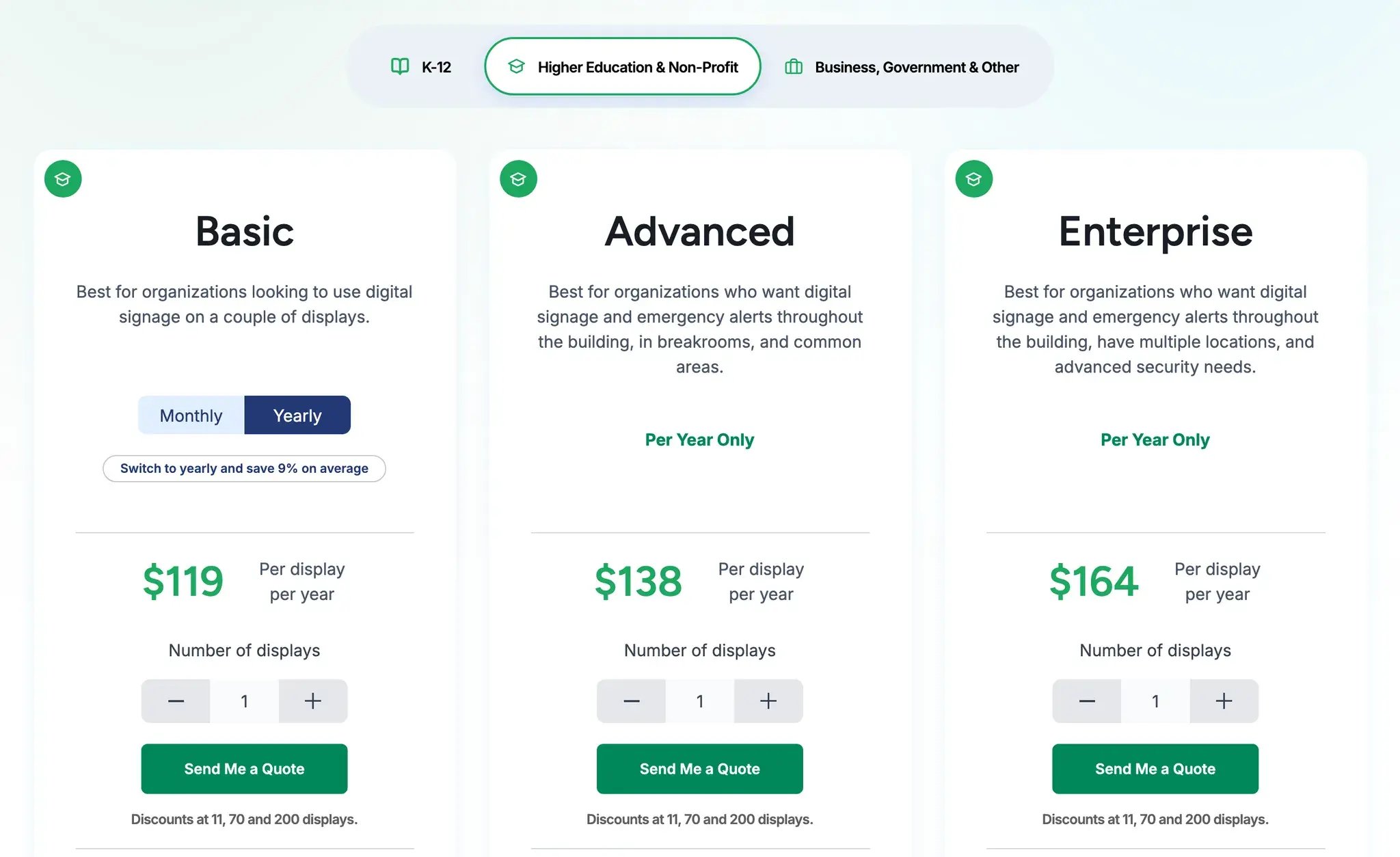
What you pay depends on the kind of organization you are. K-12 schools, colleges and non-profits all pay the same rates, while businesses and government organizations pay a little more.
| Plan | K-12, Higher Education and Non-Profit | Business, Government and Other |
|---|---|---|
| Basic | $11 per display per month, or $119 per year | $12 per display per month, or $132 per year |
| Advanced | $138 per display per year | $156 per display per year |
| Enterprise | $164 per display per year | $180 per display per year |
As for what's included, Basic gives you everything you need to get started with digital signage, like 750+ templates, unlimited users and scheduling. Advanced adds emergency alerts and calendar integrations, and Enterprise adds screen sharing, single sign-on (SSO) and a content approval workflow. If you're a college, non-profit or business, Enterprise also includes Power BI dashboards.
K-12 schools get one extra option, too. Instead of paying for each display, a school can buy an Unlimited license for $1,399 a year. That one license covers as many displays as the school needs. Even at nine displays, it's cheaper than paying per display, since nine Enterprise licenses would cost $1,476 a year. You'll need one Unlimited license per school, though, so a district with three schools would buy three.
Whichever group you're in, volume discounts kick in at 11, 70 and 200 displays. And if you'd like interactive touchscreen displays, you can add them to the Advanced plan for $1,200 per display per year.
Knowing the price upfront also means you won't get a surprise at renewal time. One university learned this the hard way. Its old signage provider asked for tens of thousands of dollars to renew 25 media players and licenses. So its IT team started looking elsewhere, and after switching to Rise Vision, the university now saves tens of thousands of dollars a year.
Rating
We have a 4.7 out of 5 rating on Capterra from 304 reviews, as of October 2026.
Why Choose Rise Vision?
So why pick us over Visix? If you're comparing the two, it comes down to three big differences.
One Platform for Signage, Screen Sharing and Emergency Alerts
With Rise Vision, you can use the same display for your signage, your presentations and your emergency alerts. On a normal day, for example, a classroom screen might show announcements and upcoming events.
But when a teacher wants to present, they can start a wireless screen share from their laptop, tablet or phone. They just go to risevision.com/join and type in the code on the screen, so there's no adapter or dongle to plug in. And if you'd like to approve people before they can share, you can turn on Moderated Mode.
Emergency alerts run on the same platform, too.
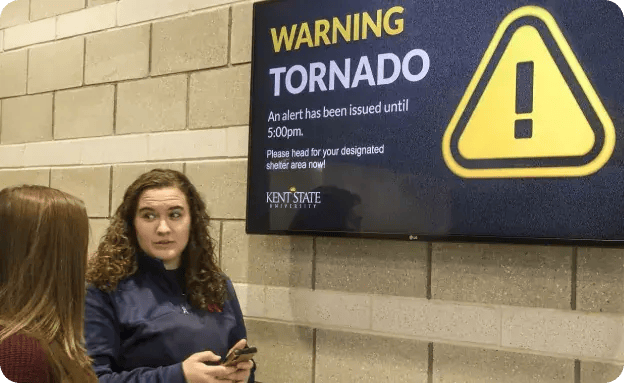
Rise Vision connects to the emergency notification system you're already using, like Raptor, InformaCast or CrisisGo. So when it sends an alert, such as a lockdown or severe weather warning, the alert appears on all your screens by default. This works through the Common Alerting Protocol (CAP), a standard format that emergency systems use to share alerts.
The alert even takes over a screen during a live screen share. So if a teacher is sharing a lesson from their laptop, the safety instructions replace it on screen right away. And since signage, screen sharing and alerts all run on Rise Vision, you only need one vendor and one account for all three.
Anyone on Your Team Can Update Screens From Anywhere
Our easy-to-use software lets you hand off screen updates to anyone in your organization, so IT doesn't have to make every change. Plus, since everything runs in the cloud, you won't need to maintain an on-campus server or install a desktop design app.
So your comms team can sign in from any browser, whether they're on campus or working from home. Then they'll pick one of our 750+ templates or pull in a PowerPoint, Google Slides or Canva design. Once they've scheduled it, it plays on your displays, so nobody has to remote into a player to push the change out.
That's a big part of why Rutgers University chose us. The university wanted a cloud-based system with no software to install, and it now manages 200+ displays with Rise Vision. To keep all those displays organized, each department has its own account under a parent account. That way, campus IT can get into any department's account, while department staff only see their own.
Use the Screens and Players You Already Own
We support a wide range of hardware, so you can bring your own media players and displays. Our software runs on Android, Windows, ChromeOS and Linux. It also works on devices like BrightSign Series 4 and up, Raspberry Pi, Apple TV and Amazon Signage Stick. That means there's a good chance the hardware you already have will work, even if it doesn't run Windows.
And when it's time to replace an old player, you can buy our Rise Vision Media Player or the Rise Vision all-in-one display outright. Or you can spread the cost with Hardware as a Service on a three- or five-year term.
The university that switched to cut its renewal costs moved its screens onto our Media Players, too. They have Wi-Fi built in, so its networking team doesn't have to run cable through the walls for every new TV. And if a player ever fails, the team just sends it back for a quick replacement.
Who Visix Suits, and When Rise Vision Is the Better Fit
Visix makes the most sense for large organizations with an in-house IT team and Windows-based hardware. That's especially true if you have a clear need for room booking signs or touchscreen wayfinding. If that sounds like you, and the quote works for your budget, it's a capable system with deep calendar integrations for campuses.
But if you'd like your comms team updating screens from anywhere, without waiting on IT, we're the better fit. You'll get screen sharing and emergency alerts on the same displays, upfront pricing and a 30-day money-back guarantee.
More From Our Blog
-
Amazon Signage Stick Review: Price, Specs, and Setup
The Amazon Signage Stick is a $99.99 media player that plugs into a TV's HDMI port and boots straight into your signage software. For announcements, menus, or lobby screens on Wi-Fi with a shared[…]
Read More -
Carousel Digital Signage Review 2026: Pros, Cons & Pricing
Carousel Digital Signage is a long-running, cloud-based digital signage platform. In short: What It Does Well: Strong accessibility, flexible emergency alerts and support for a wide range of screens[…]
Read More -
ScreenCloud Digital Signage Software Review: Features, Pricing, Pros and Cons
Best for: Organizations that want a polished digital signage platform with a broad app library, strong security, and flexible content management. Standout features: 80+ apps and integrations, SOC 2[…]
Read More
12,300+ Organizations Trust Rise Vision, You Can Too



























Schedule a Free Demo
You deserve the #1 all-in-one platform for digital signage, screen sharing, and emergency alerts.