

Quick Summary
ScreenCloud does a lot well, especially if you’re an enterprise that cares about integrations and flexible hardware. But at some point, things can feel a bit harder than they should. Maybe managing screens takes more effort. Maybe you want more control. Or maybe you just feel like it’s time to try something that fits better.
If you’re at that point, this guide is for you. We’ve looked at some of the best ScreenCloud alternatives to help you find the right fit. Our top picks at a glance:
|
# |
Tool |
Best For |
|
1 |
Rise Vision |
Organizations needing signage, screen sharing, and emergency alerts in one platform |
|
2 |
Yodeck |
Teams needing affordable digital signage with reliable hardware and simple deployment |
|
3 |
Appspace |
Large enterprises needing workplace communication and employee app integration |
Why Listen To Us?
The Rise Vision team knows this space well because we work in it every day. More than 12,300 organizations use Rise Vision across 100+ countries, so we have seen how teams compare digital signage tools, what tends to frustrate them, and what starts to matter more as their rollout gets bigger.
That gives us a real feel for the pros and cons of tools in this category, including ScreenCloud. This guide is based on that firsthand experience.
 What Is ScreenCloud?
ScreenCloud is a digital signage platform that helps you manage content across multiple screens from one place. It is mainly built for businesses that want an easy way to publish updates, announcements, dashboards, and other content across different locations without having to update each screen by hand.
A big part of its appeal is how many apps and integrations it offers, which makes it easier to plug into tools your team may already use.
Key Features
- Manage screens from one dashboard: Control, update, and organize multiple displays without handling each one separately.
- Pull in content from apps: Use 100+ apps and integrations to show things like dashboards, social feeds, calendars, and more.
- Publish content quickly: Create and send updates faster with templates and Quick Post tools.
- Store as much content as you need: Keep files in unlimited storage on paid plans so you are not constantly clearing space.
- Measure engagement more closely: Track things like QR code scans and use dashboards on higher-tier plans.
Pricing
- ScreenCloud’s Core plan starts at $20 per screen per month plus VAT.
- The Pro plan starts at $30 per screen per month plus VAT.
- Enterprise pricing is custom.
Why look for a ScreenCloud alternative?
You May Want More Control Over Layouts And Content
ScreenCloud gives you enough flexibility for most everyday signage needs. But if you want to fine-tune how content looks, how layouts behave, or how templates fit your brand, it can start to feel a little limited.
That does not make it a bad platform. It just means teams with more specific design or content needs may want an alternative with more granular control.
Bigger Setups Can Feel Harder To Handle
ScreenCloud, like most digital signage tools, can feel easy to manage when you only have a few screens.
But as your setup grows, small things start to matter more. You may need better ways to group screens, find the right displays quickly, keep content synced, or understand which messages are actually working. Without that, managing screens can start to feel more manual than it should.

7 Best ScreenCloud Alternatives Worth Considering
|
# |
Tool |
Best For |
Key Strength |
Starting Price |
|
1 |
Rise Vision |
Multi-site teams needing alerts, screen sharing, and easier rollout |
Signage, screen sharing, and alerts in one platform |
$11/display/month |
|
2 |
Yodeck |
Budget-friendly signage rollouts |
Low-cost deployment with free hardware on annual plans |
$8/screen/month |
|
3 |
Appspace |
Enterprise workplace communication |
Signage plus room booking and employee communication |
Custom pricing |
|
4 |
NoviSign |
In-house content teams |
Template-driven editor with interactive display support |
$14/screen/month |
|
5 |
Skykit |
Large networks needing device control |
Deeper hardware management and live data support |
$16.50/display/month |
|
6 |
OptiSigns |
Flexible cloud signage setups |
Broad hardware support and quick setup |
$9/screen/month |
|
7 |
TelemetryTV |
IT-led secure deployments |
Hardened OS with strong security and provisioning tools |
$8/device/month |
Let’s take a closer look at how each platform compares to ScreenCloud.
1. Rise Vision
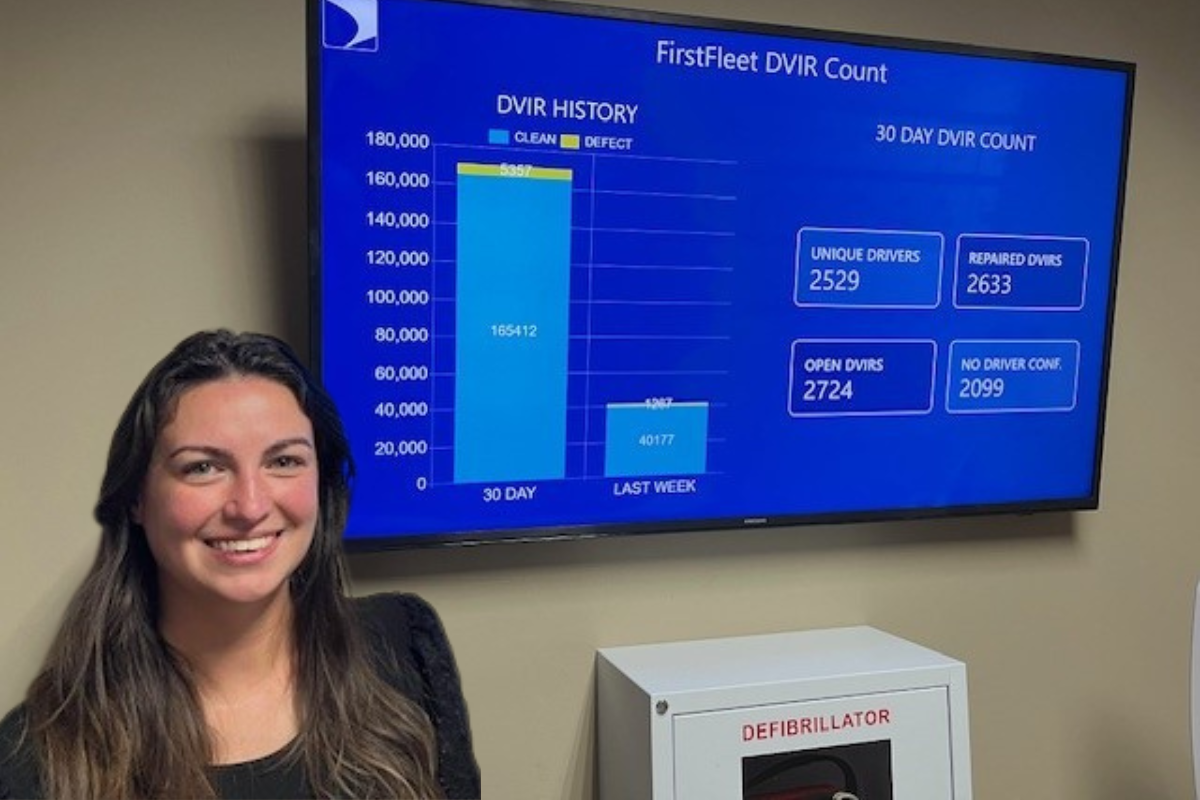
Rise Vision is one of the most practical ScreenCloud alternatives if you want to manage digital signage, emergency alerts, and screen sharing from one easy platform.
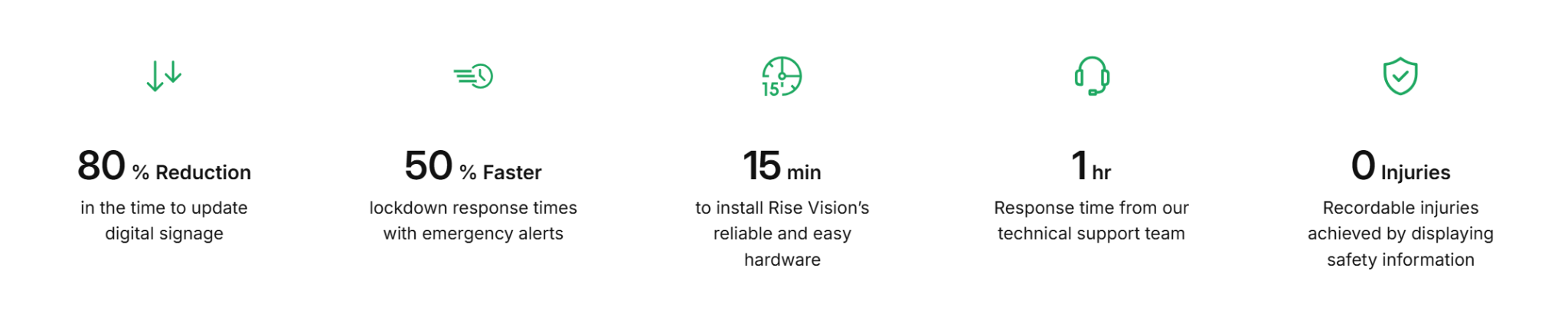
Since our debut in 1992, we’ve helped over 12.3k+ organizations use screens for clearer communication, safer workplaces, better updates, and simpler day-to-day content management. We also hold a strong 4.7-star rating, which makes sense when you look at results like:
- 80% reduction in the time it takes to update digital signage
- 50% faster lockdown response times with emergency alerts
- 15 minutes to install Rise Vision’s hardware
- 1-hour response time from our technical support team
- 0 recordable injuries achieved by displaying safety information
On the trust side, we’re SOC 2 Type 2 attested, which matters if your organization takes security seriously.
Rise Vision also works with tools your team probably already uses, including Canva, Google Slides, Microsoft 365, Power BI, Facebook, Instagram, local weather, and news feeds. Plus, you can run it on hardware you may already have, including Chrome OS, Windows, Raspberry Pi, Amazon Signage Stick, BrightSign, and Apple TV, so you are not forced into one device setup.
Key Features
- Digital signage, screen sharing, and alerts in one platform: Rise Vision combines three core communication tools in one system instead of splitting them across separate products.
- Cloud-based screen management: Teams can manage content, schedules, and playlists across one screen or many locations from a central dashboard.
- 750+ templates and built-in design tools: Users can create announcements, dashboards, menus, and workplace updates without needing design experience.
- Live content integrations: Rise Vision connects with Canva, Google Workspace, Microsoft 365, Power BI, Domo, social media, weather, and live streaming tools.
- CAP-based emergency alerts: Advanced plans and above support emergency alerts that can override scheduled content across connected displays in real time.
- Flexible hardware support: Rise Vision works with existing devices and also offers dedicated hardware through its media player and Avocor display options.
- Onboarding and fast support: Rise Vision includes free training, guided onboarding, and a one-business-hour technical support response target.
Pricing
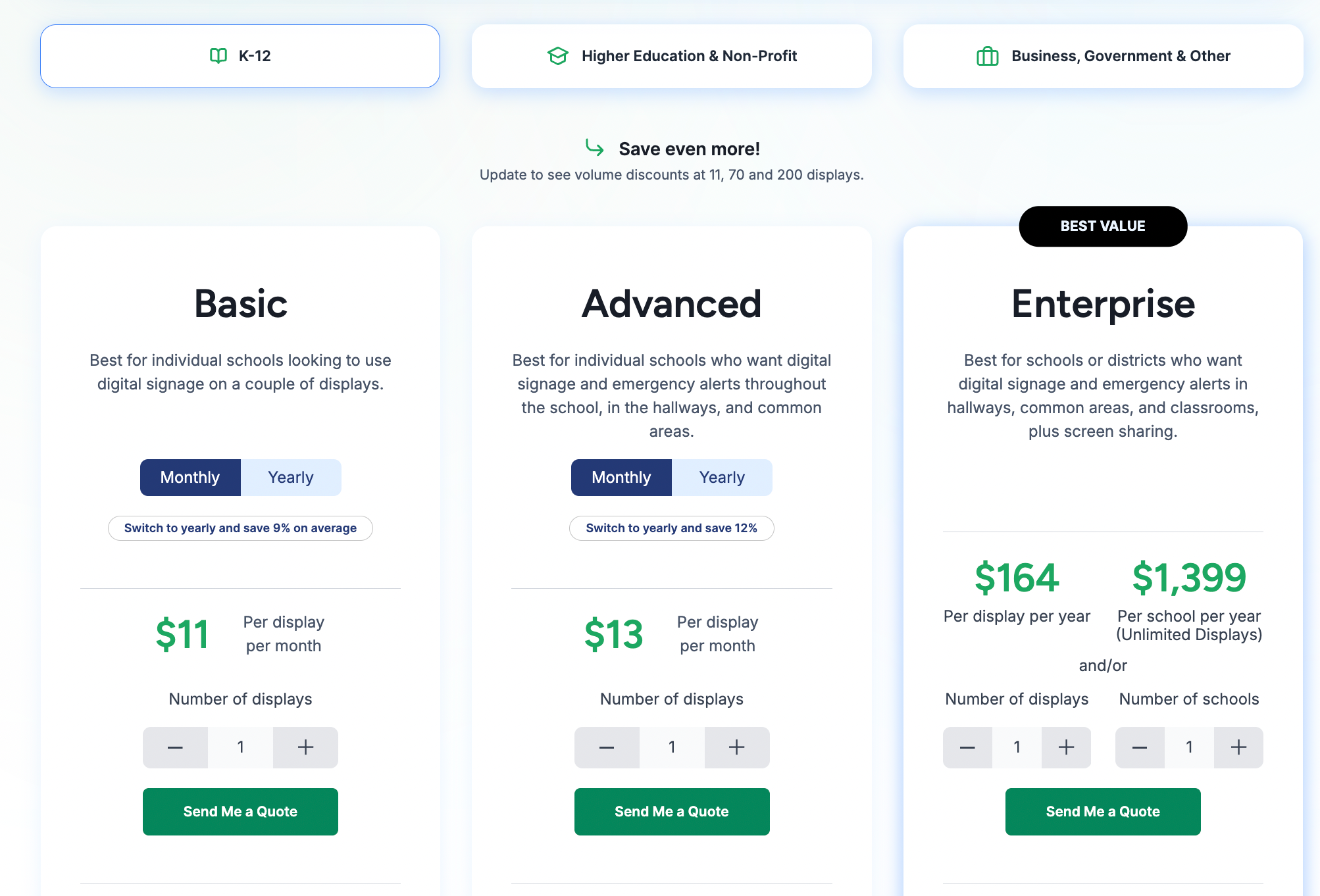
- Basic: $11 per display/month. Includes core signage, templates, scheduling, unlimited users, offline playback, and support.
- Advanced: $13 per display/month. Adds CAP-supported emergency alerts, calendar integrations, stock media, brand settings, and display notifications.
- Enterprise: $164 per display/year. Adds screen sharing, classroom alerts, approvals, SSO, enterprise controls, and district-wide overrides.
- Unlimited: $1,399 per school/year. Includes unlimited displays for K-12 schools with Enterprise-level functionality.
Higher Education and Non-Profit
- Basic: $11 per display/month. Includes core signage, templates, scheduling, unlimited users, offline playback, and support.
- Advanced: $13 per display/month. Adds emergency alerts, calendar integrations, stock media, brand settings, and organization-wide scheduling overrides.
- Enterprise: $164 per display/year. Adds dashboards, authenticated web pages, screen sharing, approvals, SSO, and enterprise management.
Business, Government and Other
- Basic: $12 per display/month. Includes core signage, templates, scheduling, unlimited users, offline playback, and support.
- Advanced: $14 per display/month. Adds emergency alerts, integrations, stock media, brand settings, and company-wide scheduling overrides.
- Enterprise: $180 per display/year. Adds dashboards, authenticated web pages, screen sharing, approvals, SSO, and enterprise controls.
Add-ons
- Interactive Display License: $1,200 per display/year. Requires an Advanced plan and adds interactive templates and touch-enabled components.
- Additional AI Credits: $300 per 600 credits/year.
Pros
- Technical support responds within one business hour.
- Combines signage, screen sharing, and emergency alerts in one platform.
- Simple interface built for non-technical staff to manage daily updates.
- Works with existing hardware to avoid expensive proprietary player lock-in.
- Extensive school and workplace templates reduce content design time.
Cons
- Interactive features require an expensive annual add-on licence.
2. Yodeck
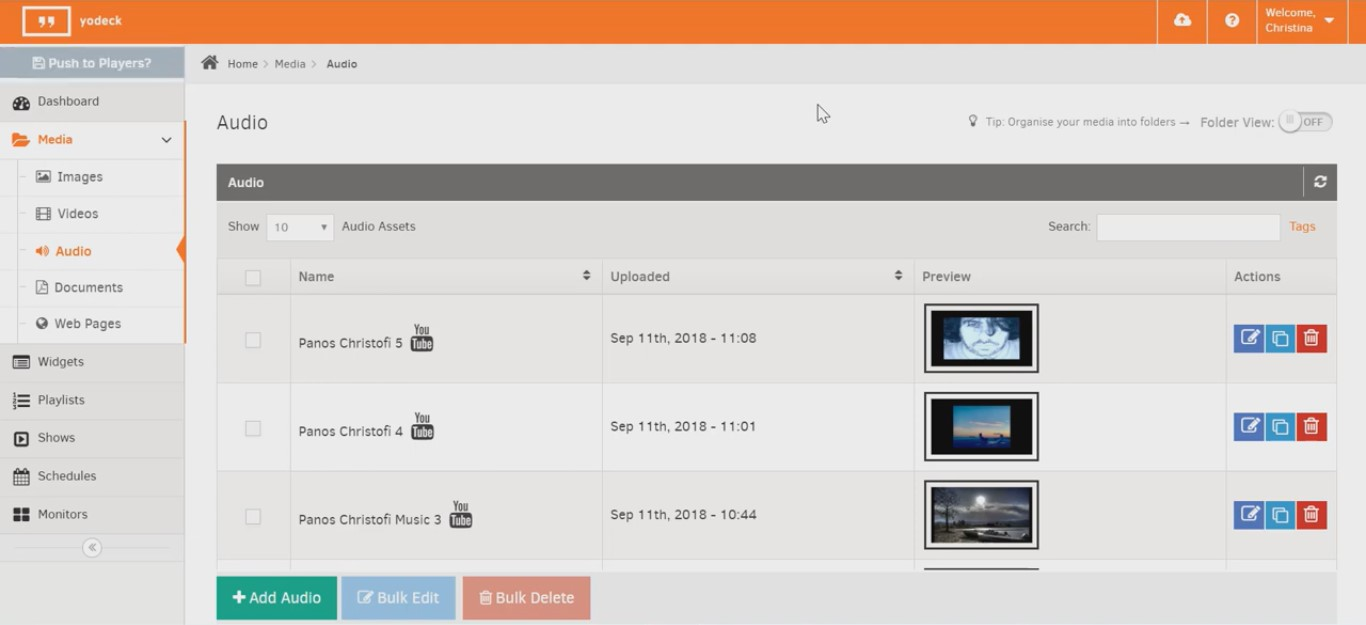
Yodeck is one of the best-known low-cost digital signage tools, and it still works pretty well. It runs on Raspberry Pi, a small and affordable computer about the size of a deck of cards. That matters because Raspberry Pi devices are known for being reliable and using very little power.
Yodeck also has simple paid plans, which we’ll cover below. But some helpful extras are only available on its Enterprise plan, like a dedicated customer success manager and free training. Also, if SOC 2 or WCAG A compliance matters to your team, Yodeck may not be the best fit.
Key Features
- Free Hardware Program: Provides a Yodeck media player at no extra cost when you commit to an annual plan.
- HDMI-CEC Power Management: Allows users to schedule screens to turn on or off automatically, reducing energy costs.
- Raspberry Pi Optimized: Built on a stable hardware foundation designed for long-term, continuous playback.
- Layout Zone Editor: Splits screens into multiple regions for simultaneous media playback.
- Instant Activation Logic: New displays are paired in minutes by simply entering a code shown on the screen into the dashboard.
Pricing
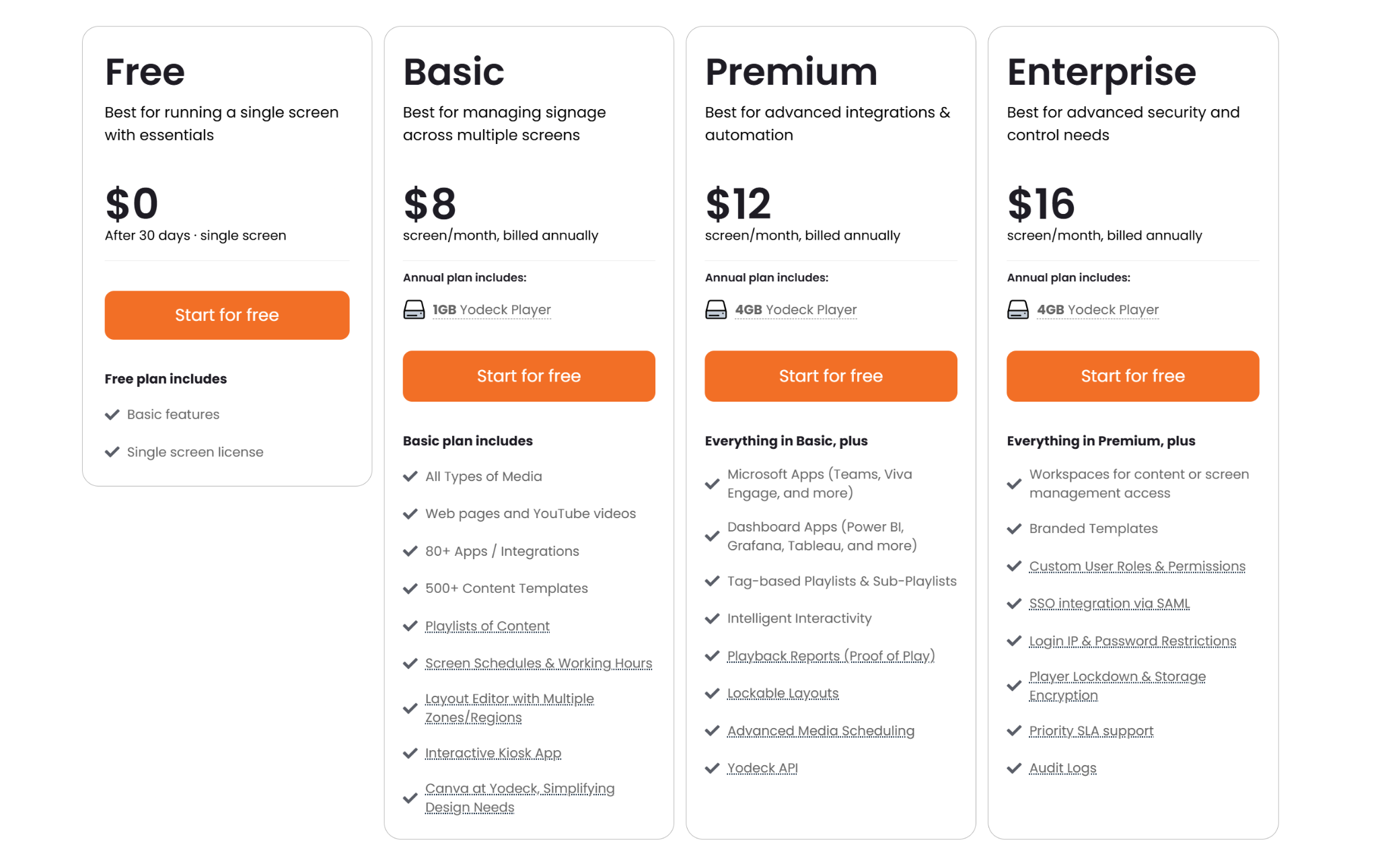
- Free: $0. Includes one screen with core signage features.
- Basic: $8 per screen/month (annual). Includes free player, templates, and scheduling.
- Premium: $12 per screen/month (annual). Adds dashboard integrations and advanced scheduling.
- Enterprise: $16 per screen/month (annual). Adds SSO, audit controls, and stronger security.
Pros
- Offers advanced signage features at a low starting price.
- Raspberry Pi hardware is stable for long-term playback.
- Includes unlimited storage and bandwidth on paid plans.
Cons
- Free hardware is only fully owned after one year.
- Advanced security features are limited to higher tiers.
- Bulk scheduling across many screens can be time-consuming.
3. Appspace
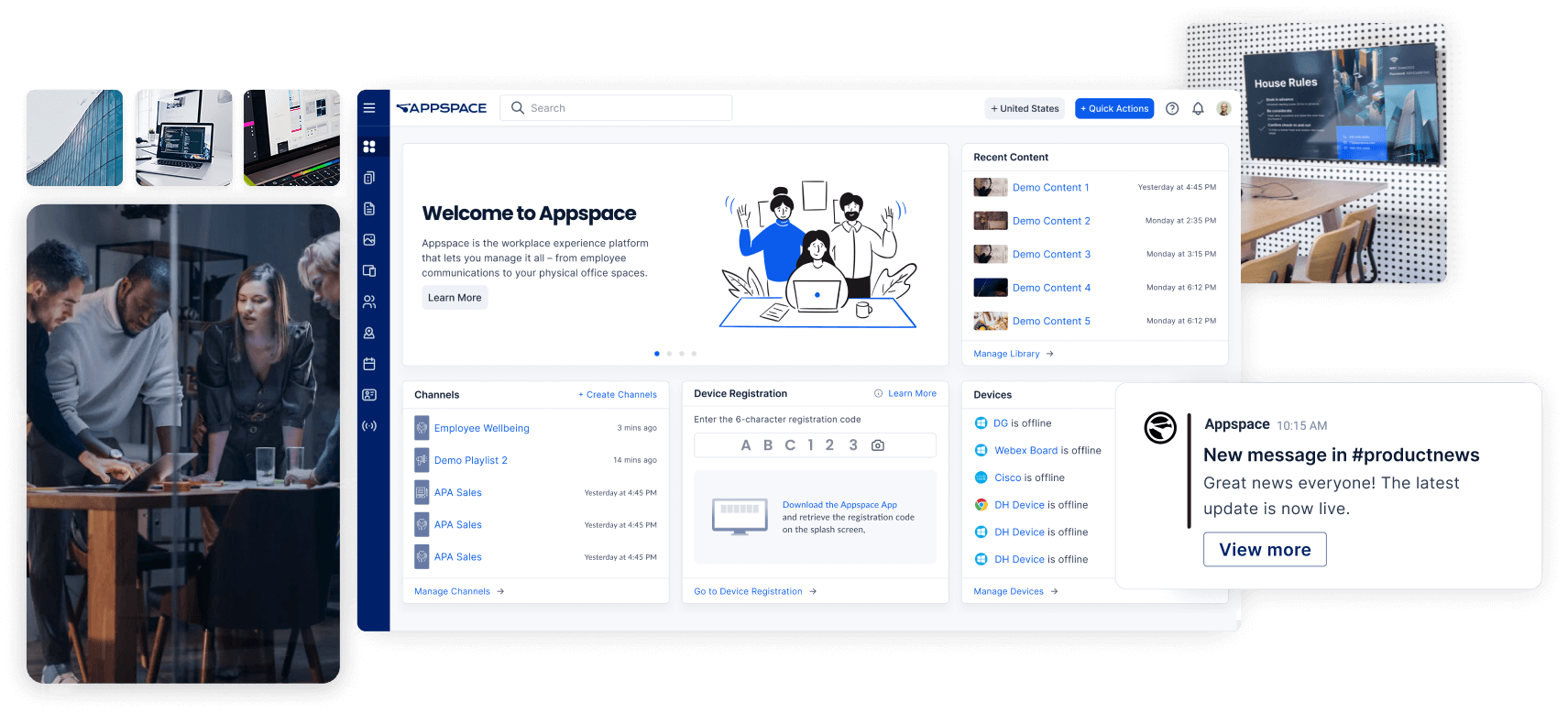
Appspace is less “digital signage software” and more “workplace hub with signage included.” It handles the screens on the wall, but it can also manage employee app updates, intranet content, room booking, visitor check-in, and desk reservations. So instead of patching together a bunch of office tools, you can run a lot of that from one place. That is why it makes more sense for bigger companies.
It works with tools enterprise teams already use, like Microsoft 365, Google Workspace, ServiceNow, Zoom Rooms, and Logitech hardware.
Key Features
- Multi-Channel Orchestration: Publishes consistent messaging across digital signs, mobile apps, Slack channels, and Microsoft Teams.
- Workplace Management Suite: Includes built-in tools for room scheduling, hot-desking, and guest registration directly from the platform.
- Appspace Intelligence: Features AI-driven tools for content writing, automated translations, and real-time engagement analytics.
- Enterprise Security Standards: Maintains high-level compliance with SOC 2 and ISO certifications, including deep SSO integration.
- Space Reservation Maps: Allows employees to book desks or meeting rooms through interactive maps on touchscreen displays.
Pricing
Appspace uses a custom, quote-based pricing model tailored to the specific products, user count, and workplace modules your organization requires.
Pros
- Combines signage, desk booking, and internal communication tools.
- Cards system keeps content consistent without design expertise.
- Supports strong administrative control across complex organizations.
Cons
- Initial setup is more complex than simpler signage tools.
- Total cost varies significantly based on organization requirements.
- Admin dashboard has a steep learning curve.
4. NoviSign
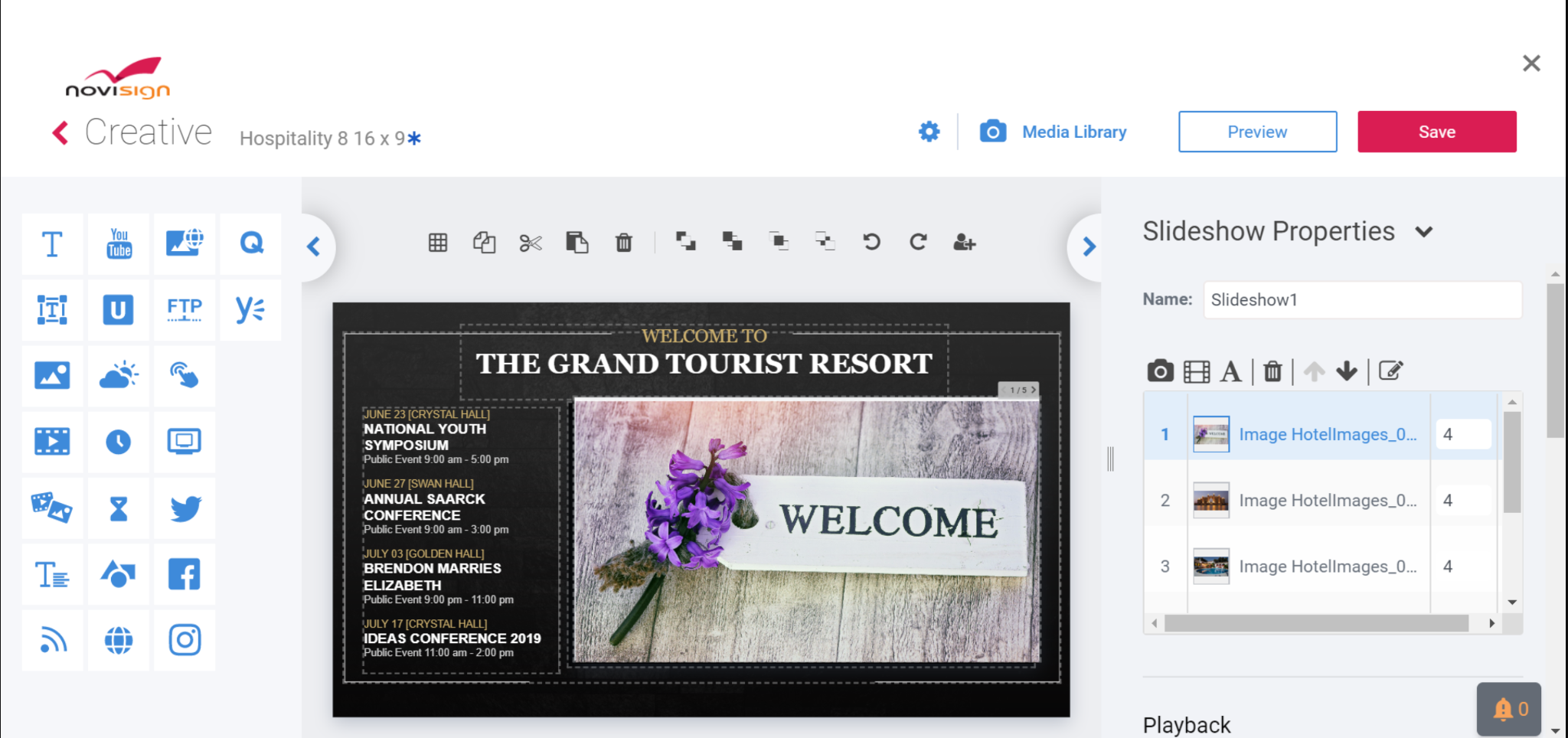
NoviSign is a good option if you want to create screen content without needing a designer.
Its main feature is Online Studio, a drag-and-drop editor that works in your browser. You can use templates, add different sections to your screen, and include interactive things like QR codes, live polls, menus, social media walls, data tickers, and trivia games.
That makes it useful for retail stores, events, restaurants, and any place where the screen needs to do more than play the same video on repeat. It also works on Windows, Android, Chrome OS, and other hardware, so you are not locked into one device.
Key Features
- Online Studio Editor: A visual drag-and-drop suite that enables the creation of complex layouts without external software.
- Interactive Widget Library: Includes over 20 functional widgets for live polls, QR codes, and social media walls.
- Hybrid Caching Logic: Automatically downloads and stores media on the player to ensure playback continues during outages.
- Proof-of-Play Reporting: Provides detailed logs of exactly when and where specific content was displayed for accountability.
- Hardware Agnostic Support: Runs reliably across a variety of devices, including Windows, Android, and Chrome OS.
Pricing
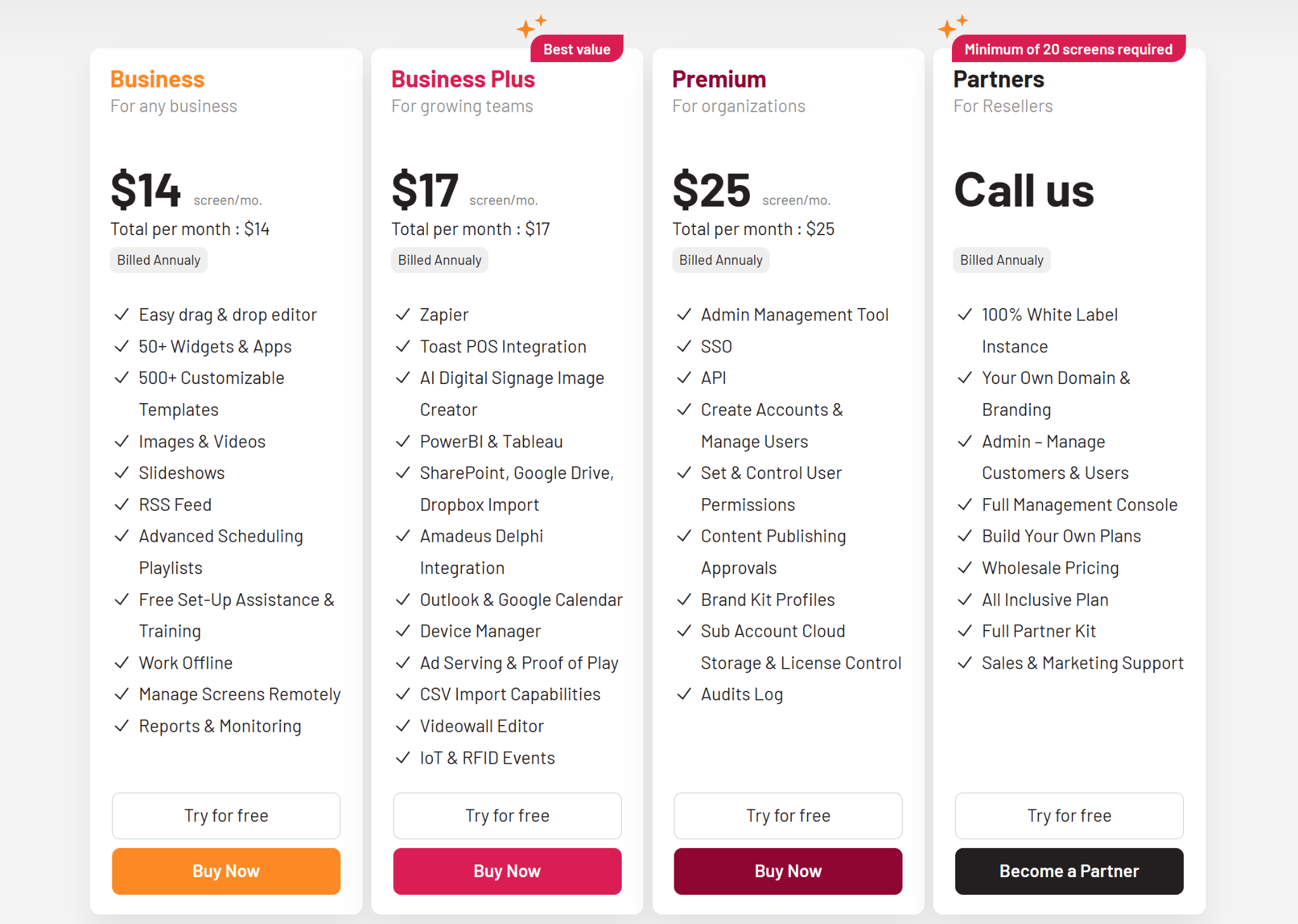
- Business: $14 per screen/month (annual). Includes editor, templates, and scheduling.
- Business Plus: $17 per screen/month (annual). Adds integrations and advanced management.
- Premium: $25 per screen/month (annual). Adds SSO and publishing approvals.
Pros
- Makes content creation easy for non-designers.
- Supports touchscreens and interactive display use cases.
- Offers responsive support and useful onboarding resources.
Cons
- Backend dashboard can feel slower than newer rivals.
- Design previews may differ slightly from live screens.
- Pricing can rise quickly as deployments scale.
5. Skykit
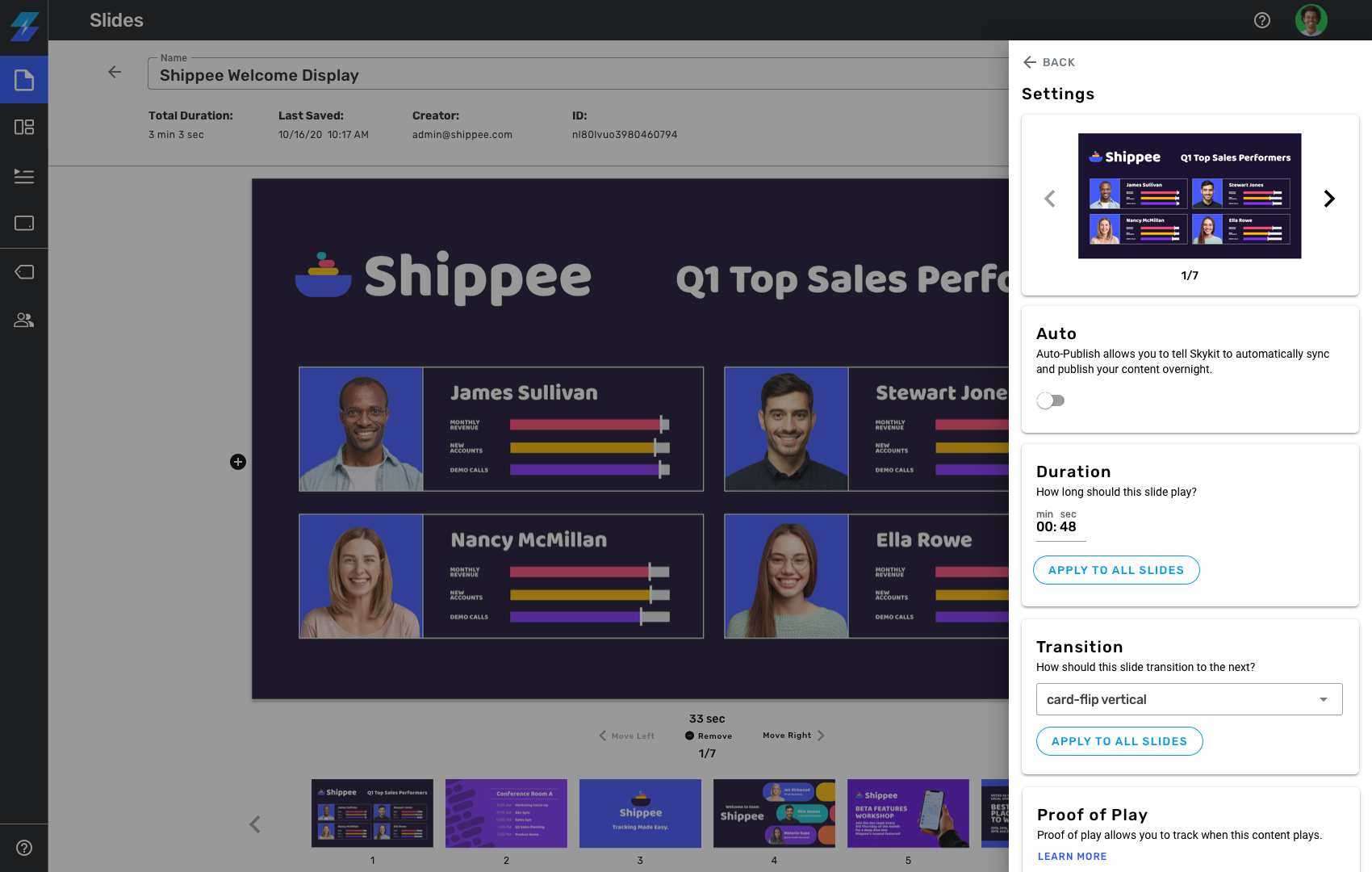
Skykit is a digital signage platform built for teams that need more control over their screens, content, and devices. It is less about “let’s make a nice poster” and more about “we have 200 screens, some are in awkward places, and we need them to actually stay online.”
- You get Skykit Beam for the content side, like uploads, playlists, and scheduling.
- Then there is Skykit Control for the device side, like checking screen health, restarting frozen screens, and pushing updates remotely.
Skykit also sells tougher media players, including LTE-enabled ones for places where Wi-Fi is unreliable or basically nonexistent. That makes it useful for factories, construction sites, remote stores, and other locations where normal setups can get messy fast.
Key Features
- Full-Stack Control: Proprietary hardware and firmware integration reduces software crashes and enables deep remote troubleshooting.
- Skykit Beam (CMS): A cloud-based system for uploading media, creating playlists, and scheduling content seamlessly.
- Skykit Control (MDM): A standalone management tool to remotely reboot and monitor device health without physical access.
- Native Google Integration: Allows users to edit content in Google Slides for instant synchronization to displays.
- LTE-Enabled Hardware: Provides media players with cellular connectivity for areas lacking reliable on-site Wi-Fi networks.
Pricing
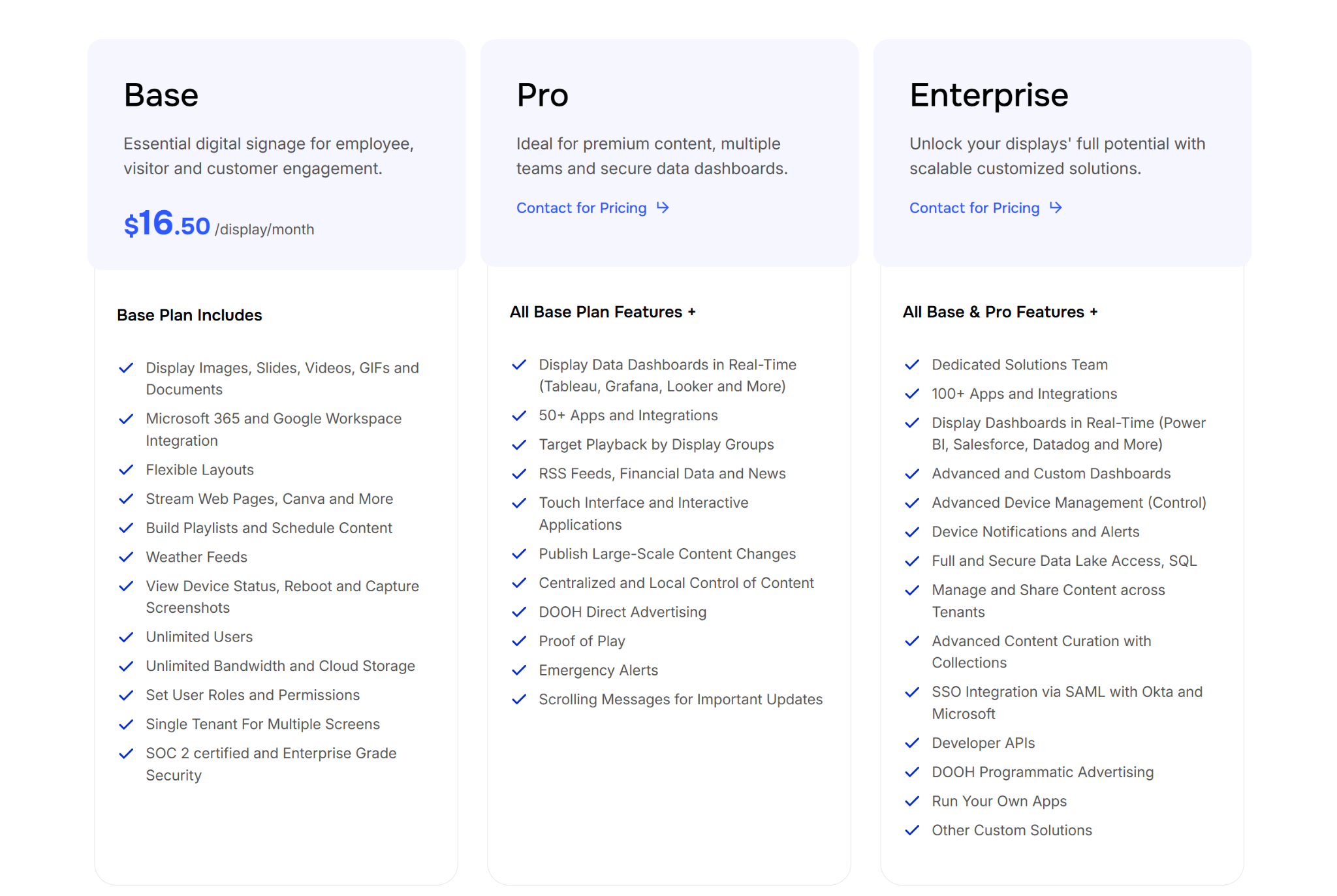
- Base: $16.50 per display/month. Includes Google/Microsoft integration, unlimited storage, and basic device monitoring.
- Pro: Contact for pricing. Adds real-time data dashboards (Tableau/Looker), emergency alerts, and proof-of-play reporting.
- Enterprise: Contact for pricing. Includes 100+ app integrations, SSO, and developer APIs for tailored solutions.
Pros
- Locked hardware and software reduce crashes and security risks.
- Native Google Slides support simplifies content for existing users.
- LTE-enabled players support sites with poor Wi-Fi signals.
Cons
- Administrative interface is less intuitive and needs more training.
- Total cost is higher with proprietary enterprise hardware.
- Bulk scheduling for individual screens can be tedious.
6. OptiSigns
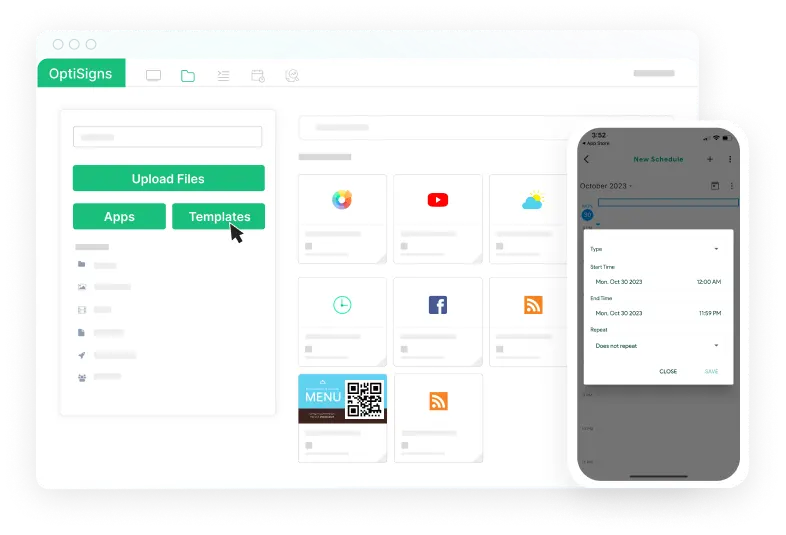
OptiSigns is a good choice if you need a ScreenCloud alternative that’s simple, reliable, and not painfully expensive. First impression here is it’s not trying to be the fanciest platform in the room. It is more of a solid workhorse. You can manage screens from the cloud, schedule content, use split-screen layouts, and connect with 140+ apps.
It also works on loads of hardware, including Amazon Fire TV, Android, Windows, Linux, Chrome OS, Roku, and browser-based devices. So you can often start with the devices you already have.
Key Features
- 140+ App Integrations: Native support for apps like Instagram, YouTube, Power BI, and Google Slides.
- Advanced Content Scheduling: Tools for "dayparting" and setting automated expiration dates for time-sensitive media.
- Split-Screen Zones: Divide a single screen into multiple areas to display weather, news, and video simultaneously.
- Mobile Admin App: Allows managers to update content and monitor screen status on-the-go via Android or iOS.
- Offline Playback: Caches content locally so screens continue to run even if the internet connection drops.
Pricing
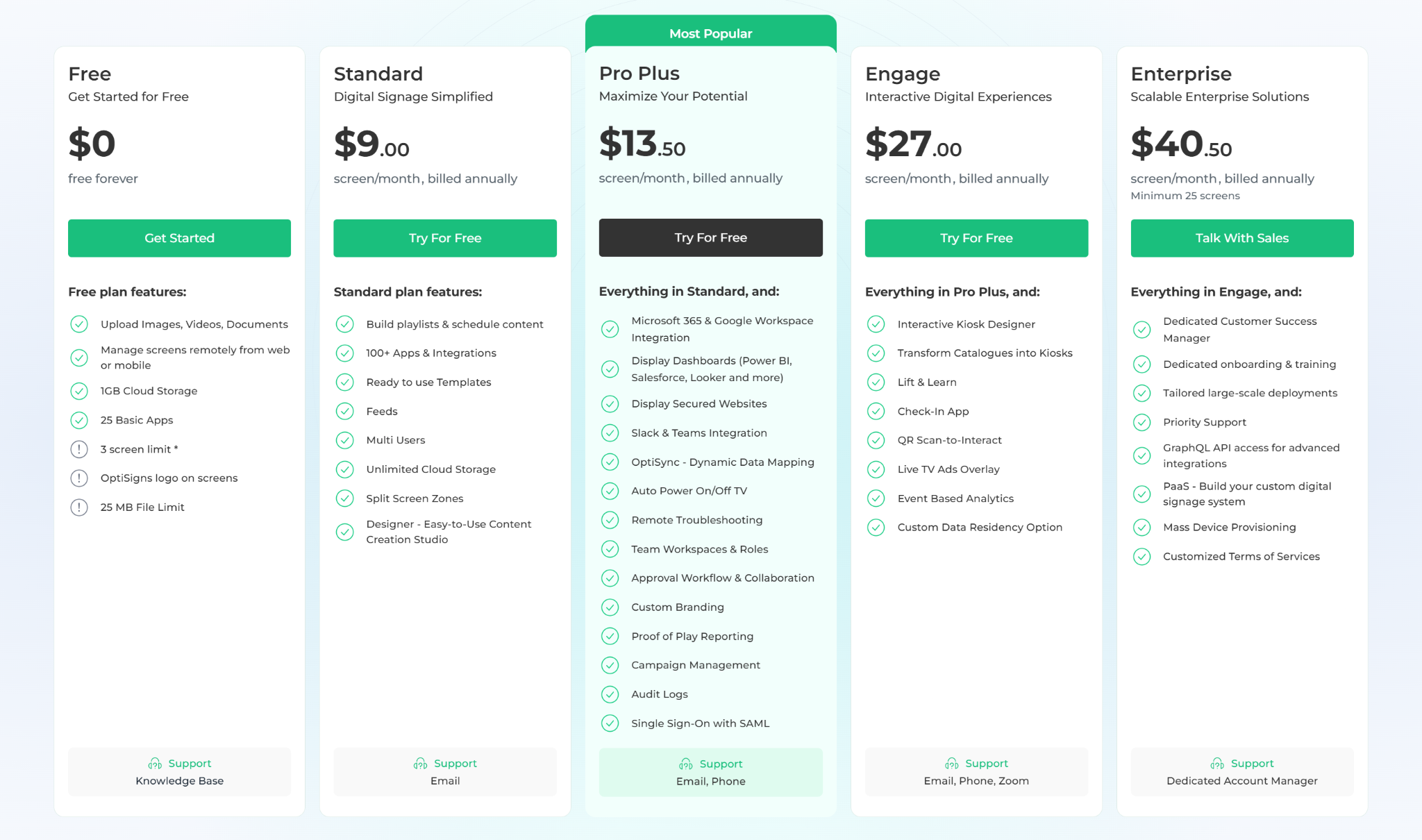
- Free: $0 for up to 3 screens. Includes basic features but requires mandatory OptiSigns branding.
- Standard: $9 per screen/month (annual). Includes 100+ apps, split-screen zones, and a designer studio.
- Pro Plus: $13.50 per screen/month (annual). Adds Microsoft 365 integration, dashboards, and SSO support.
- Engage: $27 per screen/month (annual). Includes interactive kiosk designers, QR scan-to-interact, and check-in apps.
- Enterprise: $40.50 per screen/month (annual). Includes a dedicated success manager and priority support.
Pros
- Supports diverse hardware including Android, Windows, Linux, and Roku.
- Fast deployment using a simple 6-digit pairing code.
- Robust security features including SOC 2 Type II and SSO.
Cons
- Advanced scheduling and asset management can feel tedious initially.
- Free plan is limited to 3 screens and branding.
- Minor syncing delays can occur during content updates.
7. TelemetryTV
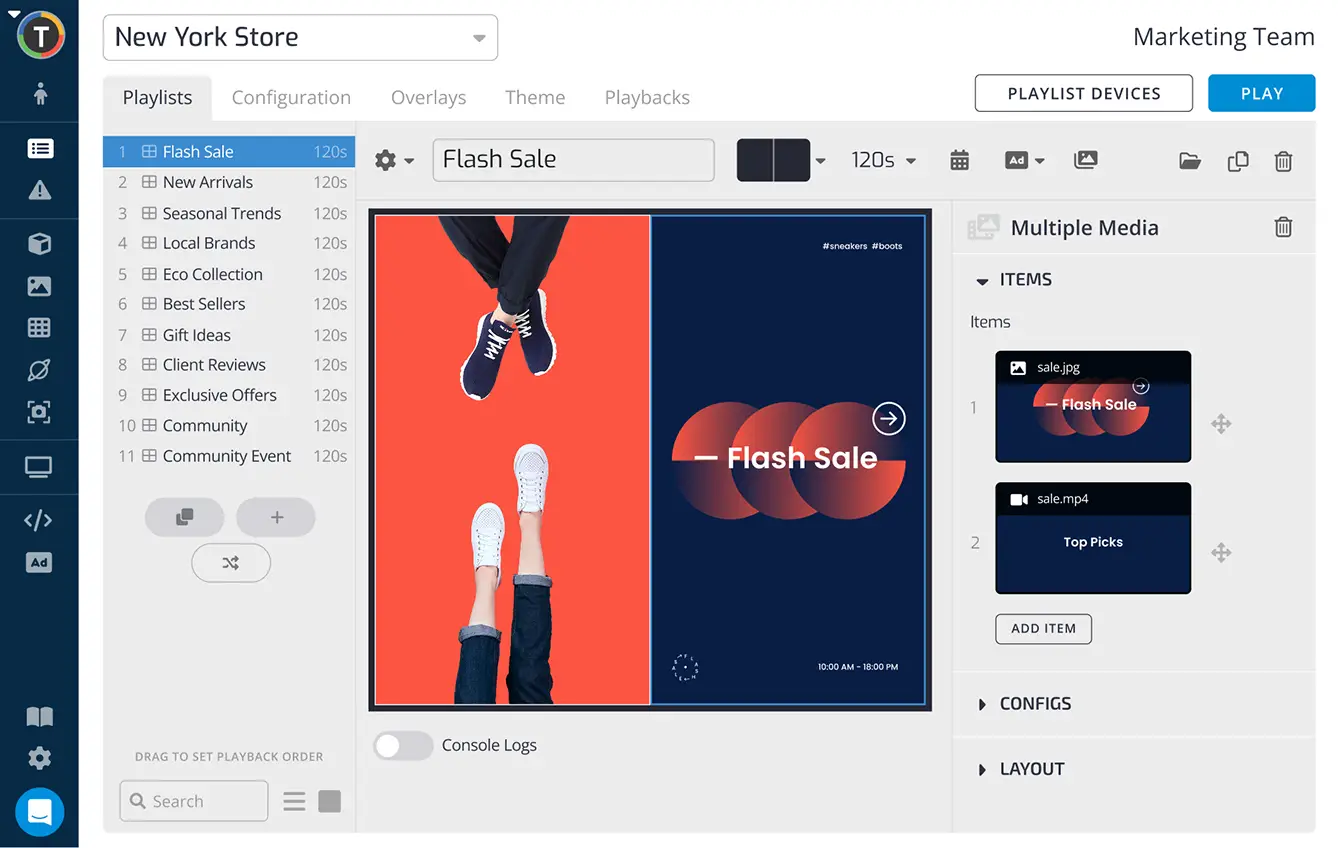
TelemetryTV is an enterprise-grade platform built for large-scale deployments where security and high uptime are non-negotiable. Unlike general-purpose tools, it features a proprietary, hardened operating system called TelemetryOS, designed specifically to minimize maintenance and prevent consumer-grade software glitches. It is a good fit for IT-led environments that need to manage large device networks with precision.
Key Features
- TelemetryOS: A stripped-down, Linux-based OS engineered to run signage software with minimal resource usage.
- Automatic Provisioning: Allows IT teams to set up thousands of devices simultaneously using USB sticks.
- 70+ Turnkey Apps: Built-in library including native Canva integration for professional design within the dashboard.
- Smart Scheduling Overrides: Precision control to interrupt regular content loops for site-wide emergency safety broadcasts.
- Hardened Security: Built to follow CIS benchmarks and SOC 2 compliance for highly regulated industries.
Pricing
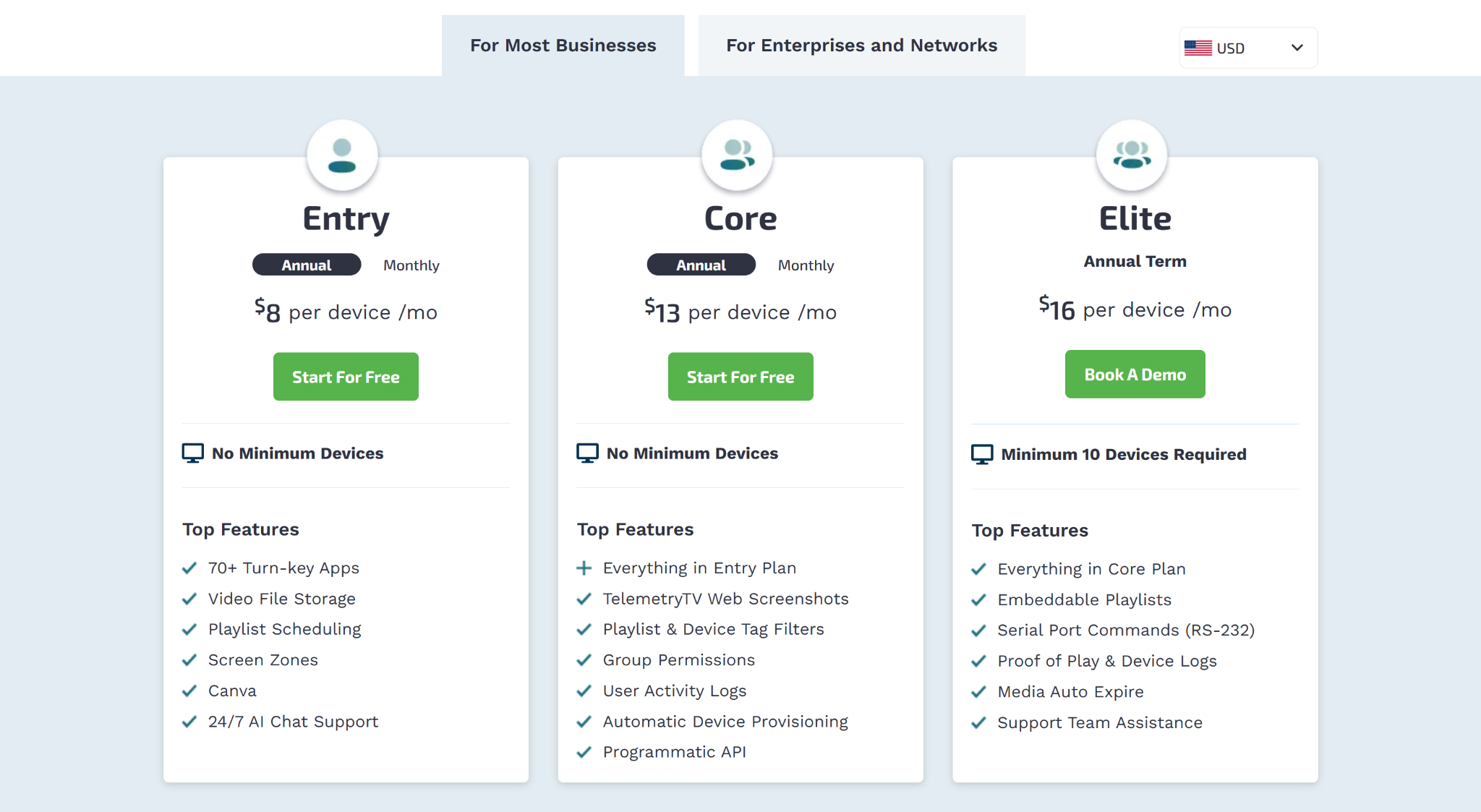
For Most Businesses
- Entry: $8 per device/month (annual) or $9 monthly. Includes 70+ apps, playlist scheduling, and Canva integration.
- Core: $13 per device/month (annual) or $15 monthly. Adds web screenshots, group permissions, and automatic provisioning.
- Elite: $16 per device/month (billed annually). Requires a 10-device minimum and adds RS-232 commands and proof-of-play logs.
For Enterprises and Networks
- Enterprise: $35 per device/month (billed annually). Requires 100-device minimum; adds Zoom integration, SAML/SCIM, and custom SLAs.
- Network: $9 per device/month (billed annually). Designed for 500+ screens with ad campaign management and exportable proof-of-play reports.
Pros
- SOC 2 Type 2 compliance strengthens governance and security.
- TelemetryOS and dedicated device options help reduce crashes.
- Native Canva integration supports design inside the dashboard.
Cons
- Feature depth can overwhelm beginners or smaller teams.
- Advanced automation features are limited to the Elite plan.
- Many dynamic tools still depend on a live internet connection.
How To Choose The Best ScreenCloud Alternative
Start With What You Actually Need The Screens To Do
First, be clear on the job. Do you need screens for simple announcements, dashboards, safety updates, menus, or internal comms? Those are not all the same thing. A basic signage tool may be enough for simple content. But if screens are part of how your team works every day, you need something that can handle that without making everything harder.
Think About Who Will Manage It Every Day
The best tool is the one your team can use without needing help every five minutes. If IT will manage everything, deeper controls may matter. If teachers, office staff, or operations teams will update screens, it needs to be simple. Look at how easy it is to create content, schedule updates, and make changes without getting stuck.
Check How It Works When You Add More Screens
One screen is easy. 10 screens across different places is where things can get messy. Look for screen groups, permissions, scheduling, and easy ways to update many screens at once. You do not want a tool that feels fine at the start but becomes a chore once your setup grows.
Look At Support And Reliability
Digital signage only works if the screens actually stay updated and online. So do not only look at features. Look at how reliable the platform is, what hardware it supports, and how quickly support responds when something breaks. A good alternative should make screen management feel easier, not give your team another thing to chase.
The Right Choice Comes Down To What Feels Easy To Run
At the end of the day, the best ScreenCloud alternative is the one your team can actually manage without it turning into extra work. Most tools can get content on a screen. Fewer make it easy to keep everything updated, consistent, and working across locations.
If that is what you are looking for, Rise Vision is a strong option to consider. It is built for the day-to-day side of signage. Updating screens quickly, keeping messages aligned, and helping non-technical teams stay in control without relying on IT for every change.
If your current setup is starting to feel harder than it should, it is probably a good time to take a closer look. Want to see how Rise Vision works in practice? Book a demo with us today.
Frequently Asked Questions
What Is the Best Alternative To ScreenCloud?
The best alternative depends on what you actually need your screens to do. If you just want to display content, many tools will work. But if you care about keeping screens updated, managing multiple locations, or using signage for real communication, options like Rise Vision or Yodeck are usually a better fit. The key is picking something your team can run easily every day.
Why Do Teams Switch Away From ScreenCloud?
Most teams switch when managing screens starts to feel harder than expected. It is usually not one big issue. It is smaller things like keeping content updated, dealing with occasional reliability issues, or wanting more control over layouts and scheduling. Over time, that adds up, and teams start looking for something that feels easier to manage as their setup grows.
What Should I Look for In A Digital Signage Tool?
Look at how easy it is to manage once everything is live. That includes creating content, scheduling updates, grouping screens, and pushing changes across locations. Also check integrations, reliability, and support. Most tools can show content, so the real difference is how much effort it takes to keep everything running smoothly over time.
Do I Need Special Hardware For Digital Signage?
In most cases, no. Many digital signage tools work on devices you already have, like smart TVs, media players, or streaming sticks. Some platforms also offer their own hardware if you want a more controlled setup. It really depends on how much control, reliability, and support you want from your setup as it grows.
Is Rise Vision A Good ScreenCloud Alternative?
Yes, especially if you want something that is easier to manage day to day. Rise Vision goes beyond basic signage by including screen sharing and emergency alerts in the same platform. That makes it a strong option for schools, workplaces, and multi-location teams that rely on screens for regular communication, not just occasional content display.
More From Our Blog
-

Digital Signage Remote Management: How to Run Every Screen From One Place
Digital signage remote management lets you control screens, schedules, and display health from an online platform. To get started, choose a hardware-agnostic platform, connect your media players or[…]
Read More -
ScreenBeam Review 2026: Features, Pricing, and Limitations
ScreenBeam sells wireless display receivers that let people cast to a screen from any device without an app. You need one receiver per display, and they run from $299.99 to $1,199.99. Cloud-based[…]
Read More -

Interactive Touch Screen Digital Signage: How It Works and What You Need
Interactive touch screen digital signage lets viewers tap a display to find what they need. It pairs a commercial touch display with content software. Common uses include wayfinding, visitor[…]
Read More
12,300+ Organizations Trust Rise Vision, You Can Too
































Schedule a Free Demo
You deserve the #1 all-in-one platform for digital signage, screen sharing, and emergency alerts.





