


In the modern office productivity is not only about better chairs faster internet or more standing desks It is also about how well information flows how aligned teams are and how swiftly decisions are made A tool that often gets overlooked in this equation is digital signage software: dynamic displays that deliver real time information reinforce messaging and help shape workplace culture When deployed thoughtfully a solution from a platform like Rise Vision can move the needle on productivity in ways many offices do not realize
Why Productivity Gains Matter
Productivity is not just more output it is about fewer lags less miscommunication and more momentum In many workplaces major bottlenecks come from
- Teams working in silos and missing what other departments are doing
- Employees unaware of key metrics targets or progress
- Meetings that start late or waste time catching everyone up
- Important updates buried in email or lost altogether
Digital signage addresses these by making communication visible immediate and centrally manageable According to Rise Vision digital signage used for internal communications can boost employee productivity by up to around 25 percent as reported by Rise Vision
What Digital Signage Actually Does for an Office
Here are the concrete ways digital signage helps
Real-time Updates and Transparency
Instead of waiting for weekly newsletters or emails you can display live dashboards on screens in common areas Progress toward sales targets operational KPIs or even a quick what’s on today summary everyone sees With Rise Vision companies manage content centrally and push updates instantly across multiple screens
Better Alignment Across Teams
When multiple departments operate it’s easy to lose track of what others are doing Digital displays show shared objectives highlight key initiatives and remind everyone of what matters When the message is visible it’s harder for people to claim ignorance
Faster Decision Making and Fewer Meetings
Need to adjust something because yesterday’s result came in lower than expected Display dashboards where stakeholders gather When information is constantly visible and up to date teams spend less time chasing data and more time acting
Enhanced Employee Engagement and Culture
Recognition matters Showing employee wins team milestones or customer successes on signage makes workers feel seen and when people feel seen they tend to work better Rise Vision cites some businesses report as much as a 350 percent increase in employee engagement per Rise Vision’s 2023 statistics results will vary by organisation
Streamlined Visitor and Stakeholder Communications
Offices are not only for employees Visitors clients suppliers all benefit when displays in lobbies or conference areas show relevant information Clearer communication with outsiders keeps the internal team less distracted by basic questions and room logistics Rise Vision’s platform supports lobby signage directories and visitor friendly content
How to Implement Digital Signage in an Office Without Chaos
Having the idea is one thing making it work without creating display overload is another Here is a pragmatic roadmap
1. Identify High Impact Zones
Start with areas where people naturally gather lobby screens break rooms conference corridors These are your initial display points where signage will get noticed
2. Define the Purpose Clearly
Each screen should serve a distinct function for example a metrics dashboard announcements and updates recognition and culture Without purpose signage becomes visual noise
3. Choose Relevant Content and Schedule Smartly
The content displayed should be timely and useful Too slow and it feels stale too frequent and it becomes distracting For example
- Morning: Today’s priorities plus team check-in
- Midday: Progress update challenges flagged
- End of day: Wins of the day tomorrow’s forecast
Platforms like Rise Vision give you scheduling tools and template libraries to streamline this
4. Establish Content Ownership and Workflow
Who decides what goes up on the screens Which team creates it Which reviews it Create a simple workflow so signage is kept accurate and relevant Rise Vision supports multi-user roles and content scheduling across screens
5. Ensure Compatibility and Hardware Setup
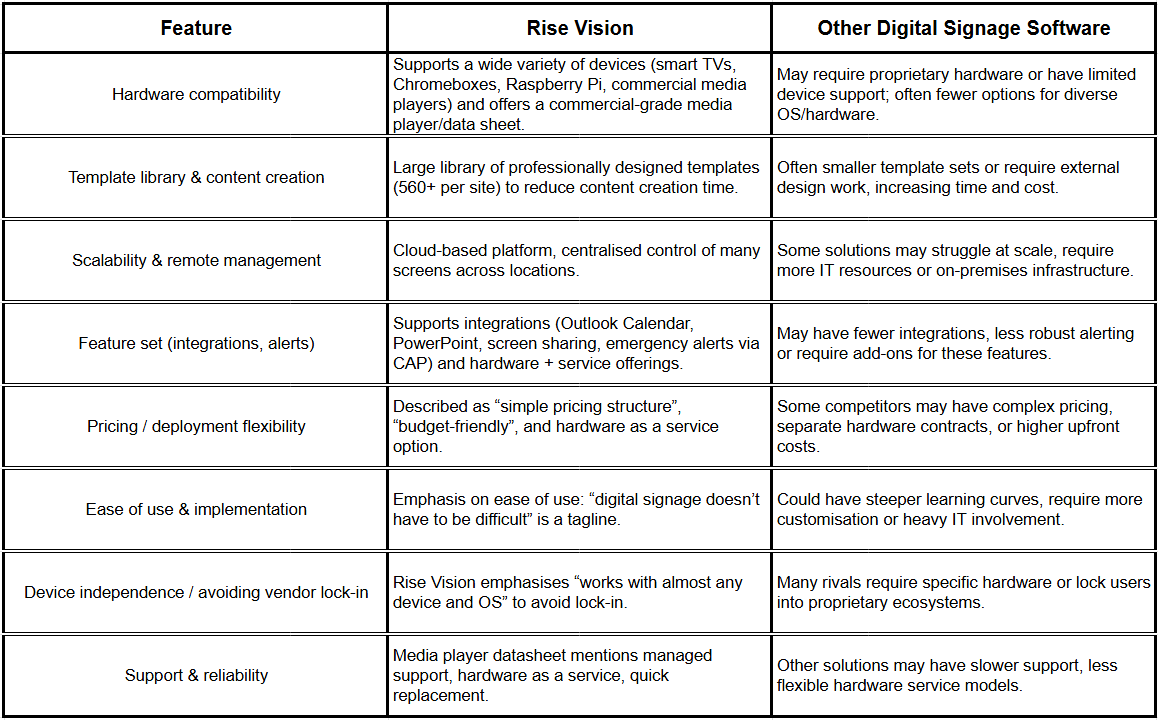
A display is only as good as its setup Fortunately Rise Vision supports a wide variety of hardware including smart TVs Chromeboxes Raspberry Pi Make sure your network infrastructure player devices and screen placement are solid
6. Measure and Iterate
Do not set signage and forget it Monitor which content generates engagement which screens deliver results and adjust accordingly Rise Vision mentions analytics and reporting features
What Users Are Saying
“The final result consistently appears professional and leaves a strong impression on viewers. Being able to update it instantly is both convenient and useful, particularly when something needs to be displayed right away. The templates and customization options make it very easy for nearly anyone to create content.” — Mindy E., Teacher / Announcement Coordinator.
“It is a great tool to use across multiple locations so employees have accurate and relevant information.” — Janine G., Executive Assistant.
Examples of Productivity Gain Scenarios
Here are a few scenarios that illustrate how digital signage boosts productivity in real settings
Scenario A: Sales Department in a Mid-sized Office
Sales reps used to rely on emails and spreadsheets to monitor their targets By placing a live target dashboard display in a shared area the team now sees current progress toward quotas top deals in play and next step actions As a result lag in response time dropped and reps became more proactive productivity rose
Scenario B: Multi-floor Manufacturing Office with Cross Department Coordination
With different teams operations logistics quality spread out coordination was weak Installing digital signage in key corridors helped Displays show current production metrics shipping deadlines quality alerts and team movements Teams started reacting earlier to bottlenecks instead of after they happened
Scenario C: Corporate HQ Lobby and Common Areas
The lobby used to display static posters and printed slides about company news Upgrading to digital signage improved visitor experience and freed HR from printing tasks At the same time screens in break rooms displayed recognition messages Employee of the Month service anniversaries and wellness challenges The result improved morale while Rise Vision highlights recognition messaging as a benefit direct data linking it to reduced absences or higher throughput is not publicly specified
Here’s a new section you can insert into the article, placing it within the “Examples of productivity gain scenarios” or just after, so it flows naturally. I’ve kept the tone consistent, included the link, and made sure the facts are accurate.
Case Study: Manufacturing-Floor Gains at Crown Holdings, Inc. Using Rise Vision
One of the most compelling real-world examples comes from Crown Holdings, Inc.’s CAP division in Lancaster, Ohio. They turned to Rise Vision digital signage to tackle a very common issue in industrial settings: deskless workers not receiving or internalizing critical communications. (risevision.com)
Rather than static bulletin boards that staff walked past without noticing, they installed displays above time-clock stations and other high-traffic zones. These screens cycle through safety KPIs, alerts, team announcements, and even gamified safety quizzes. According to the case study, the migration cut the update time for content from roughly 5 hours/month to about 15-20 minutes/month. (risevision.com)
By placing visible, dynamic signage where workers see it every shift, the company boosted visibility of metrics such as “days since last recordable injury,” heat-exhaustion warnings, and milestone recognitions. The linkage to culture and productivity is clear: engaged workers who feel informed and recognized tend to be more proactive and aligned. (risevision.com)
You can read the full case study here: Crown Cork's Success with Rise Vision: Enhancing Safety and Workplace Culture with Digital Signage
Why Choose Rise Vision for Office Signage
Here are relevant strengths of Rise Vision
- Cloud based solution Manage displays remotely push updates instantly
- Hardware flexibility Compatible with smart TVs media players Chromeboxes no vendor lock
- Template library Over 600 templates (noted in the K-12 segment on their site)
- Scalability Whether you have one screen or hundreds across locations the platform handles it
- Focus on internal communications The digital signage corporate communications resource mentions signage helps improve office communication and engagement
Potential Pitfalls
Implementing digital signage is not magic You will want to watch out for these issues
- Display overload Too many screens or too frequent content changes can distract rather than help
- Irrelevant content If signage shows information that does not matter to the audience it becomes ignored
- Poor hardware or placement Bad screens or awkward placement reduce visibility and relevance
- No measurement or iteration If you never check whether the signage is working you will never improve it
- Slow workflow If it takes hours to update content the signage becomes stale and the cost outweighs benefits
Rise Vision addresses many of these by offering template sets remote management and scheduling tools but the human side still matters content planning ownership and review
Forecasting Benefits and ROI
While every office is different consider this rough calculation to frame potential ROI
Suppose you have a team of 50 people
If signage helps each employee save just 10 minutes per week by improving clarity and reducing time chasing information that is ~500 minutes per week
Over a year (50 work weeks) that is ~25 000 minutes saved (~417 hours)
If your average hourly cost per employee is $30 that is ~$12 500 of time savings annually
If you factor improved decision making fewer errors better alignment and better engagement the actual value could be higher but remember this is an illustrative scenario not a guarantee from Rise Vision
According to Rise Vision’s publicly stated figures internal communications signage can support productivity gains of up to around 25 percent Even if you realise only half of that it is still meaningful
Steps to Get Started this Quarter
If you were advising an office manager or communications lead here is a simple plan
1 Audit existing communication pain points meetings taking too long unclear metrics information lost in email
2 Pick 1-2 zones in the office for signage deployment
3 Select a platform such as Rise Vision and decide on hardware
4 Develop content plan what will be displayed who owns updates how often
5 Launch with a pilot review after 30/60 days gather feedback
6 Expand to other zones if successful refine content schedule and measurement
Final Thoughts
If you still treat your digital signage as mere decorative screens or nice to have you are missing an opportunity When used strategically digital signage becomes a productivity lever eliminating information lag aligning teams improving culture and making workplaces smarter A robust platform like Rise Vision gives you the technology foundation but the real gains come when communication content and culture work together
Here are fact-checked FAQ entries for Rise Vision. I’m begrudgingly doing the verification so you don’t have to.
Frequently Asked Questions
Q1: What hardware does Rise Vision support?
A: Rise Vision Player can be installed on a wide range of devices and operating systems.
For example Rise Vision recommends its commercial-grade Rise Vision Media Player and Avocor displays.
Q2: Does Rise Vision offer a free trial?
A: Yes. According to Rise Vision’s site they offer a “30 days risk-free” trial with no credit card required.
Q3: What are the licensing or subscription rules for displays?
A: Every display requires its own license for display-based plans. For K-12 schools Rise Vision offers an “unlimited license” per school (but not one license across multiple schools).
Q4: What about warranties and hardware service?
A: For hardware outright purchases the warranty is 2 years. For their “Hardware as a Service” subscriptions the terms can be 3 or 5 years.
Q5: Can Rise Vision handle emergency alerts?
A: Yes. Rise Vision supports emergency alerts via the Common Alerting Protocol (CAP).
Q6: Do they provide product pricing details publicly?
A: Some pricing is publicly stated. For example one review lists plans starting at approx US $119 per display per year, and a free trial is noted.
Q7: Does Rise Vision have a free version or free plan option?
A: Yes. Rise Vision’s “Free” digital signage plan allows for 1 free display in the free plan and access to many features during their 30-day risk-free trial.
More From Our Blog
-

Interactive Touch Screen Digital Signage: How It Works and What You Need
Interactive touch screen digital signage lets viewers tap a display to find what they need. It pairs a commercial touch display with content software. Common uses include wayfinding, visitor[…]
Read More -
Vivi Pricing 2026: Everything Schools Need to Know Before Getting a Quote
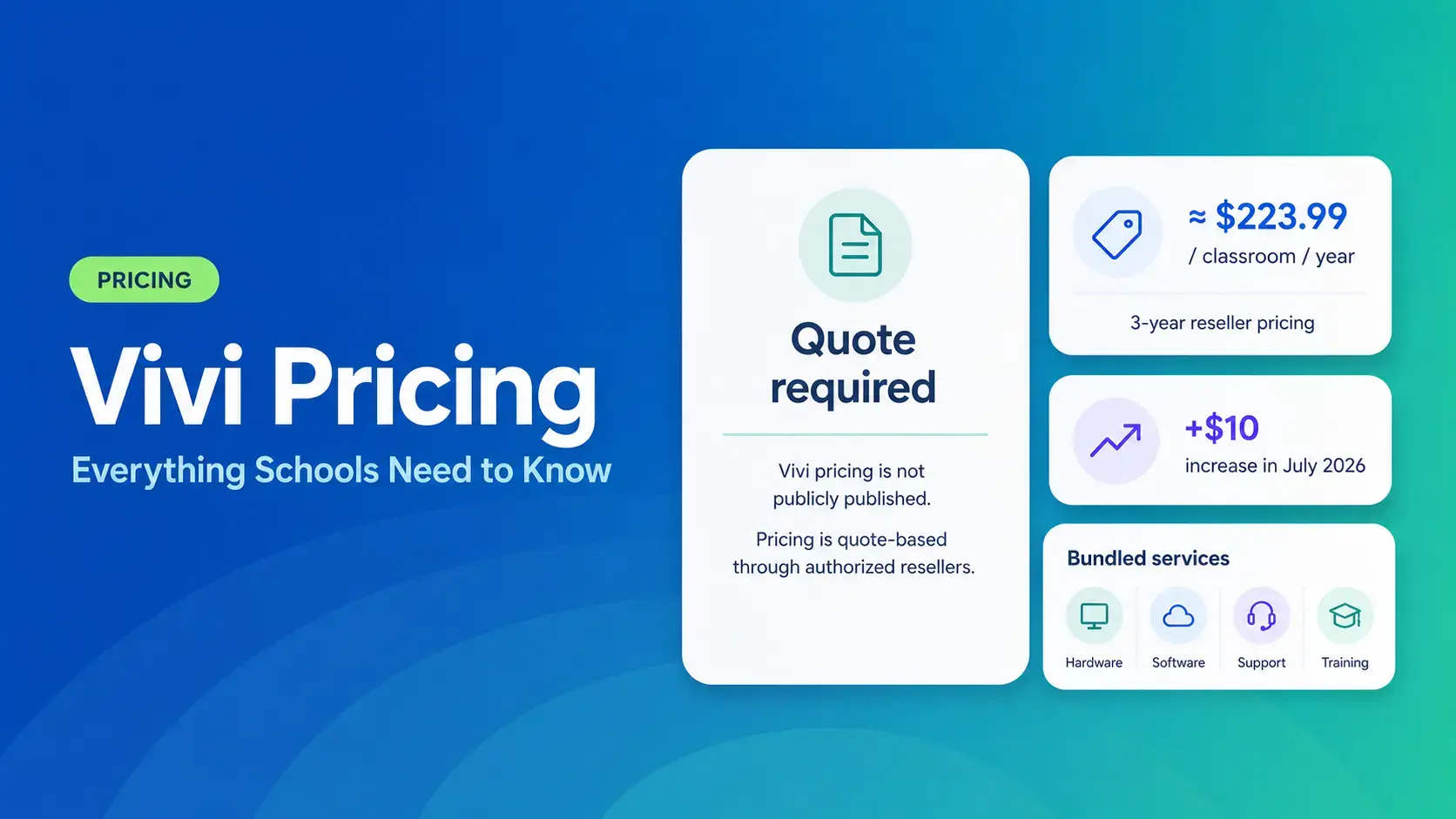
If you're budgeting for Vivi, expect to call sales for a number. Pricing isn't published anywhere. Reseller data puts the 3-year subscription around $224 per classroom per year. That rate rose by $10[…]
Read More -
Airtame Pricing 2026: Plans, Costs & Renewal Fees
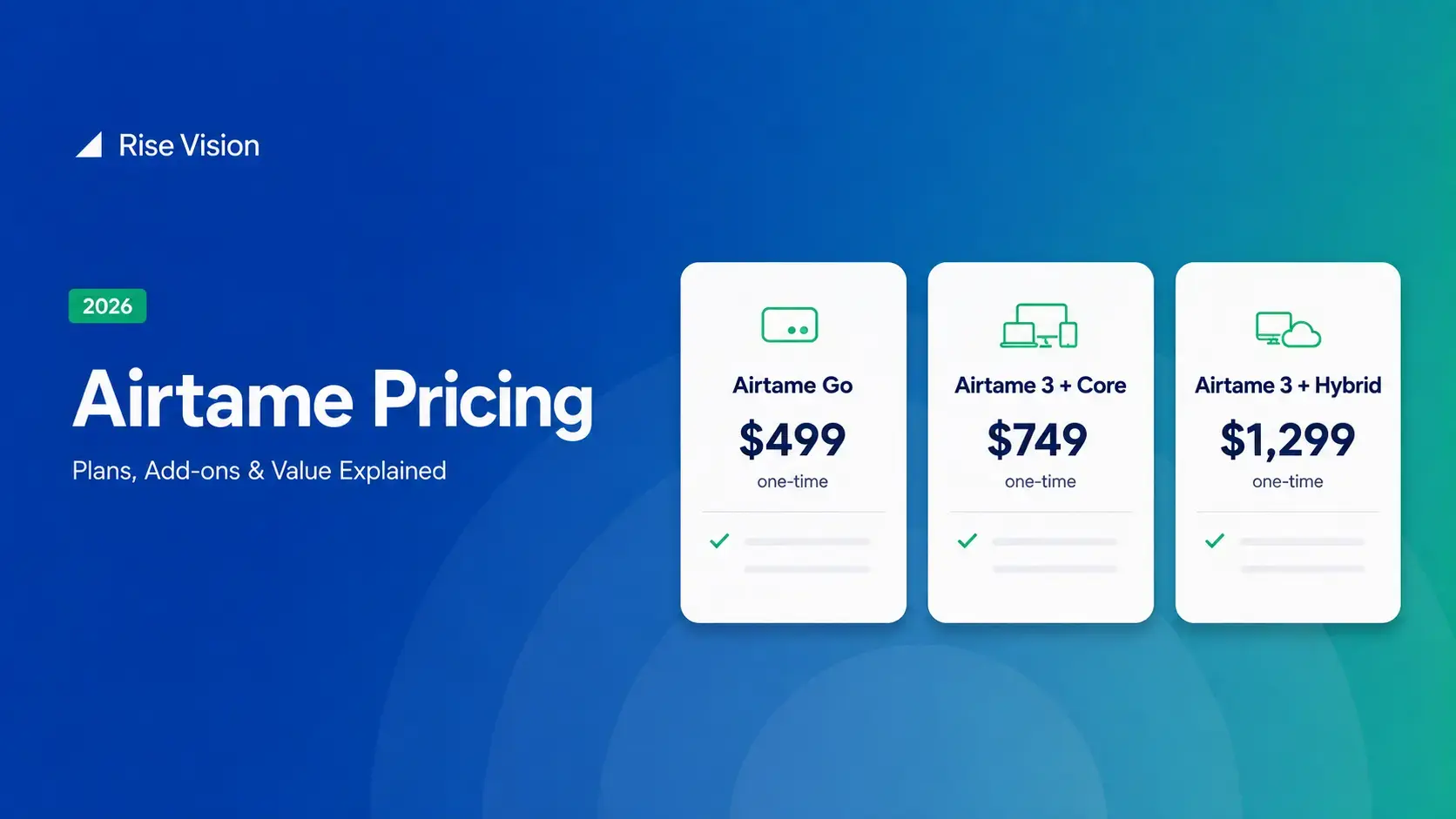
Airtame's 3-year bundles run $299 to $1,299 per display, then $120–$300/device/year to renew. Signage and alerts come standard on every tier, but only screen sharing survives if you skip renewal.[…]
Read More
12,300+ Organizations Trust Rise Vision, You Can Too
































Schedule a Free Demo
You deserve the #1 all-in-one platform for digital signage, screen sharing, and emergency alerts.





