

Quick Summary
Yodeck is the cheapest way to run a few screens. ScreenCloud is the polished corporate pick. Rise Vision combines digital signage, screen sharing, and emergency alerts in one platform, and it's the only platform here with an unlimited per-school plan. Count your screens and decide whether you need alerts, and the answer usually sorts itself out.
|
# |
Criteria |
Yodeck |
ScreenCloud |
Rise Vision |
|
1 |
Best for |
One building running a handful of screens on the tightest budget |
Corporate offices that want polished apps and dashboards |
Schools and multi-site teams that need alerts, screen sharing, and signage on one platform |
|
2 |
Starting price |
$8/screen/month billed annually |
$20/screen/month billed annually |
$11/display/month |
|
3 |
Hardware model |
Raspberry Pi player free with annual plans |
Bring your own, hardware-agnostic |
Bring your own, hardware-agnostic |
|
4 |
Emergency alerts |
CAP alerts on paid plans, workspace filtering on Enterprise only |
Emergency messaging on Pro and Enterprise |
CAP alerts on the Advanced plan, 13 named integrations |
What You're Actually Choosing Between
You've got displays going up in the hallway, the cafeteria, and the front office. Now somebody has to pick the software that runs them, and that's usually you. Yodeck comes up first on price, and ScreenCloud comes up because the interface looks great in a demo. Rise Vision shows up because it bundles signage with screen sharing and CAP emergency alerts on one platform.
All three charge per screen, but once you pass 10 displays, what you're paying each year looks very different. And if you need classroom screen sharing or emergency alerts on those same displays, only one of them covers it all.
Why Listen to Us?
Rise Vision has been empowering schools and organizations worldwide to communicate, teach, and collaborate better. ,Today more than 12,300 organizations trust Rise Vision for digital signage, screen sharing, and emergency alerts.
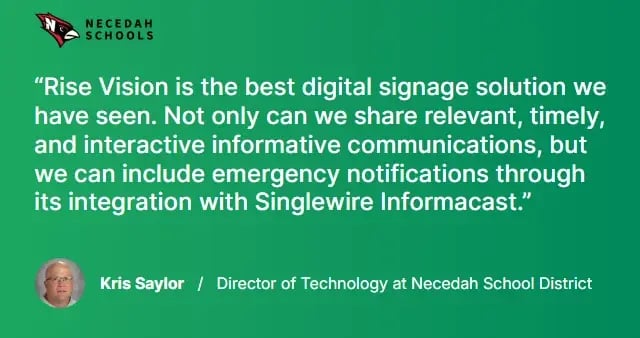
We've watched schools and multi-site teams size up Yodeck's low entry price against ScreenCloud's dashboard-heavy feature set against a platform that also covers screen sharing and emergency alerts. That's exactly the comparison this guide walks through, and since Rise Vision's on the list too, we'll tell you plainly where the other two win.
Yodeck vs. ScreenCloud: Detailed Comparison
Yodeck
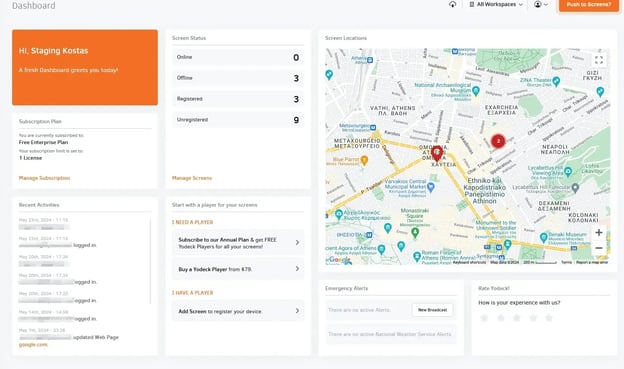
Yodeck's a digital signage platform built around aRaspberry Pi player. You can run one screen free forever with all Basic features, unlimited storage, and unlimited users. You don't even need a credit card.
This system works well for straightforward signage playlists, menu boards, and retail displays. Yodeck's also added CAP emergency alerts on its paid plans, and the template library has grown to 800+ designs. But screen sharing isn't part of the platform, so if your classrooms need wireless screen sharing, you'll need a second product.
Yodeck's built around the Raspberry Pi player, which comes free with annual plans. That's genuinely great if you want inexpensive hardware,but the Pi isn't as powerful as a commercial-grade media player, and it'll limit what you can do with video-heavy content at scale.
Key Features of Yodeck
- 800+ free templates: Customizable designs across industries, from menu boards to corporate communications
- 160+ app integrations: Social feeds, weather, news, dashboards, calendars, and data visualization
- Free Raspberry Pi player: Included with annual plans, so hardware's covered from day one
- CAP emergency alerts: Connects to Alertus and InformaCast on paid plans to push emergency alerts to screens
- Offline playback: Downloads every file to the player's SD card and keeps running roughly 30 to 40 days offline
- Interactive kiosk mode: Touch screen and remote control support for interactive experiences
Key Limitations of Yodeck
- No screen sharing: If classrooms or conference rooms need a wireless presentation system, you'll have to buy a separate tool
- Workspace-level filtering for alerts is Enterprise only: At $16/screen/month, targeting alerts to specific buildings costs more
- Admin tools are basic on lower plans: Custom roles, SAML SSO, and workspaces are all locked to Enterprise
- Raspberry Pi hardware can be limiting for video-heavy or animated content at scale
Pricing Structure
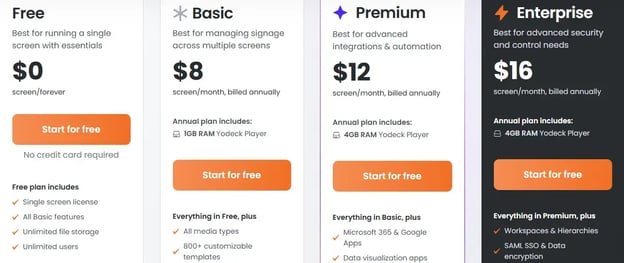
|
# |
Plan |
Price |
What's included |
|
1 |
Free |
$0 (one screen forever) |
All Basic features, unlimited storage, unlimited users |
|
2 |
Basic |
$8/screen/month |
All media types, 800+ templates, 90+ Essential Apps, drag and drop editor |
|
3 |
Premium |
$12/screen/month |
Microsoft 365 and Google Apps, data visualization, API and Webhooks, advanced scheduling |
|
4 |
Enterprise |
$16/screen/month |
Workspaces, SAML SSO, data encryption, custom roles, branded templates |
|
5 |
Enterprise+ |
Custom pricing |
Dedicated account manager, design consultation, 24/7 priority support |
Annual billing gets you a free Yodeck Player or a $70/screen/year discount if you bring your own device.
Pros
- Genuinely free single-screen plan with no credit card
- Cheapest per-screen price at every tier
- Offline playback from local SD card storage
Cons
- No screen sharing capability at all
- Emergency alert targeting locked behind the most expensive plan
- Admin and multi-site tools limited until Enterprise
ScreenCloud
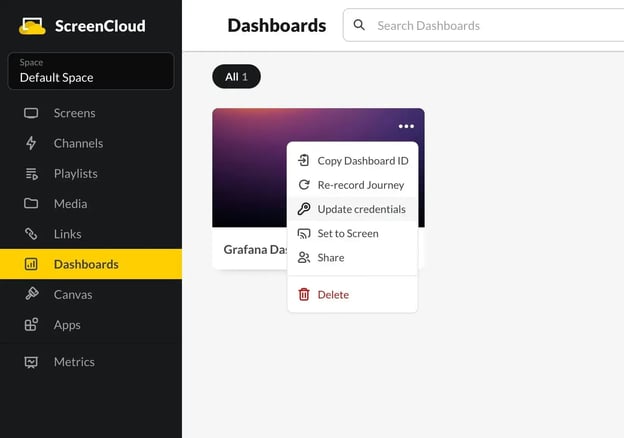
ScreenCloud's a digital signage platform with 80+ built-in apps, including Slack, Excel, Google Suite, Power BI, and social media integrations. If your screens are showing dashboards and data feeds, you'll find prebuilt apps for most of those.
It's hardware-agnostic and works across Amazon Fire, Android, BrightSign, Chrome OS, iPadOS, LG webOS, macOS, Samsung Tizen, and Windows.
ScreenCloud's Space model lets you organize screens by location and target content to specific groups. That's useful for corporate teams with multiple offices. But you won't get onboarding support from named people unless you're on Enterprise, and Enterprise pricing isn't published.
Key Features
- 80+ built-in apps: Slack, Excel, Google Suite, Power BI, social media, news, and weather integrations out of the box
- Canvas design tool: Built-in content editor so you don't need external design software
- Space-based management: Organize screens by location or department and target content to specific groups
- Emergency messaging: Push alerts across all screens on Pro and Enterprise plans
- Hardware flexibility: Works with 10+ operating systems, plus ScreenCloud's own PIXI Player
- GraphQL API: Custom integrations for teams that need to pull data from internal systems
Key Limitations
- Most expensive per screen: Core starts at $24/screen/month, so 10 screens already costs $2,880/year
- Emergency messaging is a Pro feature: At $36/screen/month, that’s expensive for schools
- No screen sharing: Like Yodeck, there's no wireless presentation capability built in
- No unlimited or flat-rate plan: Every screen you add costs the same, so your bill grows with your display count
Pricing Structure
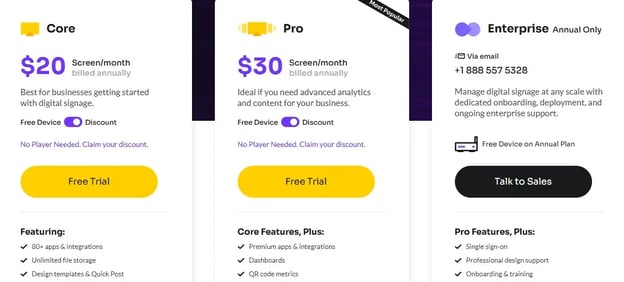
|
# |
Plan |
Price |
What's included |
|
1 |
Free trial |
14 days |
Access to Core or Pro features |
|
2 |
Core |
$20/screen/month |
80+ apps, unlimited storage, screen management, remote device management, unlimited users |
|
3 |
Pro |
$30/screen/month |
Everything in Core plus dashboards, premium apps, QR code metrics, ScreenCloud Touch, custom user permissions |
|
4 |
Enterprise |
Custom pricing |
SSO, professional design support, onboarding, premium support, dedicated Customer Success Manager |
Annual plans include a player device, or you'll get 17% off your first year if you bring your own hardware.
Pros
- 80+ app library is the strongest for corporate dashboards and data feeds
- Clean interface that's easy for non-technical teams to manage
- Solid hardware flexibility across 10+ operating systems
Cons
- Most expensive per-screen pricing in this comparison
- No screen sharing
- Emergency alerts only on Pro ($36/screen/month) and above
The Best Yodeck and ScreenCloud Alternative: Rise Vision
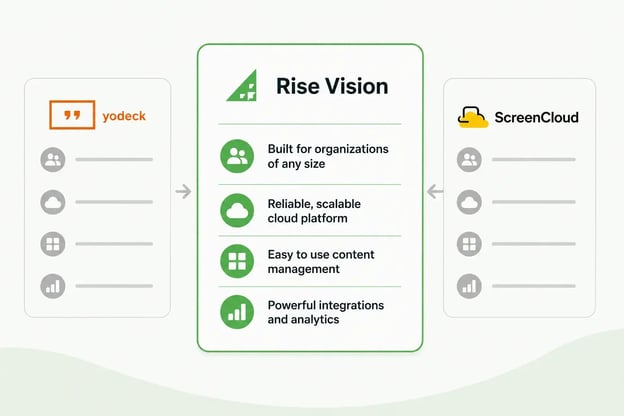
Rise Vision is the all-in-one platform for digital signage, screen sharing, and emergency alerts. Neither Yodeck nor ScreenCloud offers screen sharing, and neither offers a flat-rate unlimited plan for schools.
Rise Vision works with your existing hardware or our recommended Avocor displays and media player, and is backed by amazing technical support, free training, and guided onboarding from our knowledgeable team. You can get help within one business hour from a team with a 99% customer satisfaction rating.
At scale, the pricing works differently. Rise Vision's Unlimited license offers $1,399/school/year, covering every display for one flat price. At 50 screens, that's $1,399/year against $9,600/year on Yodeck Enterprise and $14,400/year on ScreenCloud Core. You can also get volume discounts at 11, 70 and 200 displays.
Key Features of Rise Vision
- Digital signage: 750+ professionally designed, animated, and customizable templates, plus powerful integrations with Google Workspace, Microsoft 365, Canva, Power BI, weather, social media, and more. That covers content creation and live data on the same screen without switching between tools.
- Screen sharing: Any display becomes a wireless presentation hub. A presenter navigates to risevision.com/join, enters a code, and shares from any device to any display without adapters, dongles, or special training. Moderated Mode lets a moderator approve who presents. Standard Mode allows quick sharing without an account.
- Emergency alerts: Instant, clear visual notifications to displays, interactive flat panels, and wireless presentation systems. Integrates with Common Alerting Protocol (CAP) systems including Raptor, CrisisGo, Singlewire, and Alertus, so alerts trigger automatically with no manual intervention.
- 750+ customizable templates: Animated, professionally designed templates built for school announcements, lunch menus, spirit week countdowns, student recognition, and safety messaging
- AI presentation designer: Describe your goal and watch Rise Vision’s AI content designer generate customizable, animated presentations in seconds
- Any hardware: Save money and use our recommended displays and media player, or bring your own hardware and use existing devices with our extensive operating system support.
- Responsive Technical Support: Get help within one business hour from a team backed by a 99% customer satisfaction rating. You won't be stuck waiting in a ticket queue when something needs fixing before the bell rings.
- Risk-Free to Try: Every plan comes with a 30-day money-back guarantee, so you can put Rise Vision in front of real classrooms and staff before you're locked into the decision.
- Onboarding and Training: Get your school or organization up to speed on Rise Vision with our free training sessions and have our customer success team guide you through implementation and onboarding.
Key Limitations
- Not the cheapest for a single screen: Yodeck's free plan and $8/month Basic tier beat Rise Vision's $11/month starting price
- Screen sharing is Enterprise only: If you're on Basic or Advanced, you can't add screen sharing separately
- Advanced and Enterprise require annual billing: Monthly billing is only available on the Basic plan
Pricing Structure
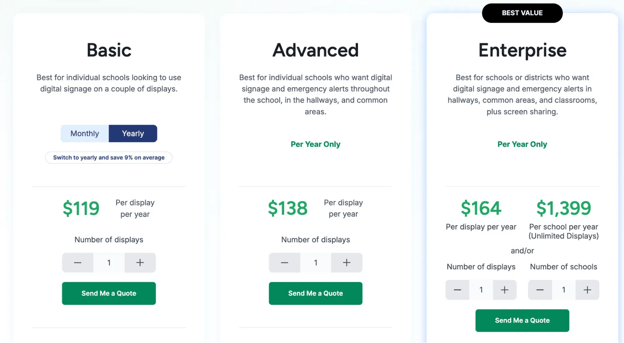
|
# |
Plan |
Starting price |
What's included |
|
1 |
Free trial |
14 days, no credit card |
Access to platform features |
|
2 |
Basic |
$119/display/year (or $11/display/month) |
750+ templates, unlimited storage, unlimited users, scheduling, offline playback, one-business-hour support |
|
3 |
Advanced |
$138/display/year (annual only) |
Everything in Basic plus CAP emergency alerts, school-wide scheduling overrides, Google and Microsoft integrations, brand settings |
|
4 |
Enterprise |
$164/display/year, or $1,399/school/year (Unlimited Displays) |
Everything in Advanced plus screen sharing, teacher user role, classroom alerts, district-wide overrides, SSO via SAML, content approval workflow |
Volume discounts start at 11 displays, and schools and nonprofits get a further discount on top of that. You'll also get a 30-day money-back guarantee on every plan.
Pros
- Only platform with signage, screen sharing, and emergency alerts on one license
- Unlimited per-school pricing flattens the bill at scale
- 13+ supported device types with no hardware lock-in
- Free onboarding and training on every plan, not just Enterprise
Cons
- More expensive than Yodeck for small, single-site deployments
- Screen sharing locked to Enterprise
- Annual billing required on Advanced and Enterprise
Yodeck vs. ScreenCloud vs. Rise Vision: Feature Comparison
|
# |
Feature |
Yodeck |
ScreenCloud |
Rise Vision |
|
1 |
Starting price |
Free (one screen), then $8/screen/month |
$20/screen/month |
$11/display/month |
|
2 |
Flat-rate/unlimited plan |
No |
No |
Yes, $1,399/school/year |
|
3 |
50 screens, best tier, annual |
Enterprise: $9,600/year |
Core: $12,000/year |
Enterprise: $1,399/year (unlimited school license) |
|
4 |
Templates |
800+ |
Available (count not published) |
750+ animated and customizable |
|
5 |
App integrations |
160+ |
80+ |
Content Integrations with 35+ Services |
|
6 |
Emergency alerts |
CAP on paid plans |
Pro and Enterprise |
CAP with 13 named integrations, from Advanced |
|
7 |
Screen sharing |
No |
No |
Yes, Enterprise, up to 10 displays at once |
|
8 |
Offline playback |
Yes, 30-40 days from SD card |
Yes, cached after one playthrough |
Yes, on every plan including Basic |
|
9 |
Supported devices |
Raspberry Pi, Android, Samsung Tizen, LG webOS |
10+ OS including Fire, Android, BrightSign, Chrome OS, Windows |
13+ device types including Chrome OS, Windows, Apple TV, BrightSign 4+ |
|
10 |
SSO |
Enterprise only |
Enterprise only |
Enterprise only |
|
11 |
Free onboarding/training |
No (self-serve) |
Enterprise only |
Every plan |
|
12 |
G2 rating |
4.7/5 (3,143 reviews) |
4.7/5 (455 reviews) |
4.7/5 (985 reviews) |
Where to Start
If you're running a handful of screens in one building on a tight budget, Yodeck's free tier is a sensible place to start. If corporate communications own your displays and want dashboards, ScreenCloud earns its price with 80+ apps and a clean interface.
If your displays have to handle announcements, emergency alerts, and screen sharing, that's the job Rise Vision was built for. You can start with K-12 digital signage and see it running on your own hardware in an afternoon.
Start Free Trial Get Free Demo
FAQs
1. Is Yodeck Cheaper Than ScreenCloud?
Yes, by a wide margin. Yodeck starts at $8/screen/month, compared to ScreenCloud's $24. Even Yodeck's Enterprise at $16/screen/month costs less than ScreenCloud's entry plan. Yodeck also gives you one screen free forever, while ScreenCloud's is a 14-day trial.
2. Which of These Platforms Works Best for K-12 Schools?
Schools need digital signage, screen sharing, and emergency alerts across their buildings, and managing three separate tools for those jobs adds cost and complexity. Rise Vision handles all three on one platform, and the unlimited license stops the bill from growing every time a classroom gets a display. Yodeck and ScreenCloud both handle signage and alerts, but neither offers screen sharing.
3. Do I Need to Buy the Vendor's Own Media Player?
No. None of them makes you buy its own player. Yodeck includes its Raspberry Pi player free with annual plans, and you'll save $70/screen/year if you bring your own device on Premium or Enterprise. ScreenCloud's bring-your-own works across 10+ operating systems. Rise Vision supports 13+ device types, so most schools reuse Chromeboxes or Windows machines they've already got.
4. What Happens to the Screens if the Internet Goes Down?
All three keep playing. Yodeck stores every file on the player's SD card and runs for roughly 30 to 40 days offline, which is the strongest performance here. ScreenCloud caches content after one full playthrough, though streaming apps won't work. Rise Vision includes offline playback on every plan starting with Basic. Web pages and live feeds still need a connection on all three.
5. Can These Platforms Send Emergency Alerts to Every Screen at Once?
Yes, all three connect to your existing emergency notification system. Rise Vision's emergency alerts start on the Advanced plan and integrate with leading emergency systems, including Raptor, CrisisGo, Centegix, and Singlewire InformaCast. Yodeck supports CAP on its paid plans. ScreenCloud includes emergency messaging on Pro ($36/screen/month) and above.
6. How Does Rise Vision Compare on a Single Screen?
Rise Vision isn't the cheapest for one screen. Yodeck's free plan gives you a single screen forever with no credit card, and its Basic plan starts at $8. Rise Vision Basic is $11/display/month. If you want one display, Yodeck beats Rise Vision on price. You'll see the value at scale, where the unlimited school license covers every display for one flat annual cost.
More From Our Blog
-
Digital Signage Remote Management: How to Run Every Screen From One Place
Digital signage remote management lets you control screens, schedules, and display health from an online platform. To get started, choose a hardware-agnostic platform, connect your media players or[…]
Read More -
ScreenBeam Review 2026: Features, Pricing, and Limitations
ScreenBeam sells wireless display receivers that let people cast to a screen from any device without an app. You need one receiver per display, and they run from $299.99 to $1,199.99. Cloud-based[…]
Read More -
Interactive Touch Screen Digital Signage: How It Works and What You Need
Interactive touch screen digital signage lets viewers tap a display to find what they need. It pairs a commercial touch display with content software. Common uses include wayfinding, visitor[…]
Read More
12,300+ Organizations Trust Rise Vision, You Can Too
































Schedule a Free Demo
You deserve the #1 all-in-one platform for digital signage, screen sharing, and emergency alerts.





