

Quick Summary
If you've invested in digital signage, or you're thinking about it, the return on investment (ROI) question is probably front of mind. You want to know whether the screens, the software, and the time your team puts in are actually paying off. Digital signage ROI isn't as hard to measure as it feels. You need to know what goes into the cost, what outcomes to look for, and which numbers to track.
We'll walk through all three.
Why Listen to Us?
Since 1992, Rise Vision has been helping schools, offices, and factories in more than 100 countries create more connected and informed environments with digital signage. Over the years, we’ve learned what makes digital signage worth the investment and, just as importantly, what gets ignored. That experience has shaped our platform around what works in the real world.
What Digital Signage Costs
Hardware for your digital signage network is usually your first big expense. A commercial-grade display costs between $1,000 and $2,000, though a consumer TV works just fine for $500 to $1,500 if you don't need always-on commercial hardware.
You’ll also need a media player, which runs anywhere from $30 to $700 depending on how much power you need, plus $50 to $200 for mounts and cables.
If you want a deeper dive into specific equipment, check out our full digital signage cost guide.
Software is the main recurring cost. Cloud-based digital signage platforms charge per display on a monthly or annual basis.
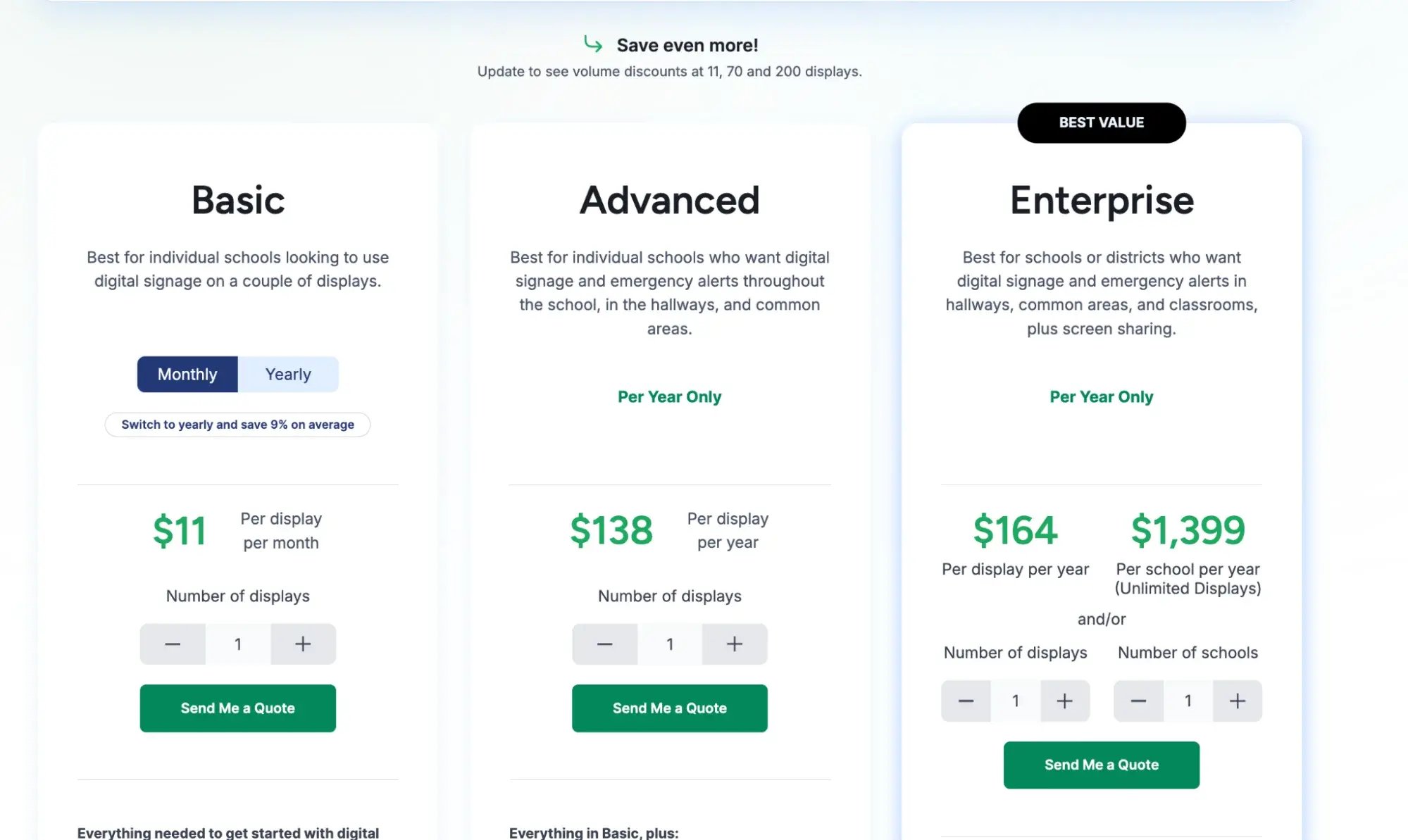
For example, Rise Vision's plans start at $11 per display per month on Basic. Advanced runs $138 per display per year (annual billing only). Enterprise covers larger rollouts at $164 per display per year, or $1,399 per school per year for unlimited displays.
Installation depends on the scale of your digital signage deployment. A one-or-two-screen setup might only run a couple hundred dollars if you handle it internally. Larger installations involving networking, structural mounting, and more complex infrastructure can start at around $2,000 and may exceed $10,000 depending on the scope.
Content creation is often easier than people expect. Platforms like Rise Vision, with professionally designed, customizable templates save hours of content creation time, enabling end users to create engaging content, no design skills required. Without a library of proven templates, you'd need to budget for traditional content creation, which can run a few hundred dollars per piece depending on complexity.
What You Can Expect to Get Back
Printing Cost Savings
Printing costs are the quickest win and the easiest to track when you’re measuring digital signage ROI. If you regularly spend money on printed posters, flyers, or menu boards, digital signage replaces most of that the moment screens go live.
A small business or school spending $100 to $200 a month on print instantly saves $1,200 to $2,400 a year. That’s not counting the hidden labor cost of designing, picking up, and manually swapping out paper materials.
Time Savings
This is where the math on your ROI gets interesting. Take Indian Prairie CUSD 204, a 26,000-student district in Illinois.
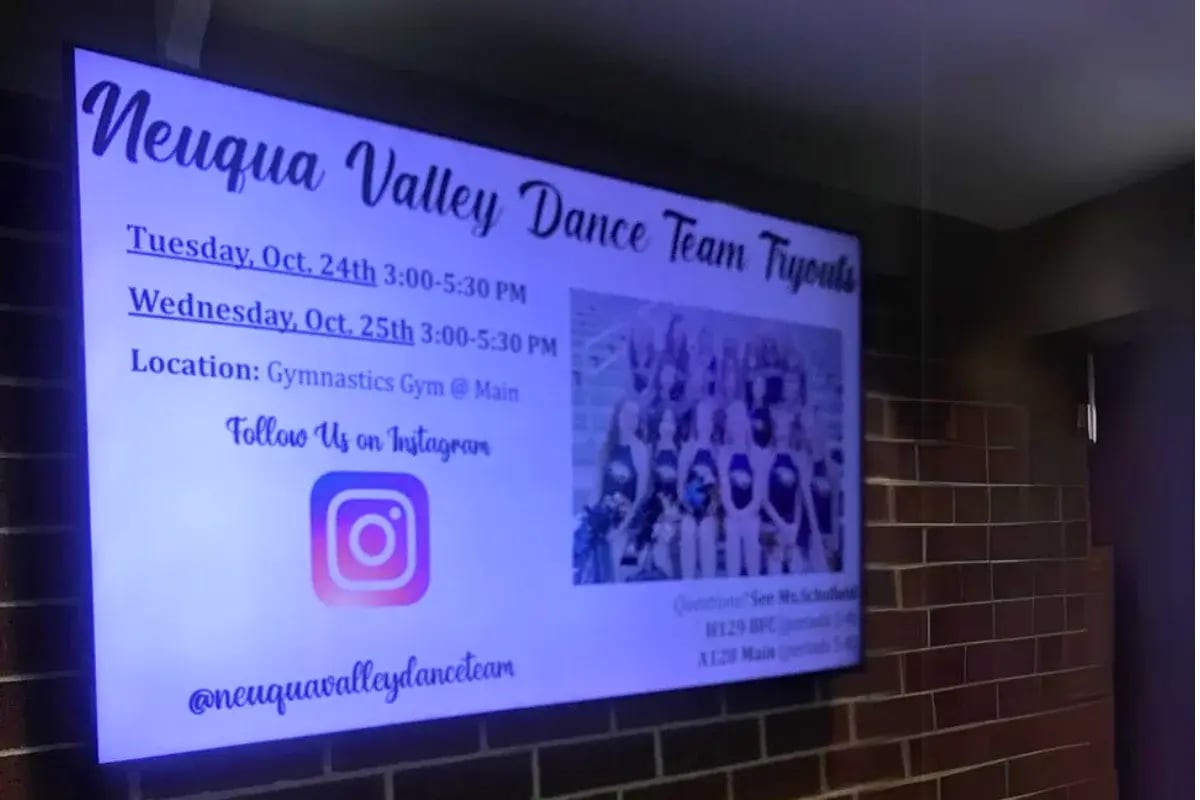
After switching to digital signage with Rise Vision, their technology team had 25 screens set up on one campus in under an hour.
The district also uses Rise Vision’s library of 750+ templates to create content without starting from scratch. Cloud-based management and scheduling means the team can update screens remotely instead of walking between buildings to make changes. Their director of technical support services said the ability to quickly plug content into existing templates helped the district save valuable resources while still tailoring messages to different audiences.
The time savings aren't limited to managing the screens, either. Joyanne Herdman, a National Board-Certified Library Media Specialist at Yates Elementary School, says she had spent numerous hours creating and editing content for the school's Morning Show before using Rise Vision. Our platform's presentation templates helped her cut down that workload while making it easier to keep students and staff informed.
For organizations managing communication across multiple locations, those savings can add up quickly. Instead of spending hours designing content, traveling between buildings, or manually updating individual screens, teams can create, schedule, and manage communications from one place.
Rasmussen Mechanical Services, which runs seven locations, used to have a different person in charge of signage at each one. Central control through Rise Vision eliminated that coordination overhead entirely.
Communication and Engagement
These returns are harder to put a dollar figure on, but they matter. Employees and students who see announcements, safety reminders, and recognition updates are more engaged. After a few months, you'll notice fewer "I didn't know about that" conversations and better event participation. Digital signage also cuts the number of all-staff emails you need to send, since screens handle routine announcements.
Capital Fence & Rail is a good example. The company implemented digital signage across multiple locations to share events, announcements, and daily updates with employees. This has made internal communication more effective and professional, while Rise Vision’s customizable templates have also saved the team time when creating content. According to Savannah Grimes, Marketing Assistant at Capital Fence & Rail, Rise Vision has “significantly enhanced our communication” and become an “indispensable tool” for keeping employees informed and engaged.
You can measure this impact through metri like event attendance, employee or student surveys, and meeting participation. These metrics won't always translate directly into dollars, but they can give you a better sense of whether people are actually seeing and engaging with the information you share.
Safety and Compliance Returns
If your organization uses emergency alerts, digital signage adds a layer of return that's difficult to price but easy to justify. Screens displaying CAP-integrated alerts reach everyone in a building instantly, including people who don't check email or carry a phone during their shift. In manufacturing and warehouse environments, that kind of reach can reduce response times during incidents and support OSHA compliance.
Necedah Area School District puts that value into perspective. By connecting Rise Vision with emergency alert system InformaCast, the district reduced the time it took to initiate a lockdown by more than 50%.
In an emergency, those saved seconds can make a meaningful difference. It's difficult to assign a dollar value to that kind of outcome, but the safety benefit is clear.
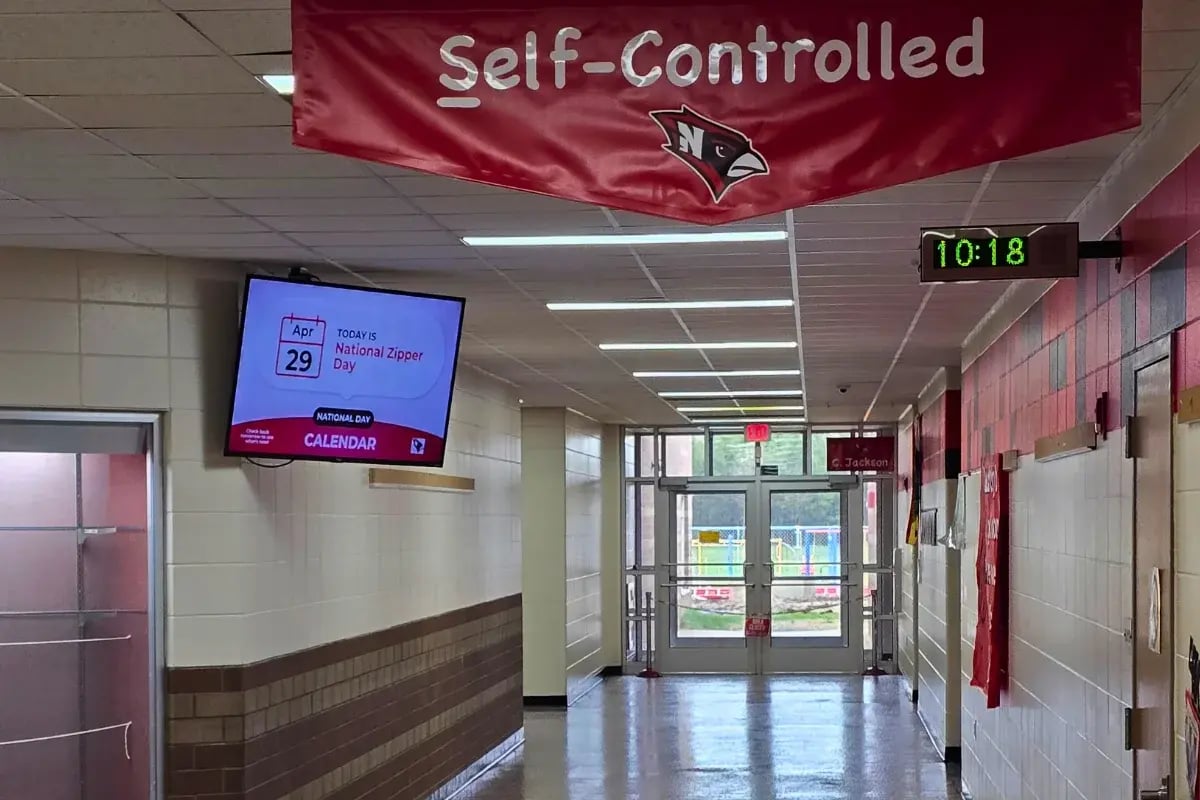
Beyond emergency response, digital signage can also support ongoing safety and compliance efforts by keeping safety reminders and procedures visible throughout the workplace. Louisiana-Pacific, a manufacturing company using Rise Vision, used digital signage to prioritize OSHA compliance and celebrate safety milestones, including a full year without a recordable incident. Fewer incidents mean lower insurance premiums, fewer lost workdays, and reduced liability exposure.
Operational Visibility
In industrial and warehouse settings, digital signage can display real-time data from tools like Power BI and ERP dashboards. Westfall Technik, a manufacturer running Rise Vision, puts live ERP data on screens across the floor. Teams track production targets, efficiency, and quality in real time. That visibility speeds up decisions that used to wait for a report or a meeting.
“Rise Vision has been a powerful addition to our digital communication strategy. By integrating our ERP database through Power BI, we were able to transform complex operational data into clear, real-time visual dashboards displayed across our facilities.
The reliability and performance of Rise Vision media players ensured that our Power BI reports were consistently delivered without interruptions, allowing teams to access up-to-date KPIs, production metrics, and business insights at a glance. This real-time visibility improved decision-making, reduced manual reporting efforts, and increased alignment between departments.
The flexibility of the Rise Vision platform made it easy to deploy, manage, and update content remotely, while the seamless Power BI integration allowed us to securely connect our ERP data without added complexity. As a result, our digital displays evolved from static messaging tools into dynamic business intelligence dashboards that drive accountability and operational efficiency.
Overall, Rise Vision helped us bridge the gap between data and action, making our ERP insights more accessible, impactful, and visible across the organization”
- Marco Perez, Sr. Systems Administrator at Westfall Technik
GXO Logistics, a warehouse operation, switched from static PowerPoint slides to Rise Vision and gained the ability to manage all signage remotely and in real time. According to Yuvraj Kang, their Continuous Improvement Manager, the change "improved communication across the warehouse significantly."
These operational gains are harder to quantify than printing savings. But you can measure them through proxy metrics like fewer information-access tickets, shorter shift-handoff times, and faster response to floor issues.
How to Measure Digital Signage ROI or Return on Objectives (ROO)?
By understanding the basics of measuring ROI, you can make better decisions about where to invest your marketing budget, especially as managers and other key decision-makers evaluate the ROI of digital signage for their organization, and ensure you’re getting the most out of your digital signage. Here are some practical strategies for measuring digital signage ROI effectively.
Determine Your Objectives Clearly
Defining clear objectives will provide the foundation for determining how you want to reach your audience and measure success.
Think about what you want to accomplish with digital signage.
For a school district, that could be keeping students, staff, and parents informed about announcements and events, or ensuring an emergency alert reaches every screen in the building within seconds.
For an industrial site, you might be trying to reach deskless employees who don't have a company email address, or distribute safety compliance messages consistently across every facility. That's what ultimately determines the KPIs you track, the methodology you choose, and how you calculate ROI at the end.
Choose the Measurement Methodology
Next, it is important to decide how your digital signage campaign goals should be measured. The most effective way to measure ROI from a digital signage campaign is by choosing the appropriate measurement methodology.
The main types of measurement methods include:
- Qualitative research (e.g. surveys and interviews)
- Quantitative analysis (e.g. analytics)
- Observational studies (e.g. focus groups).
Qualitative research can provide insights into how customers are engaging with your digital signage, while quantitative analysis can track which content elements are performing best or not. Observational studies will offer you an in-depth understanding of customer behavior in the environment where your digital signage screen is located.
No matter which measurement methodology you choose, the key is to make sure that it’s aligned with your digital signage campaign goals. You should also consider what data points will provide the most meaningful insights into the effectiveness of your digital signage campaign. During the measurement process, be prepared to identify and address any issue that may arise, such as data accuracy or selecting the right methodology.
By setting up metrics that are specific and relevant, you can ensure that you obtain accurate results.
Calculate Your Digital Signage Investment ROI
Here’s the basic formula:
ROI = (Total Gains - Total Costs) / Total Costs x 100
Let's walk through an example. A school rolling out 10 displays goes with consumer-grade TVs at $500 each and media players at $80 each. Hardware runs about $5,800. On Rise Vision's Basic plan at $11 per display per month, software comes to $1,320 for the year. That puts the total first-year investment around $7,120.
Now, what do you get back? Eliminating $150 a month in printing costs saves $1,800 for the year. Saving eight hours a week on communications adds roughly $10,400 a year at $25 an hour. That estimate is conservative based on the time-savings numbers above. Your first-year measurable return is around $12,200.
ROI = ($12,200 - $7,120) / $7,120 x 100 = 71%
And that only counts savings you can directly measure. It doesn't include better-informed staff, faster emergency communication, or shorter meetings. By year two, the hardware is paid off. Your only ongoing cost is the $1,320 software subscription, and the same savings put your return well over 800%.
A Second Scenario for Larger Rollouts
The math scales differently when you move beyond a handful of screens.
Take a district deploying 50 displays across five schools. On Rise Vision's Enterprise plan at $1,399 per school per year for Unlimited Displays, software costs $6,995 for all five schools.
Consumer TVs at $500 each and media players at $80 each bring hardware to $29,000. Add $5,000 for installation across the five sites. The total first-year investment comes to about $40,995.
On the savings side, eliminating printed materials across five schools at $200 per month each saves $12,000. If each school recovers even five hours a week in staff time at $25 an hour, that's $32,500 a year. The first-year measurable return is roughly $44,500.
ROI = ($44,500 - $40,995) / $40,995 x 100 = 8.5%
That's a modest first-year number, but the hardware is a one-time cost. By year two, the ongoing expense is just the $6,995 software subscription, and the same $44,500 in annual savings puts the return above 530%. Plus, with the Unlimited Display license, each school can add more screens without increasing the software cost, so the per-display economics only improve as you expand.
ROI vs. ROO
When creating a business strategy, two of the most important metrics to understand are ROI and return on objectives (ROO). ROI measures how much money is generated from an investment, while ROO measures how well objectives are met through that investment.
ROI evaluates financial success and is typically used to measure one-time investments, such as advertising campaigns or capital investments. It’s usually expressed as a percentage and calculated by dividing the net gain from an investment by its total cost.
ROI helps companies decide if they should invest in new projects or not, or how much they should invest in any given project.
ROO is a more holistic metric that evaluates a project’s success by measuring how well it meets its objectives. It takes into consideration not only the financial returns but also qualitative factors, such as customer satisfaction and brand perception.
ROO is used to measure the overall effectiveness of projects, programs, or strategies over time, rather than one-time investments like ROI.
Assess by Asking
Measuring ROI can also involve collecting feedback from customers, such as surveys and interviews. Survey results can reveal that a majority of respondents agree on the benefits of digital signage, highlighting its positive impact. This can help you better understand the impact of digital signage on consumer behavior and perceptions. Additionally, it can provide valuable insights into how to further optimize your digital signage strategy and improve ROI.
It’s important to remember that measuring ROI isn’t just about tracking tangible numbers; it’s also about understanding the overall impact of digital signage on customer experience and satisfaction.
By assessing the effectiveness of your digital signage implementation against customer feedback, you can ensure that your digital signage is creating the desired customer experience and driving ROI.
Common Mistakes That Undercut Your ROI
Some organizations invest in digital signage and don't see the returns they expected. The technology usually works fine. The setup and management are where things go wrong.
- Splitting ownership across too many people is the most common one. When five different staff members are responsible for updating screens, nobody takes full ownership, and the content goes stale within weeks. Assign one person or a small team to own the signage content, and give them a simple schedule for updates.
- Using the wrong hardware for the environment is another. A consumer TV in a lobby that gets direct sunlight will wash out and look unprofessional. A commercial display in a low-traffic back office is overkill. Match the hardware to the location and the audience.
- Ignoring content quality can also drag down your ROI. Screens showing the same three-month-old announcement lose their impact fast. Rise Vision's 750+ customizable templates and weekly template recommendations help with this. They give non-designers a fast way to keep content fresh without starting from scratch.
- And finally, not tracking results at all. If you don't measure the before and after, you can't prove the return, and you can't make the case for expanding. Even a simple spreadsheet beats no tracking at all. The organizations that scale their signage fastest are the ones that documented results from the first few screens and brought those numbers to the budget conversation.
Rise Vision Keeps Your Costs Down and ROI Up
Your platform's ongoing cost and maintenance burden directly affect your ROI. Rise Vision is designed to keep both low.
The platform includes 750+ professionally designed templates that anyone on your team can customize in minutes. Rick Gangwer, CIO at Beekmantown Central School District, says Rise Vision makes managing content across multiple displays intuitive, even for non-technical users. He also highlights the template library, noting that his team can create polished new displays in minutes instead of spending hours on design work.
Rise Vision supports a wide range of hardware, allowing you to bring your own media players and displays. The all-in-one platform is compatible with popular operating systems like Android, Windows, Chrome OS, and Linux, and devices like Amazon Signage Sticks, Raspberry Pi, and Apple TV, allowing you to maximize the value of your existing devices while delivering professional-quality communication with ease..
If you'd prefer a purpose-built solution, you can go with Rise Vision's media player or Avocor all-in-one displays.
Pricing is transparent with no contracts and a 30-day money-back guarantee. Free weekly training and support with a 99% satisfaction rating mean you're not paying for consultants to get started or keep things running.
If you're not sure where to start, Rise Vision makes it easy too. Our plans start at $11 per display per month with no contracts, 750+ ready-to-use templates, and a 30-day money-back guarantee.
FAQs
How Long Does It Take to See ROI From Digital Signage?
It depends on what you're measuring. Printing cost savings show up immediately. Time savings become clear within one to two months as your team gets comfortable. Engagement and revenue improvements need three to six months of data to show a reliable trend.
What's Considered a "Good" ROI for Digital Signage?
There's no magic number here, which is probably frustrating to hear. A lot depends on your industry, how you're using the displays, and what you're comparing against.
Generally speaking, if your digital signage pays for itself within 12-18 months, that's solid. Some retail environments see payback in under 12 months through increased sales and reduced printing costs. Corporate offices might take longer because they're measuring softer metrics like internal communication effectiveness.
Here's a practical benchmark: if you're saving more in printing costs and labor time than you're spending on the system, you're already in positive territory. Anything beyond that, customer engagement, sales increases, improved safety compliance, is gravy.
Do I Need Expensive Analytics Software to Measure ROI?
Not necessarily. Start with what you can track easily without adding complexity. Basic metrics like printing cost reduction, content update time savings, and labor hour comparisons don't require specialized software, just some spreadsheet work and honest tracking.
If you're trying to measure viewer engagement, dwell time, or conversion rates, then yes, analytics tools help. But plenty of organizations justify their digital signage investment using simple before-and-after comparisons of operational costs and staff time spent on communication tasks.
If you're trying to measure viewer engagement, dwell time, or conversion rates, then yes, analytics tools help. But plenty of organizations justify their digital signage investment using simple before-and-after comparisons of operational costs and staff time spent on communication tasks.
How Do I Calculate ROI if I Can’t Put a Dollar Value on Everything?
This is where ROI (return on investment) and ROO (return on objectives) come in handy. Not everything translates neatly into dollars, and that's okay.
For things like employee engagement, safety compliance, or brand perception, track your objectives instead of pure financial returns. Did safety incident reports decrease after installing digital signage with safety reminders? Did employee survey scores improve? Are customers asking fewer directional questions because wayfinding got better?
For things like employee engagement, safety compliance, or brand perception, track your objectives instead of pure financial returns. Did safety incident reports decrease after installing digital signage with safety reminders? Did employee survey scores improve? Are customers asking fewer directional questions because wayfinding got better?
Is Digital Signage Worth It for Small Businesses With Limited Budgets?
It can be, but you need to be realistic about scale and expectations. A single screen in a small retail shop or restaurant can absolutely pay for itself through reduced printing costs and the ability to promote specials without reprinting materials constantly.
The math gets easier if you're already spending money on printed signage, promotional materials, or menu boards that need frequent updates. Digital signage that costs $15-40 per month might replace $100+ monthly in printing and design costs while giving you more flexibility.
The math gets easier if you're already spending money on printed signage, promotional materials, or menu boards that need frequent updates. Digital signage that costs $15-40 per month might replace $100+ monthly in printing and design costs while giving you more flexibility.
Cloud-based platforms with transparent pricing and no contracts make this easier to test without huge upfront commitments. You're looking for solutions where the monthly cost is less than what you're currently spending on the problem the signage is supposed to solve.
What if My Digital Signage ROI is Negative? When Should I Cut My Losses?
First, figure out why it's not working. Is the problem the technology, the content, the placement, or your measurement methods?
Common fixable issues: screens in low-traffic areas nobody sees, content that's boring or never gets updated, hardware that's unreliable and causes more headaches than value, or tracking metrics that don't actually reflect your goals.
If your screens are in good locations with decent content but still aren't moving the needle after 6-9 months, you've got a real problem. At that point, either pivot how you're using them or acknowledge it's not the right solution for your organization.
Red flags that suggest cutting losses: spending more staff time managing the system than you're saving, technical problems that never get resolved, or management treating the screens as "set it and forget it" when they actually need active content management to provide value.
The sunk cost fallacy is real. If it's not working and you can't identify fixable problems, canceling might be the right ROI decision.
How Do I Present Digital Signage ROI to Leadership Who Are Skeptical?
Lead with their language. If leadership cares about costs, start with concrete savings. For example, you might say: "We're spending $2,400 annually on printed materials that digital signage would eliminate." If they care about efficiency, focus on time savings: "Content updates currently take 4 hours weekly; digital signage could reduce that to 30 minutes."
Bring specific examples from similar organizations in your industry. Skeptical executives trust peer data more than vendor promises. You might reference organizations like yours: "School districts similar to ours have reported 50% reduction in communication costs after implementing digital signage." Real-world examples land better than theoretical benefits.
Propose a pilot program instead of asking for full deployment. "Let's test two screens in the main lobby for 90 days and track actual results" feels less risky than "Let's put screens in every building." Show them a clear measurement plan with specific metrics you'll track, then actually track them.
If possible, tie digital signage to problems leadership is already complaining about. Are they frustrated that employees miss important announcements? Do they wish customer service could handle routine questions faster? Position digital signage as a solution to their existing pain points, not a shiny new toy.
Can I Measure ROI if We're Using Digital Signage for Internal Communication Only?
Absolutely, though your metrics look different than retail or customer-facing applications. Track things like:
- Email volume reduction (fewer all-staff emails needed)
- Meeting time savings (announcements on screens instead of taking up meeting agenda time)
- Employee survey responses about feeling informed
- HR onboarding time reduction (new hires get information from screens instead of requiring staff walkthrough)
- Safety incident rates if you're using screens for safety reminders
- IT support ticket reduction if you're using screens for tech tips or FAQ content
These might feel harder to quantify than sales increases, but they're real operational improvements with real cost implications. An employee who feels informed and connected is more productive. Fewer accidents mean lower workers' comp costs. Faster onboarding means new hires contribute sooner.
Document the time your team currently spends on internal communication tasks, implement digital signage, then measure again after 2-3 months. The time savings alone often justify the investment, even before you factor in improved employee satisfaction or safety metrics.
More From Our Blog
-
Digital Signage Remote Management: How to Run Every Screen From One Place
Digital signage remote management lets you control screens, schedules, and display health from an online platform. To get started, choose a hardware-agnostic platform, connect your media players or[…]
Read More -
ScreenBeam Review 2026: Features, Pricing, and Limitations
ScreenBeam sells wireless display receivers that let people cast to a screen from any device without an app. You need one receiver per display, and they run from $299.99 to $1,199.99. Cloud-based[…]
Read More -
Interactive Touch Screen Digital Signage: How It Works and What You Need
Interactive touch screen digital signage lets viewers tap a display to find what they need. It pairs a commercial touch display with content software. Common uses include wayfinding, visitor[…]
Read More
12,300+ Organizations Trust Rise Vision, You Can Too
































Schedule a Free Demo
You deserve the #1 all-in-one platform for digital signage, screen sharing, and emergency alerts.





