


Running a small business means you're juggling about fifteen things at once. You've got 10 to 50 employees spread across offices, production floors, or clinic rooms, and keeping everyone on the same page without constant emails or printed notices is harder than it should be.
Digital signage handles internal communication so you're not printing stacks of paper or hoping people actually read that email you sent at 4pm on Friday. Rise Vision runs on screens you already have (or inexpensive ones you can grab), lets you schedule announcements and updates from your desk, and doesn't require an IT department to manage. Upload what you need to share, pick a template, and push it to whichever screens need it.
Small corporate offices use it for meeting room schedules and company announcements. Professional services firms display client appointments and staff schedules. Healthcare clinics show employee updates and wayfinding for administrative areas. Manufacturing shops and small warehouses post safety reminders and production schedules. All internal communication for staff, not customer-facing marketing or retail promotions.
What Small Operations Actually Need

Most digital signage platforms assume you're running 200 locations or have dedicated IT staff. But if you're a 25-person accounting firm, a small distribution center, or a medical clinic with three offices, you don't need enterprise complexity. You need something straightforward that staff can update without a manual.
Here's what matters: quick setup that doesn't take two weeks to learn, templates you can customize in a few clicks instead of building graphics from scratch, and remote management so you're not walking around with USB drives. Reliability counts too. Screens that crash during meetings or content that doesn't refresh make the whole system useless. And pricing needs to fit realistic budgets, not enterprise assumptions.
Rise Vision checks these because it's built for internal communication at smaller scale. Gary Lambert, managing displays for a district, mentioned the templates are "professional" enough that his team didn't waste time creating everything manually. The system runs in your browser, so you're managing content from a laptop without installing software or dealing with updates.
Small Corporate Offices and Professional Services
Law firms, accounting practices, consulting shops, and small corporate offices typically need meeting room displays, employee announcements, and company updates visible in common areas. Conference rooms booked back-to-back create confusion when people open doors mid-meeting to check availability.
Meeting room schedule displays outside each room show real-time booking status. Rise Vision integrates with room scheduling workflows, so screens update automatically when someone reserves space. No manual intervention. Jim Bologna called it a "great product for digital signage and room schedule displays." Tracy M, managing screens in a corporate office, said it's been "a great tool for digital signage across multiple screens."
Break rooms and hallways work for company announcements, employee recognition, and policy updates. You're replacing bulletin boards and printed notices with screens that update from your desk. Staff check displays for information instead of hunting through email chains or asking around. Matthew Mason mentioned it "saves us time and eliminates the need for printed posters."
Some firms use screens near reception to display directory information or visitor instructions for administrative areas, not customer marketing. Internal wayfinding that helps people find the right conference room or department without staff fielding the same questions repeatedly.
Small Healthcare Clinics and Medical Offices
Small healthcare facilities have specific needs around staff communication and internal wayfinding. You're not promoting services to patients, you're keeping employees informed and helping people navigate administrative areas.
Staff break rooms need shift schedules, policy updates, and compliance reminders visible without interrupting workflow. Digital screens show this information automatically, updating when schedules change. Administrative areas can display departmental directories or directions to different offices so visitors aren't stopping staff to ask where things are.
Healthcare facilities also need emergency alert capabilities. If there's a facility closure, security issue, or time-sensitive staff notification, Rise Vision's alert feature overrides regular content and broadcasts across all locations immediately. You're not scrambling to update individual screens during an actual emergency.
The system works with existing displays, which matters when budgets are tight. Oren Tanay pointed out that it "works with a variety of hardware," so you're not locked into proprietary equipment. If your current screens connect to standard media players, you can start using the system without replacing everything.
Small Manufacturing and Warehouse Operations
Small manufacturing shops and distribution centers need safety messaging front and center. OSHA compliance, equipment updates, and production schedules should be visible in break rooms and near workstations without disrupting operations.
Screens show safety reminders, shift information, and employee recognition without staff hunting for printed notices or checking email during breaks. Information stays current because you're updating it remotely from an office computer, not printing new signs every time something changes.
Production schedules, equipment maintenance alerts, and quality control updates can rotate through displays in work areas. Staff see what's happening without leaving their stations or waiting for shift handoff meetings. The information doesn't need flashy animation, just visibility and regular updates that reflect current operations.
Rise Vision's template library includes layouts for schedules, announcements, and safety messaging. You're not building graphics from scratch unless you want to. Kristi Ramirez mentioned the templates "save me time" while still offering "flexibility for creating my own graphics."
Actually Getting This Running
You sign up, connect displays, and start scheduling content. Rise Vision runs on most modern screens and doesn't force proprietary hardware purchases. Already have TVs or monitors? Use those. Starting fresh? Compatible media players are available but not required.
The interface runs in your browser, so you're managing everything from a laptop. No software installation, no manual updates. Log in, pick a template, drop your content in, and assign it to screens. Setup happens fast. Rick Gangwer called it "the best digital signage platform we've ever used" and specifically mentioned how "intuitive" it is.
Templates cover what small businesses typically need: announcements, schedules, emergency alerts, employee recognition, and meeting room displays. You're not staring at a blank canvas. C Camacho described the system as "incredibly easy to use, reliable with no bugs."
Managing multiple screens doesn't require updating each one individually. Push the same content everywhere or send different information to specific locations. Your office lobby might show visitor information while the production floor displays safety alerts. Set it up once, the software handles distribution. David Eubanks called it "intuitive and all-in-one" for managing content across displays.
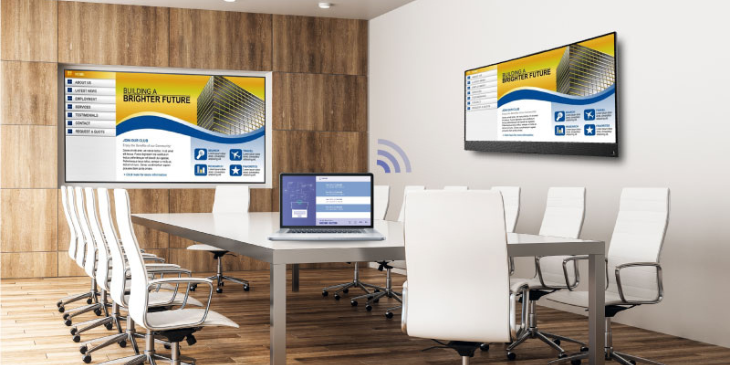
Training sessions, presentations, and live dashboards need to broadcast to screens without hunting for HDMI cables or troubleshooting adapters. Rise Vision's screen sharing feature mirrors a laptop or device to your displays through your browser.
This beats standalone wireless presentation systems because you're not managing separate hardware and software for scheduled content versus live sharing. One platform handles both. Schedule your regular announcements, then override when you need to share something live. Switch back when you're done.
Professional services firms use this for client presentations in conference rooms. Manufacturing operations share live production dashboards or training materials. Healthcare facilities display administrative information during staff meetings. No cables, no compatibility issues.
Google Workspace Integration
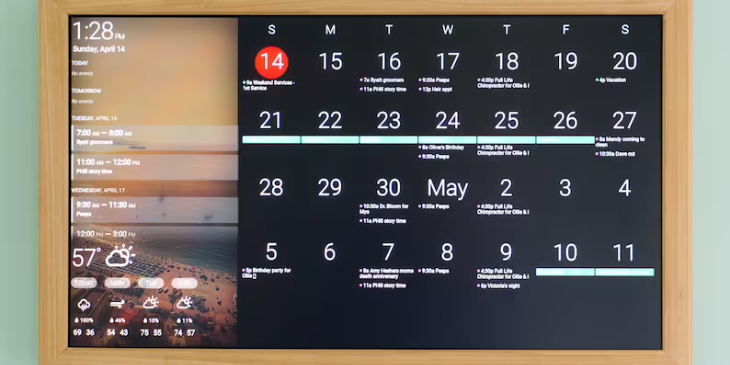
If you're already running on Google Calendar or Google Slides, Rise Vision pulls that information in automatically. Calendar events display on screens without manually copying between systems. Updates sync when someone changes a meeting time, so screens reflect it without you touching anything.
This matters for professional services firms managing client appointments or corporate offices coordinating conference room bookings. The information stays current because it's pulling directly from your existing calendar system, not requiring duplicate data entry. Greg Ashe mentioned it "integrates well with Google Workspace," which helps if your business already runs on that ecosystem.
Pricing That Makes Sense
Enterprise platforms charge based on assumptions that you've got hundreds of screens and unlimited budgets. Small operations running three to ten displays don't need that capacity, so paying for it makes no sense.
Rise Vision's pricing scales with your setup. Three screens? Pay for three. Add more later if you expand. Features like scheduling, remote management, and emergency alerts are built in, not upsells. Blake Cretens called it "affordable and easy to use" and mentioned it "saved us a lot of time" with last-minute updates.
No upfront hardware costs if you're using existing displays. Media players are available if needed, but you're not forced into equipment that only works with one vendor. Craig Knights noted that while "it does seem pricey at first, compared to others, it's a great price and support is responsive."
What Happens When Something Breaks
Customer support is handled by actual people, not chatbots or ticket systems that disappear into the void. Something stops working or you can't figure out a feature? You're talking to someone who can walk you through it. Joe Kulbacki mentioned "excellent tech support." Guy Hait said "customer service and product are top in the industry."
This matters when you don't have IT staff on hand. If a screen goes offline before an important presentation or you need to push an emergency alert and can't remember the steps, you need help immediately, not a response three days later.
Getting Started Without Long-Term Commitments
Rise Vision offers free digital signage covering a single display. Sign up, connect a screen, test the templates, and see if it fits your workflow before committing to anything bigger. If it works, keep using it. If it doesn't, you're not locked into contracts.
Most small businesses start with screens in high-traffic areas: the main office, break room, or entrance. Once staff get used to checking displays for updates instead of hunting through emails, they add more. The system scales as needs grow, so you're not rebuilding everything when you go from three screens to ten.
Digital signage for business works when it's easier than alternatives. If updating a screen takes less effort than printing notices or sending emails nobody reads, people will actually use it. The interface makes it simple enough that non-technical staff can update content and share information without training.
You can test it with one screen, see how staff respond, and decide from there. Most people know pretty quickly whether it solves the problem or just adds another tool to manage.
More From Our Blog
-

Digital Signage Remote Management: How to Run Every Screen From One Place
Digital signage remote management lets you control screens, schedules, and display health from an online platform. To get started, choose a hardware-agnostic platform, connect your media players or[…]
Read More -
ScreenBeam Review 2026: Features, Pricing, and Limitations
ScreenBeam sells wireless display receivers that let people cast to a screen from any device without an app. You need one receiver per display, and they run from $299.99 to $1,199.99. Cloud-based[…]
Read More -

Interactive Touch Screen Digital Signage: How It Works and What You Need
Interactive touch screen digital signage lets viewers tap a display to find what they need. It pairs a commercial touch display with content software. Common uses include wayfinding, visitor[…]
Read More
12,300+ Organizations Trust Rise Vision, You Can Too
































Schedule a Free Demo
You deserve the #1 all-in-one platform for digital signage, screen sharing, and emergency alerts.





