


Speed and accuracy drive logistics operations. Your team needs dock schedules, safety alerts, and shift changes visible now, not buried in an email thread or tacked to a break room bulletin board.
Digital signage puts that information where people actually see it: on screens throughout warehouses, loading docks, and distribution centers. Not every platform handles the specific demands of logistics, though. Plenty were built for corporate lobbies or retail displays, and can't hack it in a busy fulfillment center.
Warehouses and distribution centers have different requirements than offices or schools. Shift workers in logistics operations need quick access to production targets, safety updates, and operational changes. Screens get mounted near loading bays where dust and temperature swings are common. Content updates happen fast because dock schedules change hourly.
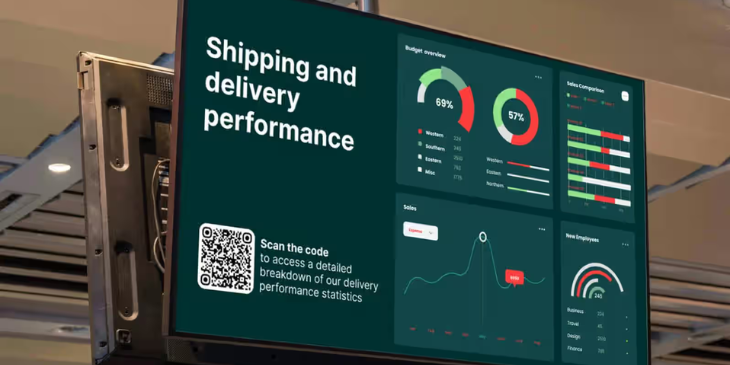
Here's what actually matters: remote management that lets you push content from anywhere, reliability that doesn't crash during shift changes, template libraries that skip the graphic design work, quick content updates you can make in seconds, and hardware flexibility that works with what you already own.
1. Rise Vision
Rise Vision handles warehouse needs without overcomplicating things. Cloud-based management means content updates from any device with internet access. Templates come ready for logistics: shift schedules, production metrics, safety reminders, dock assignments.
Setup is direct. Connect displays to Rise Vision's media players or use compatible hardware you already own. Upload content, schedule what shows on which screens, done. The Google Workspace integration pulls in data from Calendar or Sheets if your team already uses those tools. No manual copying between systems.
Emergency alerts are built in. Safety issue or urgent operational change? Override scheduled content and push alerts to all screens immediately. This matters in logistics environments where delays or hazards need instant communication. The system integrates with Common Alerting Protocol (CAP) providers, so it works with emergency notification systems your facility might already have.
You can send different content to different areas through scheduling and distribution settings. Loading dock screens show shipping schedules, while break room displays show shift rotations and employee recognition.
Tony Blevins has used the system for over a decade to post employee information, calling it "a great way" to handle internal communications at scale. Tracy M, managing office signage, says it's been "a great tool for digital signage across multiple screens."
Best for: Warehouses needing reliable remote management with built-in emergency alerts and Google Workspace integration.
2. ScreenCloud
ScreenCloud is cloud-based and works with existing screens. The interface targets non-technical users. Supports content scheduling and remote management.
The per-screen pricing model can get expensive as you scale to larger deployments. Outfitting a warehouse with dozens of screens? Costs add up. For smaller operations with 5-10 displays, pricing stays reasonable. Larger facilities running 30+ screens across multiple zones might hit budget constraints.
Platform includes apps for social media feeds, dashboards, and custom content. Cloud architecture means you manage everything through a web browser, no on-site servers required.
Best for: Smaller logistics operations with under 15 screens looking for straightforward cloud management.
3. Yodeck
Yodeck markets itself as budget-friendly, running on Raspberry Pi devices to keep hardware costs low. Supports scheduling and content management.
The DIY nature requires some technical comfort for initial setup and ongoing maintenance. Want plug-and-play reliability without hardware configuration? This might not fit. Teams comfortable with Linux and network configuration can get solid value from the lower hardware costs.
Free tier covers one screen, which works for testing or single-location pilot programs. Paid plans scale based on screen count.
Best for: Tech-savvy teams comfortable with DIY setup who want to minimize hardware costs.
4. NoviSign
NoviSign offers content creation tools that work with Android-based media players. Includes scheduling features and content analytics.
Pricing models vary based on features. The analytics dashboard tracks screen performance and content engagement, useful for operations managers tracking which messaging actually gets read by shift workers.
Android player compatibility means flexibility in hardware choices. Most Android TV boxes and sticks work with the platform.
Best for: Operations focused on content analytics and Android-based hardware deployments.
5. OptiSigns
OptiSigns caters to multi-location deployments with scheduling, content workflows, and screen monitoring. More features for complex deployments can mean a steeper learning curve if you're just getting started.
Single-location operations might pay for capabilities they won't use. The platform shines for logistics companies running multiple warehouses or distribution centers who need centralized control across facilities.
Screen health monitoring alerts you to display issues before they become problems. Matters during overnight shifts when IT staff might not be on-site.
Best for: Multi-location logistics operations needing centralized management across facilities.
What to Look For in Logistics Digital Signage Software

The right platform depends on what you're solving for.
Getting shift schedules and safety updates visible to employees who don't sit at desks? You need reliable remote management and quick content updates. Bonus if it integrates with tools your team already uses.
Tracking production KPIs and displaying those numbers in real time? Look for platforms with data integration capabilities. Not all digital signage software pulls from external sources cleanly. Some require manual uploads or additional configuration that adds complexity.
Operations running 24/7 shifts make uptime non-negotiable. Check what kind of support the vendor offers. Screens go down at 2 a.m., and nobody's available to call? That's a problem. Some platforms include device health monitoring that alerts you before hardware fails. Others leave you guessing until someone reports a blank screen.
Hardware compatibility matters if you're not starting from scratch. Some platforms work only with specific media players. Others support standard devices like Android boxes or Chrome devices. Already have screens mounted in your warehouse? Being able to use compatible low-cost players saves budget.
Robert Watts, who deployed digital signage across his business operation, points out that good platforms work for "any small or large-scale digital signage" deployment. Matters if you're starting with a few screens and planning to expand.
Setting Up Digital Signage in a Logistics Facility
Getting the software running is one thing. Making it work for your team takes more.
Placement matters. Screens go where people naturally look: near time clocks, break rooms, loading docks, main aisles. Skip spots where glare or poor angles make content hard to read. Mounting screens in high-traffic areas with forklifts? Keep them out of the danger zone.
Content design keeps it simple. Shift workers don't have time to read paragraphs. Large text, high contrast, minimal information per screen. A dock schedule shows dock numbers, assignments, and times. Nothing else. Safety alerts need to be unmissable: bright colors, bold text, short messages.
Update frequency prevents content from getting ignored. Static content gets tuned out. Rotate between different types of information: schedules, KPIs, safety tips, and employee recognition. Same slide all day? People stop looking. Most platforms let you schedule content rotations automatically.
Testing runs the system for a week or two with non-critical content before relying on it for operational updates. This flushes out connectivity issues, screen placement problems, and content readability concerns. Better to discover a screen's hard to read from 20 feet away during testing than after moving all your schedule postings to digital. Starting with free digital signage keeps costs down while you work out the kinks.
FAQ
What's the difference between cloud-based and on-premise digital signage software?
Cloud-based software runs on the vendor's servers. You access it through a web browser and manage everything remotely. Updates happen automatically, no server maintenance required. On-premise software installs on your own servers. You control the infrastructure but handle updates, security, and maintenance yourself. For most logistics operations, cloud-based makes more sense because you're not adding IT overhead.
Can digital signage software integrate with warehouse management systems?
Some platforms support integrations through APIs or third-party connectors. If your WMS exports data to Google Sheets or has a web-based dashboard, you can often display that information through digital signage. Direct integrations are less common and usually require custom development. Check with the software vendor about specific WMS compatibility before committing.
How many screens can one media player support?
Most media players drive one screen. Need to show the same content on multiple displays in the same area? You can use HDMI splitters to mirror one media player to several screens. Different content on different screens requires separate media players for each display. Some platforms offer multi-screen support from a single player, but it's less common.
Do I need IT staff to manage digital signage software?
Not usually. Most modern platforms target non-technical users. Upload images or videos, set a schedule, and assign content to screens. Initial setup might require someone comfortable with network configuration and device pairing, but day-to-day content management doesn't need IT involvement. Can you use Google Docs or PowerPoint? You can handle most digital signage platforms.
What happens if internet connectivity goes down?
Depends on the platform. Many cloud-based systems cache content locally on the media player. Internet drops, the player continues showing the last scheduled content until connectivity returns. Some platforms revert to a default offline playlist. A few stop working entirely without internet, which is why checking offline capabilities matters for logistics facilities where network interruptions happen.
Can employees submit content to digital signage screens?
Some platforms include content approval workflows where employees submit messages that go to a manager for review before publishing. Works for things like employee recognition or shift swap announcements. Not all software supports this out of the box. Want employee-generated content? Verify the platform handles submission and approval before buying.
How much does digital signage software typically cost for a warehouse?
Pricing varies widely. Some platforms charge per screen per month, with costs that vary based on features and scale. Others use tiered pricing based on total screen count. Don't forget hardware costs: media players range from budget options to several hundred dollars each, depending on capabilities. Screens can be repurposed TVs or commercial displays. For a 10-screen warehouse setup, budget for both monthly software costs and one-time hardware expenses.
Is there a limit to how often I can update content?
Most platforms let you update content as often as needed. Changes push to screens within seconds or minutes, depending on the system's sync schedule. Updating dozens of times per day? Check if the platform has rate limits that might slow things down. For typical logistics use (updating schedules a few times per shift), you won't hit restrictions.
More From Our Blog
-
7 Best ScreenCloud Alternatives in 2026 (+How to Choose)
Quick Summary ScreenCloud does a lot well, especially if you’re an enterprise that cares about integrations and flexible hardware. But at some point, things can feel a bit harder than they should.[…]
Read More -

We Reviewed The 8 Best OptiSigns Alternatives Worth Considering In 2026
Quick Summary OptiSigns is a solid digital signage platform, and for some teams, it may be more than enough. But it is also easy to see why some buyers keep exploring other options. Usually, it is[…]
Read More -
7 Best Plant Floor Communication Tools in 2026: Better Communication for Production and Warehouse Teams
Quick Summary Plant floor communication tools help manufacturers reach workers who do not use email or desk-based collaboration tools during a shift. Rise Vision, Poka, and Beekeeper are among the[…]
Read More
12,300+ Organizations Trust Rise Vision, You Can Too
































Schedule a Free Demo
You deserve the #1 all-in-one platform for digital signage, screen sharing, and emergency alerts.





