

Quick Summary
Digital signage gives your school a smarter way to communicate: real-time safety alerts, event promotion, daily announcements, and more. It's easier to manage than you'd expect, and most schools see a return within 12 to 18 months.
What Digital Signage Can Do for Your School
If you're trying to make the case for digital signage at your school, you probably already have a hunch that it'll make a massive difference. And after working in this industry for over 30 years, believe us when we say—it absolutely does. In fact, most schools see a full payback on their investment within 12 to 18 months, which is the gold standard for a solid tech investment of this size.
In this guide, we'll go over the absolute basics of using digital signage in education. We'll cover exactly what it is, the key benefits you can expect, and some great use cases based on how schools are using the technology every day.
Why Listen to Us?
Education is an important segment we serve at Rise Vision. Over the years, we've partnered with thousands of schools and districts, watching them use digital signage in creative ways. This guide distills that hands-on experience, giving you everything you need to know about launching and scaling digital signage in an educational environment.
What is Digital Signage?
Digital signage is the use of screens/digital displays to share content like videos, images, announcements, live data, menus, dashboards, and alerts instead of relying on printed signs.
You probably see it across campuses every day: the TV in the main hallway showing upcoming game schedules, a display in the teacher's lounge sharing policy updates, or a screen in the front office welcoming visitors.
Digital signage replaces traditional bulletin boards so you can update your screens instantly from your desk. Instead of printing, laminating, and taping up flyers, you can push a new update to one classroom or the entire district in a few clicks.
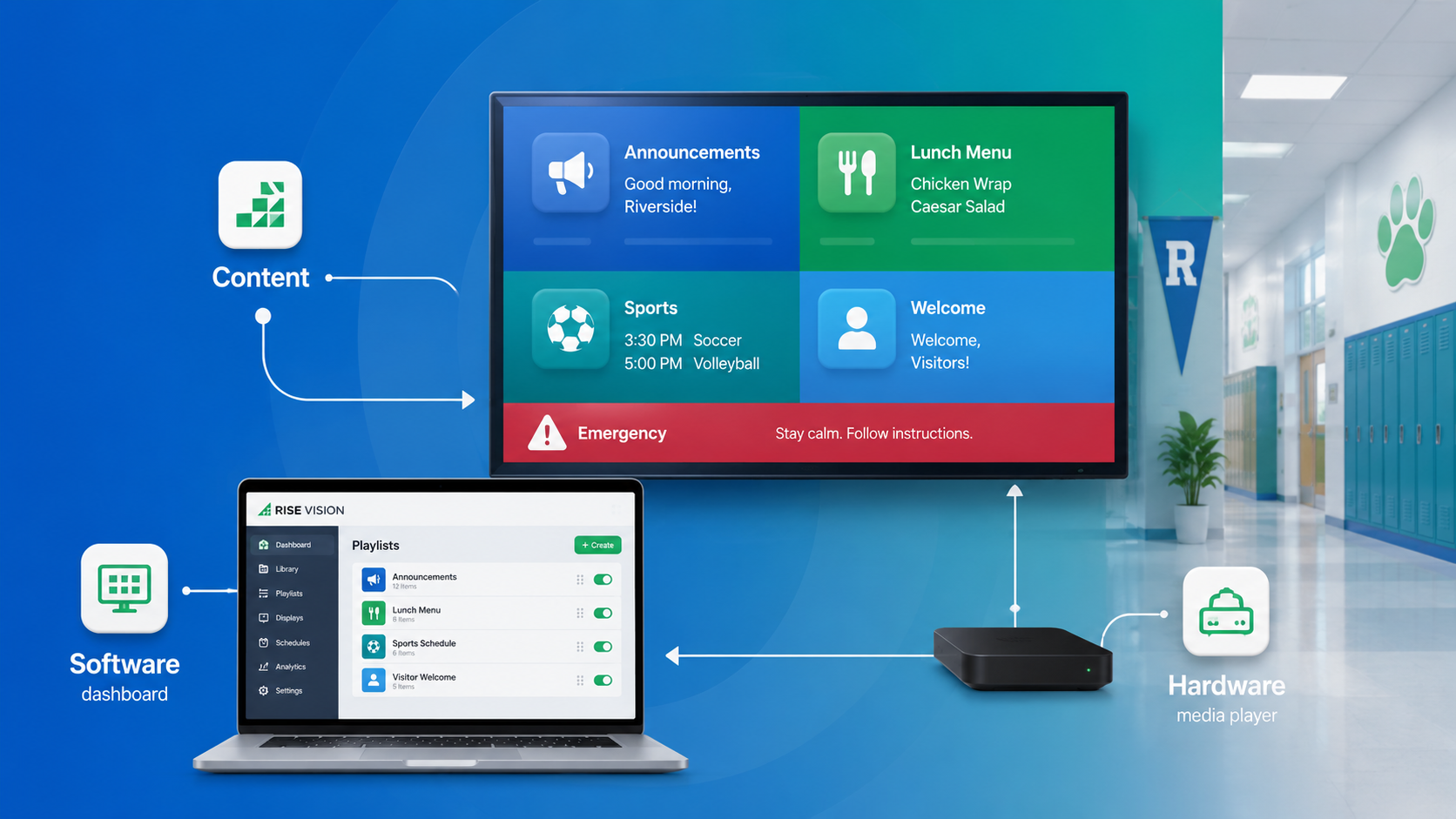
Every setup has three basic parts:
- Your content: The actual media you show, like morning announcements, lunch menus, slide decks, or emergency alerts.
- The software: The dashboard you log into to create, schedule, and send that content to specific screens.
- The hardware: The physical TV or display on the wall, paired with a media player that connects it to the internet.
Benefits of Digital Signage in Educational Environments
There are countless reasons that a school, college, or university may decide to ditch the paper and use digital signage as part of their strategy. Here are the top benefits that come with implementing a digital signage project in an educational setting.
1. Improved Communication
Reaching thousands of students on a daily basis is no easy task for administrators. Unlike static posters that students quickly learn to ignore, digital signage allows educational institutions to leverage dynamic, engaging visuals that capture a younger audience's attention.
As digital natives, modern students expect digital communication. Because they spend the majority of their day on campus, it pays to connect with them through a medium they understand and prefer.
2. Campus Safety
Providing a safe and secure environment in which to study and work in is a top priority for any school or educational institution. Digital signage can easily be integrated with an emergency alert system that immediately communicates emergencies such as weather conditions and school closings. Digital signs can also communicate emergency contact information, emergency plans and safety guides, campus maps, and real time messages about what students should do in a certain situation.
When paired with emergency alerts, digital signage allows schools to take an active role in promoting a safe campus, and is an efficient method to access campus safety resources, giving you peace of mind that you've taken the steps to create a secure campus environment.
3. Increased Event Attendance
Universities and schools are always buzzing with events, and digital signage is a powerful medium to promote these events and provide your audience with useful and timely information they need. From job fairs, to formals, graduations, sports events, concerts, charity functions and other activities, you can use your digital signage to keep students updated and in the loop.
You can also integrate your social media with your digital signage to let students stay in touch with photos and other updates from events. This will do a much better job of drawing attention to campus activities than what's possible with a static sign.
4. Real-Time Updates
With the ability to schedule and update messaging in real time, digital signage is perfect for providing your audience with useful information. Whether its weather or traffic conditions, building closures, planned construction or bus route interruptions, digital signage is a powerful way to get these messages across in a timely manner.
When it comes to campus communication, digital signage is the clear winner. As the most efficient method of spreading a message and streamlining communication, digital signage is essential to any school, college, or university.
Some Amazing Ways Schools Are Using Digital Signage (+ ROI)
1. Sending Emergency Alerts Across the Campus
Emergency communication is one of the most important uses of school digital signage.
While traditional PA systems still have their place, relying entirely on audio is risky. Hallways and cafeterias get incredibly loud, announcements can easily be misheard, and hard-of-hearing students are left completely in the dark. On top of that, when panic sets in during a stressful situation, a spoken instruction can be surprisingly hard to remember.
Digital signage solves this by adding a vital visual layer to your safety plan. When you sync your displays with an emergency notification platform, you can instantly override everyday content to blast clear, step-by-step instructions across specific buildings or the entire campus.
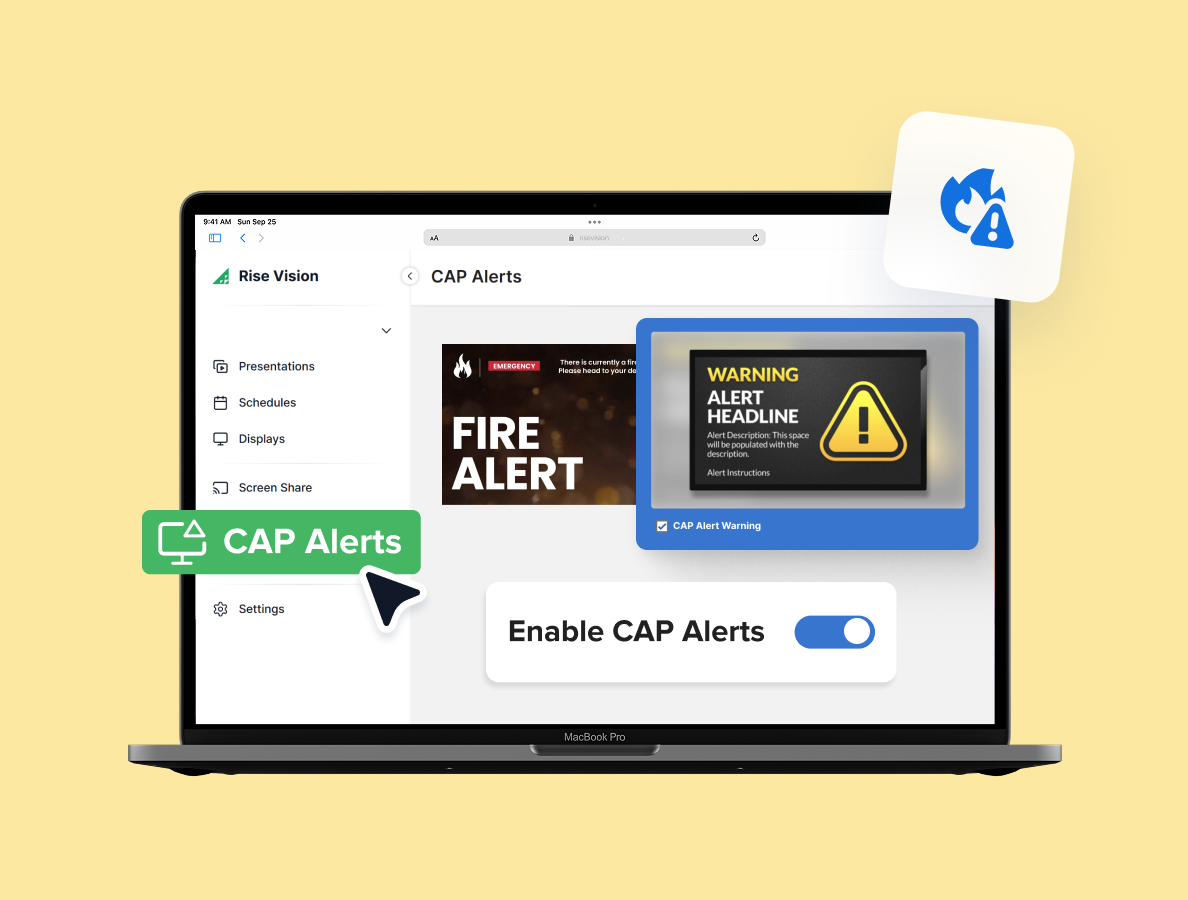
Take Necedah Schools in Wisconsin, for example. They paired Rise Vision with Singlewire InformaCast to streamline their emergency response. Before making the switch, staff had to manually activate the PA system, wait for the tone, and deliver a verbal announcement.
Now, they can trigger simultaneous audio and visual alerts directly from a mobile app. This simple upgrade cut their lockdown response time from a full minute down to just 20 seconds!
Even better, it gave them the ability to target specific zones—meaning they can alert the middle school wing about an incident without causing unnecessary panic for the younger kids on the other side of the campus.
Here are the words of their director of technology:
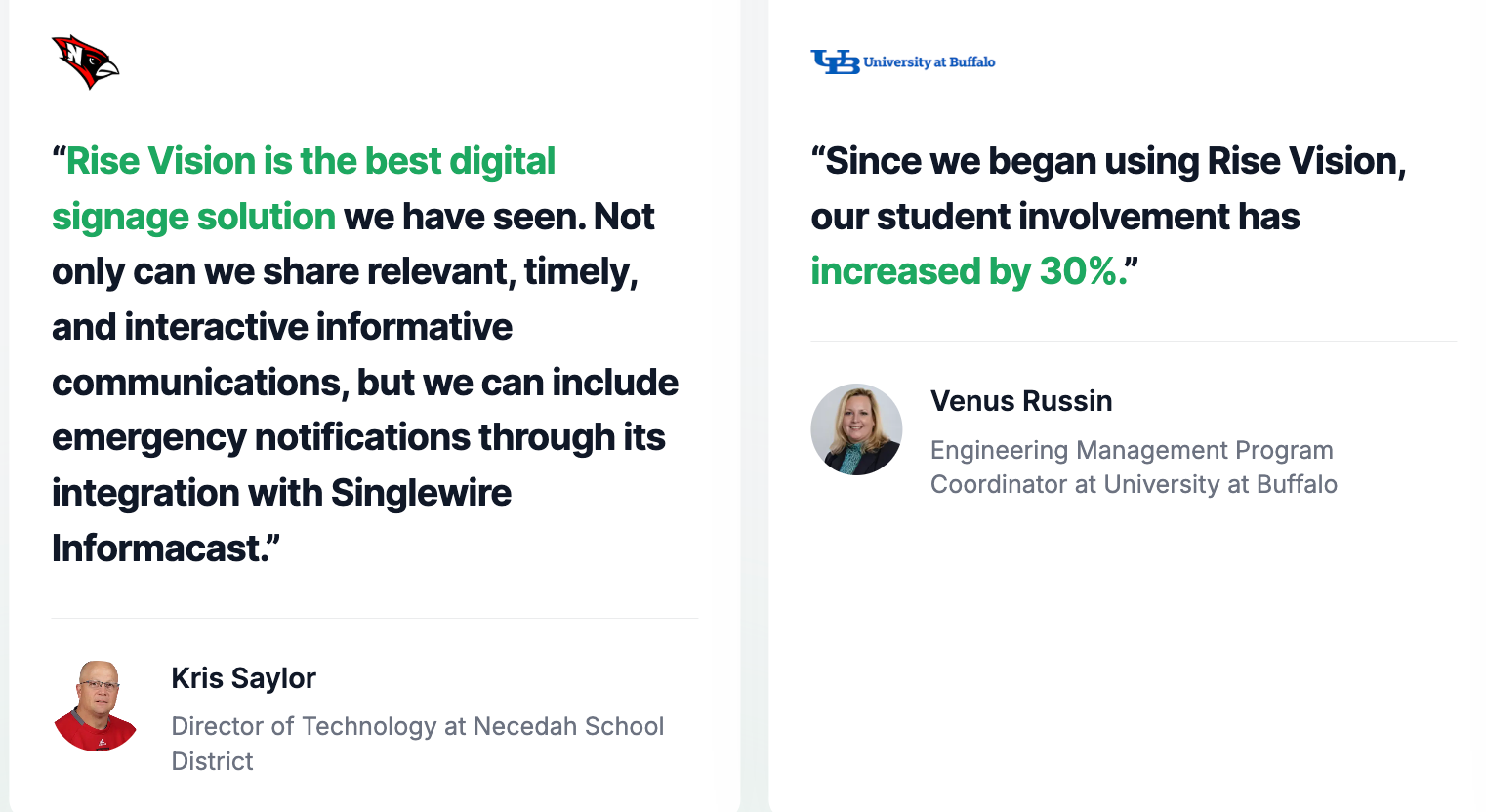
"Rise Vision is the best digital signage solution we have seen. Not only can we share relevant, timely, and interactive informative communications, but we can include emergency notifications through its integration with Singlewire Informacast."
Kris Saylor
Director of Technology at Necedah School District
Streamlining District-Wide Communication
Managing communication gets exponentially harder when you're overseeing dozens of different facilities. The right digital signage setup can help you automate this and scale faster.
For example, one consolidated independent school district in Texas manages Rise Vision across 30+ schools and 24,000+ students. Rather than tasked-out staff building content from scratch at every single campus, the district connects its signage directly to existing workflows.
By syncing the screens with their current district website feeds, Google Slides, social channels, and lunch menus, the content updates itself.
They also established a highly efficient governance model to keep things organized:
- IT Infrastructure: Manages the physical devices and backend network.
- Communications: Oversees branding, design templates, and district-wide announcements.
- Campus Managers: Handle localized, school-specific updates.
- Central Coordinator: Manages user onboarding and frontline troubleshooting.
Striking this balance is super critical. It doesn't make sense to pull IT staff away from technical projects to fix a typo on a school menu. Conversely, giving unrestricted access to everyone on campus compromises security and visual consistency. A tiered structure ensures everyone controls only what falls under their actual expertise.
Involving Students in the Creative Process
Digital signage doesn't just have to be an administrative tool, it can actually be an awesome part of the learning experience.
Case in point — Sarah Scott Middle School. They have nine displays across their campus used for everything from daily announcements and emergency alerts to sports updates and school culture.

But the coolest part happens on Fridays, when the screens host a student-run school news broadcast. It's entirely produced through the school's TV and film production program, giving students hands-on experience as anchors, camera operators, and production crew members covering local news and weather.
On top of that, the school pushes some of these same signage schedules out to their website, email blasts, and social media. This "write once, publish everywhere" approach has been a lifesaver. In fact, the person managing the system estimated it cut the time they used to spend updating the website and messaging parents completely in half.
Boosting Accessibility and Multilingual Support
Visual communication helps schools reach people who may not receive information effectively through a public address announcement.
This became incredibly clear at Saline Middle School when a student with hearing loss missed out on announcements for an upcoming school event. Realizing the gap, the district stepped up and placed visual displays throughout its buildings so deaf and hard-of-hearing students could get the exact same information as their peers.
Having that visual backup is transformative, especially for time-sensitive updates like:
- Emergency instructions and weather closures
- Last-minute schedule or room changes
- Bus and transportation updates
- Daily announcements and event reminders
Beyond accessibility, digital signage is a fantastic tool for connecting with multilingual families. Lindbergh Elementary is a great example here. They serve a diverse community where families speak Spanish, Nepali, and several other languages at home. By utilizing their displays and connected newsletters, the school can easily share critical updates in the families' native languages, making everyone feel included and informed.
Streamlining Wayfinding and Visitor Communication
Navigating school and college campuses is hard enough for seasoned students, let alone freshmen, substitute teachers, visiting parents, or guests arriving for an event.
To fix this, the University of Kansas set up displays at high-traffic hubs throughout its business school to stream clear directions, event schedules, and building info right where people need it most.
Miami Country Day School uses a similar approach to manage their sprawling campus, which is split into lower, middle, and upper school divisions. By placing outdoor displays and screens right in the pickup zones, they can easily grab the attention of parents and visitors the second they step onto the property.
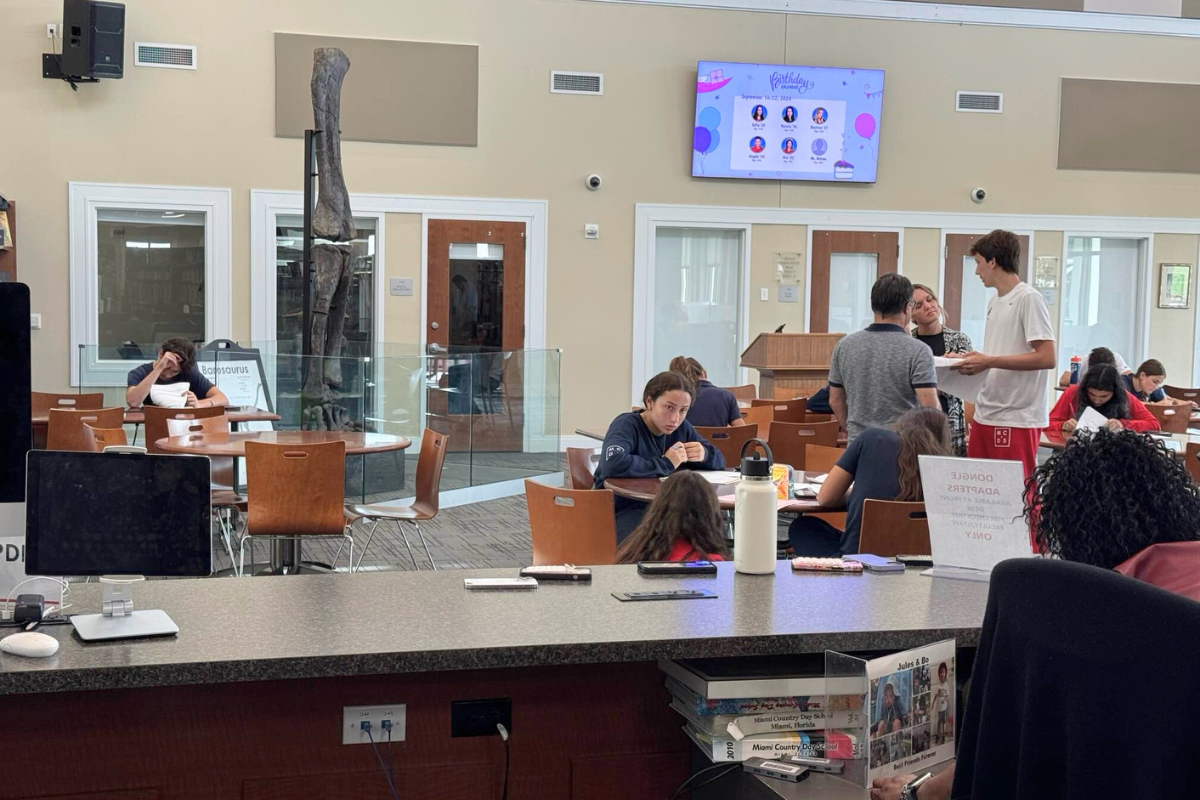
When it comes to digital wayfinding, you can use your screens to show:
- Building directories and room numbers
- Event locations and temporary room changes
- Accessible routes for those who need them
- Drop-off, pick-up, and visitor check-in instructions
- Custom maps for open houses, game days, and graduation
While interactive touchscreens are great, you don't necessarily need to drop a ton of cash on them to make a difference. Most schools can solve their navigation headaches using standard screens with smart scheduling. For instance, a lobby screen can show basic daily announcements during school hours, and then automatically flip to a welcome map and directions right before a parent-teacher conference or theater performance begins.
Launch Your School's Digital Signage Program with Rise Vision
If you've been building the board case for digital signage, you've seen what it can do. Rise Vision is built for schools running on limited budgets and small IT teams, and most get up and running in under a day with 750+ ready-to-use templates.
You can book a demo and we'll show you what a digital signage program looks like for a school your size. Or start with a free 14-day trial. If you decide to subscribe and it's not the right fit, you're covered by a 30-day money-back guarantee.
More From Our Blog
-
ScreenCloud Digital Signage Software Review: Features, Pricing, Pros and Cons
Best for: Organizations that want a polished digital signage platform with a broad app library, strong security, and flexible content management. Standout features: 80+ apps and integrations, SOC 2[…]
Read More -

Avocor Displays Review: Every Series Compared
Avocor makes commercial displays across more than a dozen series. For classrooms, you'll want the S, A, or E50 Series, and for meeting rooms, the G or H Series. The E92 and L Series are ultra-wide,[…]
Read More -

We Reviewed the 5 Best Industrial Digital Signage Players for 2026
We reviewed five digital signage players that can handle different industrial environments, from standard break rooms and production floors to areas exposed to extreme temperatures.
Read More
12,300+ Organizations Trust Rise Vision, You Can Too
































Schedule a Free Demo
You deserve the #1 all-in-one platform for digital signage, screen sharing, and emergency alerts.





